
LinkedIn In-Network vs Out-of-Network Reach: What the New Metric Means And How to Use It
- LinkedIn Strategy
Published 9 June 2026•Updated 25 September 2026•By Rob Illidge
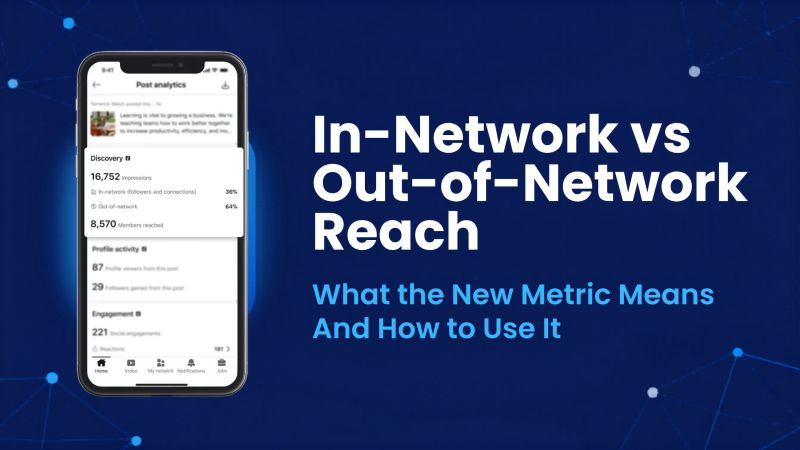
LinkedIn has started showing creators exactly where their reach comes from. As of early June 2026, your post analytics now split impressions into two groups: people already in your network, and people who are not. It is a small interface change with a big strategic message, because the second number is the one that quietly decides whether your audience grows or stays the same.
Here is the short version. In-network reach is the share of your impressions that came from your existing followers and connections. Out-of-network reach is the share that came from everyone else: people who found you through feed recommendations, reshares, and search. If you care about growth, personal branding, or proving that employee advocacy actually works, out-of-network reach is now the clearest signal you have.
Key takeaways
- LinkedIn now breaks post reach into in-network and out-of-network percentages, shown in the discovery section under impressions.
- In-network reach measures how well content resonates with the audience you already have. Out-of-network reach measures how far it travels to new people.
- Out-of-network reach is the better proxy for audience growth, brand awareness, and advocacy performance.
- The update arrives alongside a refreshed, more compact format for document posts, which remain one of LinkedIn's highest-engagement formats.
- You can act on this immediately by tracking the split over time and doubling down on the content that consistently reaches beyond your own network.
What changed in LinkedIn post analytics
LinkedIn's director of creator products, Sam Corrao Clanon, confirmed the rollout in a public post on LinkedIn, and it was first reported by Social Media Today. As the feature ramps up globally, creators will see a percentage breakdown inside their post analytics that shows who saw a given post, grouped by whether or not those viewers already followed or connected with them.
You will find it in the discovery section of your post analytics, sitting under your impressions count. Rather than a single reach figure, you now get the story behind that figure: how much of it stayed inside your circle, and how much spilled outside it.
What is in-network reach on LinkedIn?
In-network reach is the percentage of your post's impressions that came from people who already follow you or are connected to you. These are the people who chose to see your content. When in-network reach is high and engagement is strong, it tells you the post landed well with the audience you have built. It is a measure of resonance and loyalty.
A post that performs almost entirely in-network is not a failure. Deep engagement from your core audience builds trust, keeps you top of mind, and often seeds the early activity that the algorithm needs before it decides whether to push a post further.
What is out-of-network reach on LinkedIn?
Out-of-network reach is the percentage of your reach that came from people who were not following or connected to you at the time. According to Corrao Clanon, these viewers discover you through distribution surfaces such as feed recommendations, reshares, and search.
In plain terms, out-of-network reach is LinkedIn telling you, "this post escaped your bubble." It is the closest thing the platform gives you to a built-in audience growth metric, because every out-of-network impression is a chance to win a new follower, a new connection, or a new customer.
Why out-of-network reach is the metric that matters most
For years, LinkedIn reporting forced everyone to treat reach as a single lump sum. That hid the most important distinction in content strategy: the difference between talking to the same people again and reaching someone new.
The reason the split matters comes down to how the LinkedIn feed works. The algorithm rewards content that earns early engagement and then keeps performing when shown to people beyond the author's network. Posts that travel out-of-network are, by definition, the posts the algorithm decided were worth recommending to strangers. Tracking that percentage tells you which topics, hooks, and formats have genuine pull, rather than which ones simply please the audience you already have. For the full picture, see our guide to how the LinkedIn algorithm works in 2026.
This is also why the metric is so valuable for two specific goals.
What it means for employee advocacy
The entire point of employee advocacy is to reach audiences a single company page never could. When ten, fifty, or five hundred employees post, the prize is not just more impressions, it is impressions in front of new, relevant people: their networks, and the networks beyond those.
Until now, that promise was hard to prove. Out-of-network reach changes that. An advocacy programme that is working will show meaningful out-of-network percentages across its advocates, which is concrete evidence that employee content is expanding the company's audience rather than recycling it. If you manage advocates across an organisation, this is the number to put in front of your leadership. Tools that pull this data across a whole team, like Vulse's multiple account manager and automated content reports, make it possible to monitor reach quality at scale instead of one profile at a time.
What it means for personal branding
If you are building a personal brand, follower growth is the long game, and out-of-network reach is the leading indicator. A profile that consistently reaches outside its own network is a profile that is compounding. One that does not is, at best, holding steady.
The practical move is to compare your two numbers across many posts and learn your own pattern. Some content will deepen relationships with your existing audience. Other content will introduce you to new people. The best creators do both on purpose, and they use live LinkedIn post analytics to know which is which. This new breakdown builds neatly on top of LinkedIn's earlier post performance alerts, giving you a fuller picture of how each post shapes your professional presence.
How to increase your out-of-network reach
You cannot control the algorithm, but you can give it more of what it rewards. Based on how out-of-network distribution works, here is where to focus.
- Lead with a hook that works without context. Out-of-network viewers do not know you. The first two lines have to earn the click on their own, with no assumption of prior trust.
- Write for shareability. Reshares are a primary out-of-network surface. Strong opinions, useful frameworks, and genuinely surprising data get shared. Vague updates do not.
- Use formats that travel. Document posts and carousels continue to perform strongly for engagement and dwell time, which helps content qualify for wider distribution.
- Make it search-friendly. Search is now an explicit out-of-network surface. Use the words your audience actually searches for, in your hook and throughout the post, rather than only insider jargon.
- Post consistently. A steady cadence gives the algorithm more chances to find your breakout posts. A reliable LinkedIn post scheduler and an tone-matched post generator remove the friction that usually kills consistency.
The document posts change, briefly
Alongside the analytics update, LinkedIn refreshed how document posts appear in the feed, presenting them in a more compact, streamlined carousel format. It is a minor visual change, but a relevant one given that research has found document posts generate the highest engagement of any LinkedIn content type. A cleaner in-feed display could affect how often people stop, swipe, and engage, so it is worth watching your own document post performance over the coming weeks.
How to track the in-network split over time
A single post's breakdown is interesting. The trend across dozens of posts is where the strategy lives. The goal is to spot which themes reliably push you out-of-network, then build more content around them while still feeding your core audience the in-depth material that keeps them engaged. Vulse's live LinkedIn analytics track post performance across your whole team, so those patterns are easy to spot.
This is exactly the kind of analysis that is painful to do by hand and easy to do with the right reporting. If you run content for a team, especially in a sector where consistency and compliance both matter, a purpose-built LinkedIn content tool for professional services turns the raw numbers into a weekly view of what to do next.
LinkedIn Out of Network: What It Means for Profiles and Search Results
Reach is not the only place LinkedIn users run into the phrase. "Out of network" also describes members profiles that sit beyond your 3rd-degree connections, and the two meanings are worth separating because they behave very differently.
When a person is out of your LinkedIn network, their profile can show with limited visibility: in some cases search results display "LinkedIn Member" instead of a name and title, and you cannot open the complete profile or send a message. This is not an error to resolve; it is how LinkedIn's visibility settings work for members outside your network. The same profile may be fully visible to someone else whose network overlaps with that person.
If you need access to an out-of-network profile, you have a few options. Joining the same group as the person makes their full profile visible, since group members are treated as part of your extended network. A connection request, where LinkedIn offers one, is the most direct route, and sending an InMail is the answer where it does not; upgrading to Premium or Sales Navigator unlocks more profiles and open InMail credits. A quick check on Google for the person's name plus "LinkedIn" will often surface a public profile link that shows more than the logged-in view, and an email introduction is sometimes the most effective action of all.
One thing to remember: if out-of-network results fail to load or a profile that used to be visible suddenly is not, the usual explanation is that the member tightened their visibility settings rather than anything on your side. The fix is to connect, not to troubleshoot.
How to Grow Your LinkedIn Network for More Valuable Connections
The wider and more relevant your LinkedIn network, the fewer profiles sit out of reach, and the more of the platform's members can see and share your posts in the first place. Growing it deliberately is one of the highest-leverage things you can do for out-of-network reach, because every new connection brings their own network within one degree of your content.
Keep your own profile complete and open: a clear headline, a real photo and a public profile make people far more likely to accept your request. Send connection requests with a short personal note that explains the idea behind the outreach, and prioritise valuable connections in your industry over volume for its own sake. Engaging in groups, commenting on posts from people you want to know, and posting consistently all trigger the visibility that makes others send requests to you, which compounds the effect without any extra effort. Your organisation's page matters too, and our guide to how to create a LinkedIn Company Page covers setting one up well.
Frequently asked questions
What is the difference between in-network and out-of-network reach on LinkedIn?
In-network reach is the share of impressions from people who already follow or are connected to you. Out-of-network reach is the share from people who are not, who found your content through feed recommendations, reshares, or search.
Where do I find out-of-network reach in LinkedIn analytics?
It appears as a percentage breakdown in the discovery section of your post analytics, located under your impressions, as the feature rolls out globally through 2026.
Is out-of-network reach good or bad?
High out-of-network reach is generally a positive growth signal, because it means your content is reaching new people. In-network reach is not bad, though. It reflects how strongly your existing audience engages. Healthy accounts pay attention to both.
Why does out-of-network reach matter for employee advocacy?
Because expanding the company's audience is the entire goal of advocacy. Out-of-network reach gives advocacy managers direct evidence that employee posts are reaching new, relevant people rather than recirculating among the same connections.
How can I increase my out-of-network reach on LinkedIn?
Lead with a strong standalone hook, write content people want to reshare, use high-engagement formats like documents, include the terms your audience searches for, and post consistently so the algorithm has more chances to recommend your best work.
Why do some profiles show as "LinkedIn Member" instead of a name?
Those profiles are out of your network and their owners have restricted visibility to their own network only. Connect with people in their orbit, join a shared group, or use Premium tools to see the full listed profile.
Want to see exactly how far your team's LinkedIn content travels, and turn that into a report your leadership understands? See how Vulse works.