Vulse ArtVulse Art
Home/Linkedin Strategy

The AI Revolution: Highlights From LinkedIn's Future Of Work Report

  • LinkedIn Strategy
blog-image

If you haven't already noticed, AI is having a significant impact on the way we work.


LinkedIn's latest “Future of Work Report” looks at how AI advancements are changing job roles, skills, and industry dynamics.


The report, using data from LinkedIn's professional network, highlights three key areas:


AI Conversations


AI's integration into our daily lives is clear, with LinkedIn witnessing a 70% increase in AI-related conversations. This surge is significant and reflects a notable shift in how professionals perceive AI, with a majority expressing optimism about its role in career development.


AI's Impact Across Demographics


The report highlights that AI is not just a tech-industry phenomenon. It's a cross-generational, cross-gender wave affecting various educational backgrounds. Notably, professionals with advanced degrees, Gen Z, and women are likely to see the most significant changes in their job roles due to AI.


LinkedIn's AI-Enhanced Tools and Services


LinkedIn is at the forefront, developing AI content tools like 'Recruiter 2024' and AI-powered insights for Premium subscribers. These innovations aim to streamline job seeking, recruiting, and business networking, aligning with the evolving needs of the global workforce.


The report highlights AI's transformative potential across industries, reshaping jobs from traditional definitions to skill and task-based roles. As we pivot into this new era, it's crucial for professionals and businesses to embrace AI literacy and adapt to the changing skill sets required in the AI-augmented workplace.


At Vulse, we understand the importance of staying ahead in the rapidly evolving content world. This report from LinkedIn offers valuable insights for professionals and businesses looking to navigate the AI revolution successfully. 


Stay connected for more updates and in-depth analyses from our content team.

Vulse ArtVulse ArtVulse Art
Vulse Art

You May also be interested in

  • blog img

    LinkedIn Crosscheck: Test AI Models for Free Inside LinkedIn

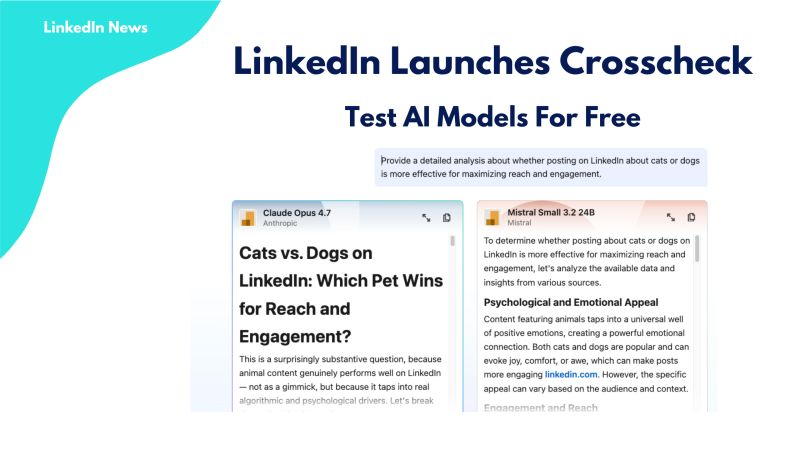
    LinkedIn has launched a feature that lets Premium subscribers compare AI models from OpenAI, Anthropic, Google, Microsoft and others, side by side, without paying for separate subscriptions or hitting token limits. The feature is called Crosscheck, and it is rolling out now to LinkedIn Premium subscribers in the United States, with broader availability planned for additional countries and free users. How LinkedIn Crosscheck Works Crosscheck is described by LinkedIn's Chief Product Officer Hari Srinivasan as a "blind taste test" for AI models. The experience works like this: You enter a text prompt LinkedIn returns two answers, each generated by a different AI model You choose which answer you prefer Only after making your selection does LinkedIn reveal which models produced each response The feature already supports a wide range of models. Early testing has returned responses from Anthropic, Google, MoonshotAI, Mistral, and Amazon, with more expected to be added. Crosscheck also has its own leaderboard tracking how professionals across different industries rate the various models against each other. What Crosscheck Does and Does Not Support Crosscheck is currently text-only. You cannot generate images, upload files, or access the more advanced capabilities available directly on each AI platform's native interface. What you do get is unlimited text-based conversations with no token limits, and no requirement to sign up for additional paid subscriptions to access models you want to try. On data sharing: LinkedIn states that anonymised usage data is shared with the AI model providers to help them understand performance across different professional roles and industries. According to LinkedIn's own documentation, no personally identifiable information is passed to model builders. Why This Matters for B2B Content and Advocacy Teams For marketing, content, and employee advocacy teams already working inside LinkedIn, Crosscheck removes a meaningful barrier. Testing whether Claude, Gemini, or GPT-4o produces better output for a specific use case, such as a thought leadership post, a comment response, or a newsletter section, has historically required maintaining multiple subscriptions and switching between platforms. Crosscheck consolidates that comparison inside a platform your team is already using every day. A few practical implications worth considering: For content quality benchmarking. If your team uses AI to support LinkedIn post drafting or employee content kits, Crosscheck gives you a fast, free way to identify which model produces output that resonates with your specific audience and industry vertical. For employee advocates. Employees who are less familiar with AI tools now have a low-friction way to experiment with AI assistance directly inside LinkedIn, without needing separate accounts or training on new platforms. For advocacy programme managers. The Crosscheck leaderboard, broken down by industry, could become a useful proxy for understanding which AI models are gaining traction among your target audience, informing both content strategy and tool selection. What to Watch Crosscheck is currently an early-stage product from LinkedIn Labs, and Srinivasan has acknowledged there is work to do on speed, model range, and supported prompt types. It is also US-only for LinkedIn Premium users at launch, which limits immediate access for UK and European teams. That said, LinkedIn's track record of rolling features out globally after US pilots, combined with the stated intention to extend access to free users, suggests Crosscheck will reach wider audiences within months rather than years. The Bigger Picture for LinkedIn Content Strategy LinkedIn's move to embed AI model comparison directly into the platform is part of a broader pattern. Over the past 18 months, LinkedIn has introduced AI writing assistance, AI-powered post suggestions, and now a structured way to evaluate models against each other, all within the interface where B2B professionals are already spending time. For teams running employee advocacy programmes, this trajectory reinforces a simple strategic point: LinkedIn is becoming a content production and evaluation environment, not just a distribution channel. The tools employees need to create, refine, and share professional content are converging in one place. If your team is not yet building a structured approach to LinkedIn content and employee advocacy, the platform's own investment in AI tooling is accelerating the gap between organisations that are and organisations that are not. Frequently Asked Questions What is LinkedIn Crosscheck? LinkedIn Crosscheck is a feature from LinkedIn Labs that lets Premium subscribers compare responses from different AI models side by side using a blind test format. You enter a prompt, receive two anonymous answers from different models, choose the one you prefer, and then LinkedIn reveals which models produced each response. Which AI models does LinkedIn Crosscheck include? At launch, Crosscheck includes models from Anthropic, Google, MoonshotAI, Mistral, and Amazon, with more expected to be added. LinkedIn has confirmed it plans to expand the model range as the feature develops. Is LinkedIn Crosscheck free to use? Crosscheck is currently available at no additional cost to LinkedIn Premium subscribers in the United States. LinkedIn has stated it plans to extend access to free users and additional countries, though no confirmed timeline has been given. Does LinkedIn Crosscheck share my data with AI companies? Yes. According to LinkedIn's documentation, anonymised usage data is shared with AI model providers to help them understand how their models perform across different professional roles and industries. LinkedIn states that no personally identifiable information is shared with model builders. Can I use LinkedIn Crosscheck to generate images or upload files? No. Crosscheck currently supports text-based prompts only. Image generation, file uploads, and the more advanced tools available natively on each AI platform are not supported within Crosscheck. Is there a limit on how many prompts I can send in LinkedIn Crosscheck? No. LinkedIn has confirmed there are no token limits or usage caps on text-based conversations within Crosscheck, which is one of its main advantages over testing models through their native platforms on free or limited tiers. How can employee advocacy teams use LinkedIn Crosscheck? Advocacy teams can use Crosscheck to benchmark which AI models produce the best output for specific LinkedIn use cases, such as thought leadership posts, comment responses, or newsletter sections. It is also a useful onboarding tool for employee advocates who are new to AI writing assistance, as it removes the need to sign up for separate platforms. Where can I access LinkedIn Crosscheck? Crosscheck is available through LinkedIn Labs for LinkedIn Premium subscribers in the United States.

    Loading

    LinkedIn Crosscheck: Test AI Models for Free Inside LinkedIn

    by - Rob Illidge -

  • blog img

    LinkedIn Content Benchmarks 2026: Which Post Format Drives Most Engagement

    If you are still guessing which LinkedIn content format to prioritise, new benchmark data from 1.3 million posts makes the answer clear: native document posts (uploaded PDFs displayed as carousels) generate the highest engagement rate of any content type on the platform at 7.00%, followed by multi-image posts at 6.45% and video at 6.00%. This matters because LinkedIn's overall engagement rate has actually increased 8% year-over-year to an average of 5.20%, even as organic reach continues to decline. The platform is rewarding depth and substance over volume, and the formats that keep people on the page longest are winning. This guide breaks down the latest Socialinsider 2026 LinkedIn Benchmarks data, explains what it means for your content strategy, and shows how employee advocacy programmes can use these insights to maximise performance. Document Posts Now Outperform Every Other LinkedIn Format The biggest finding from the Socialinsider study is that native document posts have overtaken all other content types for engagement. As Social Media Today reported, this is a significant departure from other social platforms where short-form video dominates. Here is how each format performed based on average engagement rate by impressions in 2025: Native documents: 7.00% (up 14% year-over-year) Multi-image posts: 6.45% Video: 6.00% (up 7% YoY) Image: 5.30% (up 9% YoY) Text: 4.50% (up 12% YoY) Poll: 4.20% Link: 3.25% The year-over-year trend is notable. Engagement grew across every content format except polls and links. Document posts saw the largest increase at 14%, but even simple text posts climbed 12%. LinkedIn users are engaging more across the board. Julia Holmqvist, Social Media Manager at Semrush, explained the document trend well in the Socialinsider report: documents perform because they deliver downloadable, practical value like frameworks, templates, and checklists in a format that is easy to scan and save for later. This aligns with what LinkedIn's own algorithm now rewards: dwell time. Document carousels require swiping through multiple slides, which keeps users on the post longer than almost any other format. That extended attention signals quality to the algorithm and triggers broader distribution. Multi-Image Posts Drive the Most Likes While documents lead on overall engagement rate, the data shows a different winner for likes specifically: multi-image posts generate the most likes across every page size. For pages with 100K to 1M followers, multi-image posts average 180 likes per post compared to 155 for video and 30 for native documents. The pattern holds for smaller pages too, though at lower absolute numbers. This creates a useful strategic distinction. If your goal is overall engagement (comments, shares, saves, clicks), prioritise documents. If your immediate goal is social proof through visible like counts, multi-image posts are your best option. For employee advocacy content, this distinction matters. Employees sharing document carousels will generate deeper engagement that drives profile visits and conversations. Employees sharing multi-image posts will generate higher visible reaction counts that build credibility in the feed. Both have a place in a well-rounded advocacy programme. Video Views Are Declining Despite More Video Being Posted One of the most counterintuitive findings in the data is that LinkedIn video views dropped 36% year-over-year across all page sizes, even as brands doubled their video posting frequency from 2 to 4 posts per month. The decline is consistent across every audience tier. Pages with 10K to 50K followers saw average video views drop from 1,000 to Even the largest pages (100K to 1M followers) saw views fall from 2,430 to 1,This does not mean video is dead on LinkedIn. Video still generates a 6.00% engagement rate, which is above the platform average. But it does suggest that the market is saturated with video content, and the returns are diminishing as more brands compete for attention in the same format. The Socialinsider report includes a useful insight from Semrush's social team: LinkedIn is not a video-first platform the way TikTok or Instagram are. Users do not open LinkedIn to scroll through video feeds. They come for professional knowledge sharing, and the formats built for that purpose (documents, text, images) are outperforming video on the metrics that matter. For employee advocacy, this reinforces the case for document carousels and well-crafted text posts over video. Most employees are more comfortable creating a PDF or writing a text post than recording and editing video, and the data shows those formats perform just as well or better. Impressions Vary Dramatically by Page Size and Format The benchmark data reveals how much content performance depends on audience size. The right format for a page with 5,000 followers is not the same as the right format for a page with 100,For pages with under 50K followers, multi-image posts consistently generate the most impressions per post. A page with 10K to 50K followers averages 1,850 impressions per multi-image post compared to 1,420 for video and 1,150 for native documents. For pages with over 50K followers, polls become the highest-impression format. Pages with 100K to 1M followers average 9,797 impressions per poll compared to 3,867 for multi-image posts. This is a significant finding for employee advocacy. Most employee LinkedIn profiles have follower counts in the low thousands, which means the multi-image and document formats are their best options for maximising both reach and engagement. Polls may work well for executive profiles with larger followings but are less effective for the broader employee base. Posting Frequency Is Increasing Across Visual Formats Brands are posting more on LinkedIn, particularly in visual formats. Image posts increased from an average of 5 to 7 per month. Video doubled from 2 to 4 per month. Native document posts rose from 1 to 2 per month. This increase in posting frequency aligns with Buffer's finding that top-performing LinkedIn accounts post more frequently and more consistently than the median account. The "no-post penalty" is real: accounts that skip a week consistently underperform their own baseline growth rate. For employee advocacy programmes, the practical takeaway is straightforward. Encourage employees to post at least 2 to 3 times per week. Provide them with a mix of content formats, particularly documents and multi-image posts. And make the content creation process as frictionless as possible so consistency does not feel like a burden. Our employee advocacy training guide covers how to build posting habits that sustain momentum without burning employees out. Audience Growth Is Slowing, Especially for Large Pages LinkedIn follower growth rates declined across every page size in Pages with 1K to 5K followers still saw a respectable 24.5% average growth rate, but pages with 100K to 1M followers saw growth slow sharply to just 6.4%, down from 21.6% the previous year. This slowdown has a direct strategic implication: growing an audience through your company page alone is increasingly difficult. The brands that maintain healthy growth rates are those that supplement company page content with employee-driven distribution. Our analysis of 400 million LinkedIn impressions found that employee posts generate 14 times more engagement than company page content. When audience growth on your company page stalls, activating employee voices is the most effective lever available. Employee networks are roughly 12 times larger than company follower bases, and the LinkedIn algorithm allocates approximately 65% of feed real estate to personal profiles versus just 5% for company pages. What This Means for Your LinkedIn Strategy in 2026 The Socialinsider data points to a clear set of priorities for marketing teams. Lead with documents and carousels. They generate the highest engagement rate and align with what LinkedIn's algorithm rewards: dwell time and substantive content. Invest in creating original frameworks, research summaries, checklists, and guides in PDF format. Use multi-image posts for visibility and social proof. When you need likes and impressions rather than deep engagement, multi-image posts are consistently the top performer across page sizes under 50K followers. Be strategic with video. Video still works on LinkedIn, but the declining returns mean it should complement your strategy rather than dominate it. Use video for content that genuinely benefits from the format, like executive interviews, behind-the-scenes footage, or product demonstrations, rather than defaulting to video for everything. Post consistently. Frequency matters. The data shows brands are increasing output across visual formats, and top performers post more often and more consistently than average accounts. Aim for at least 2 to 3 posts per week per employee in your advocacy programme. Invest in employee advocacy. With company page growth slowing and the algorithm favouring personal profiles, employee-driven content is the highest-leverage organic strategy available. Equip your team with document templates, multi-image assets, and clear guidelines. For practical guidance on getting started, see our employee advocacy buyer's guide. Personalise everything. The algorithm penalises mass-identical resharing. When employees share content from your advocacy programme, even a single line of personal commentary transforms a templated share into authentic content that performs dramatically better. Frequently Asked Questions What is the best content format on LinkedIn in 2026? Native document posts (uploaded PDFs displayed as carousels) generate the highest average engagement rate at 7.00%, according to Socialinsider's analysis of 1.3 million LinkedIn posts. Multi-image posts follow at 6.45%, and video at 6.00%. What is a good engagement rate on LinkedIn? LinkedIn's overall average engagement rate by impressions is 5.20% in Content above this threshold is performing better than typical. Native documents average 7.00%, making them the format most likely to exceed the benchmark. Are LinkedIn video views declining? Yes. Average video views dropped 36% year-over-year across all page sizes, even as brands doubled their video posting frequency. Video still generates above-average engagement rates, but the returns are diminishing as more content competes in the format. How often should a company post on LinkedIn? Benchmark data shows brands are increasing their posting frequency, particularly for images (7 per month) and video (4 per month). Top-performing accounts post more frequently and consistently than the median. For employee advocacy, aim for 2 to 3 posts per week per advocate. Why is LinkedIn audience growth slowing? Follower growth rates declined across all page sizes in Pages with 100Kfollowers saw the sharpest slowdown, from 21.6% to 6.4% average growth. The brands maintaining growth are those supplementing company page content with employee-driven distribution through advocacy programmes. Do document posts work for employee advocacy? Yes. Documents are an ideal format for employee advocacy because they showcase expertise through practical resources like frameworks, checklists, and research summaries. They generate the highest engagement rate on the platform and align with what LinkedIn's algorithm rewards: dwell time and substantive content. Ready to equip your team with the content formats that actually work on LinkedIn? Vulse helps marketing teams create, distribute, and measure employee content that drives real engagement. Start your free trial or book a demo to see how it works.

    Loading

    LinkedIn Content Benchmarks 2026: Which Post Format Drives Most Engagement

    by - Rob Illidge -

  • blog img

    How To Use LinkedIn Articles And Newsletters To Scale Employee Thought Leadership

    In this exclusive guide, we'll show you how B2B marketing and HR teams can use LinkedIn long-form content, specifically Articles and Newsletters, to build scalable employee thought leadership that drives trust, discoverability, and pipeline signals.Purpose: Practical steps to launch and scale employee-written LinkedIn Articles and Newsletters.Outcome: Increased discoverability, shareable assets, and repeatable workflows for employee advocates.Who this helps: Marketing managers, internal comms, and HR teams running employee advocacy programs.Why long-form content matters for employee personal brandsShort posts amplify reach, but Articles and Newsletters create lasting assets.They index on LinkedIn and search engines, demonstrate expertise, and give employees a reusable content hub for speaking, sales enablement, and recruiting.LinkedIn’s own guidance on newsletters and articles shows they help authors build a subscriber base and extend reach beyond a single post. See LinkedIn’s help center for how LinkedIn newsletters work.Three reasons to include Articles and Newsletters in your employee advocacy playbookSearchable credibility: Articles live on the author’s profile and can be found via Google and LinkedIn search.Subscriber momentum: Newsletters create an opt-in audience that notifies subscribers when new issues publish.Repurposable assets: Long-form pieces feed shorter posts, videos, and sales enablement collateral.How to run a low-risk pilot for employee Articles and NewslettersStart small with a 6-week pilot that focuses on coaching, templates, and measurement.Week 0: Select authors and set goalsChoose 4 to 8 employees across sales, product, and customer success.Set simple goals: subscribers, article views, and lead signals from comments or messages.Week 1-2: Train and templateRun a two-hour workshop on topic selection and storytelling. Use practical templates: intro hook, 3 insight sections, and action items.Provide a headline swipe file and SEO tips for LinkedIn Articles.Week 3-6: Publish and amplifyPublish one article per author and convert it into a weekly or biweekly newsletter issue if traction appears.Amplify through employee networks with a simple share kit: suggested post copy, hero image, and tagging guidelines.Editorial and governance rules that keep the program scalableLong form introduces brand and compliance risk if unmanaged.Put straightforward governance in place:Lightweight editorial review for claims and sensitive content.Ownership rules: authors own voice, company reviews for legal or customer references.Republishing policy: who can repurpose company blog content and how to credit sources.Measurement: metrics that matterMeasure both direct and downstream impact.Direct: article views, read time, newsletter subscribers, and engagement rate.Downstream: inbound messages, demo requests mentioning content, and link clicks to gated assets.Track a small set of KPIs and add qualitative win stories from sales and recruiting.Repurposing playbook: get more from each long form pieceExtract 3–5 short posts promoting key quotes or stats.Create a 60–90 second video summarizing the article for LinkedIn native video.Convert article sections into a downloadable slide or checklist for lead capture.Tools such as an employee advocacy platform can automate content distribution and track amplification across the team.Best practices and examplesEncourage authenticity and useful takeaways. HubSpot’s guide to LinkedIn Articles is a practical resource for structure and optimization.Also, review industry thought leadership research to understand what audiences value in long-form content.Tip: Start with customer problems, lessons learned, or unique frameworks rather than promotional pieces. Readers subscribe for insights, not pitches.Questions AnswersQ: Who should own editorial coaching for employee newsletters?A: A cross-functional content lead or communications manager should coach authors, supported by subject matter reviewers.Q: How often should employees publish newsletters?A: Start with biweekly or monthly cadence. Frequency should match the author's bandwidth and the audience response rate.Q: Can company content be republished as employee articles?A: Yes, with clear attribution and small edits to reflect the author voice. Include a republishing clause in your governance doc.

    Loading

    How To Use LinkedIn Articles And Newsletters To Scale Employee Thought Leadership

    by - Rob Illidge -

Revolutionise Your LinkedIn Output Today

Got a question? Give us a call or start your free trail today