Vulse ArtVulse Art
Home/Linkedin Strategy

LinkedIn Introduces Premium LinkedIn Video Ad Placements

  • LinkedIn Strategy
blog-image

LinkedIn is introducing LinkedIn video advertising along with premium video ad placements and a suite of advanced AI tools, aimed at improving B2B marketing strategies.


These new features promise to enhance visibility, engagement, and precision targeting for businesses looking to make a significant impact on the platform.


Premium LinkedIn Video Ad Campaign Placements to Boost Engagement


LinkedIn has launched premium video ad placements. These placements ensure that video content appears in prime locations within the LinkedIn feed, guaranteeing higher visibility and engagement. This development comes as video continues to dominate digital marketing, proving to be one of the most effective mediums for capturing attention.


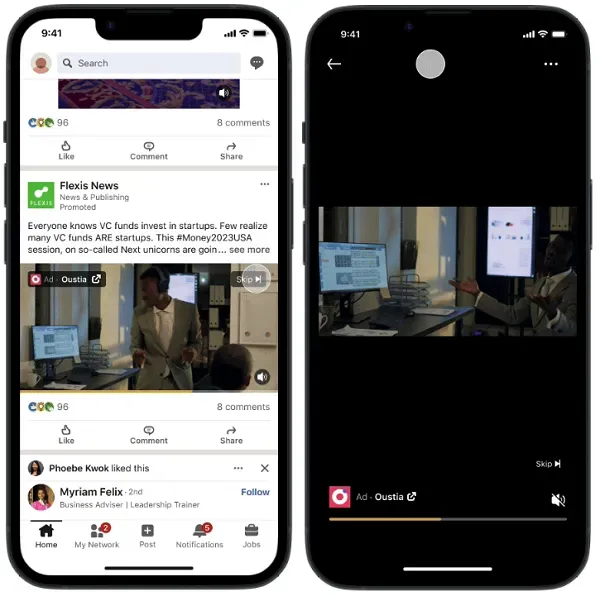
LinkedIn video ad examples illustrate the effectiveness of these premium placements by using live action, screen share, a casual and simple tone, and strong visual elements, and brand colors to make the message stand out.


The strategic placement of these video ads is designed to ensure that advertisers’ messages reach the most relevant and engaged audiences. This enhancement is expected to drive brand awareness and engagement, providing businesses with a more powerful tool to tell their brand story and connect with professionals.


Advanced AI Tools for Precision Targeting


LinkedIn’s new suite of AI-driven tools represents a significant leap forward in advertising technology on the platform. These tools leverage extensive data analysis to identify user trends, preferences, and behaviours, enabling more precise ad targeting through LinkedIn's Campaign Manager.


The AI capabilities allow for the creation of highly personalised ad experiences, aligning content with the specific needs and interests of LinkedIn users. This personalisation is anticipated to enhance user experience and increase conversion rates, as ads are tailored to reach the most relevant target audience.


Available AI tools provide continuous insights into ad performance, allowing businesses to refine and optimise their campaigns. This data-driven approach ensures that marketing strategies remain effective and responsive to user engagement patterns.


Expanding Influence Across B2B Buying Groups and Target Audience


LinkedIn is also focusing on enhancing influence within B2B buying groups. Recognising the complexity of B2B purchasing decisions, which often involve multiple stakeholders, LinkedIn’s new features aim to streamline and amplify messaging across entire buying groups through effective video ad campaigns.


By targeting all key decision-makers within an organisation, LinkedIn enables a more cohesive and impactful marketing approach. This capability is expected to facilitate stronger relationships with potential clients and accelerate the decision-making process.


Additionally, tracking video views is crucial for retargeting prospects throughout the lengthy B2B buying process, ensuring that the brand remains top of mind and effectively engages potential customers.


Implications for B2B Marketers


These advancements signify LinkedIn’s commitment to providing tools that cater to the evolving needs of B2B marketers. The introduction of premium video ad placements and advanced AI tools offers businesses new avenues to enhance their marketing strategies and achieve greater ROI.


As LinkedIn continues to innovate, businesses are encouraged to stay abreast of these developments to fully leverage the platform’s capabilities. The integration of these features into marketing efforts, including the ability to create LinkedIn video ads, promises to drive significant growth and engagement, solidifying LinkedIn’s position as a leading platform for B2B marketing.


With these latest offerings, LinkedIn is not only enhancing the user experience but also providing businesses with the tools necessary to navigate the competitive digital marketing landscape effectively.

Additionally, driving website visits is crucial for generating leads, viewer engagements, and conversions.

Vulse ArtVulse ArtVulse Art
Vulse Art

You May also be interested in

  • blog img

    LinkedIn Crosscheck: Test AI Models for Free Inside LinkedIn

    LinkedIn has launched a feature that lets Premium subscribers compare AI models from OpenAI, Anthropic, Google, Microsoft and others, side by side, without paying for separate subscriptions or hitting token limits. The feature is called Crosscheck, and it is rolling out now to LinkedIn Premium subscribers in the United States, with broader availability planned for additional countries and free users. How LinkedIn Crosscheck Works Crosscheck is described by LinkedIn's Chief Product Officer Hari Srinivasan as a "blind taste test" for AI models. The experience works like this: You enter a text prompt LinkedIn returns two answers, each generated by a different AI model You choose which answer you prefer Only after making your selection does LinkedIn reveal which models produced each response The feature already supports a wide range of models. Early testing has returned responses from Anthropic, Google, MoonshotAI, Mistral, and Amazon, with more expected to be added. Crosscheck also has its own leaderboard tracking how professionals across different industries rate the various models against each other. What Crosscheck Does and Does Not Support Crosscheck is currently text-only. You cannot generate images, upload files, or access the more advanced capabilities available directly on each AI platform's native interface. What you do get is unlimited text-based conversations with no token limits, and no requirement to sign up for additional paid subscriptions to access models you want to try. On data sharing: LinkedIn states that anonymised usage data is shared with the AI model providers to help them understand performance across different professional roles and industries. According to LinkedIn's own documentation, no personally identifiable information is passed to model builders. Why This Matters for B2B Content and Advocacy Teams For marketing, content, and employee advocacy teams already working inside LinkedIn, Crosscheck removes a meaningful barrier. Testing whether Claude, Gemini, or GPT-4o produces better output for a specific use case, such as a thought leadership post, a comment response, or a newsletter section, has historically required maintaining multiple subscriptions and switching between platforms. Crosscheck consolidates that comparison inside a platform your team is already using every day. A few practical implications worth considering: For content quality benchmarking. If your team uses AI to support LinkedIn post drafting or employee content kits, Crosscheck gives you a fast, free way to identify which model produces output that resonates with your specific audience and industry vertical. For employee advocates. Employees who are less familiar with AI tools now have a low-friction way to experiment with AI assistance directly inside LinkedIn, without needing separate accounts or training on new platforms. For advocacy programme managers. The Crosscheck leaderboard, broken down by industry, could become a useful proxy for understanding which AI models are gaining traction among your target audience, informing both content strategy and tool selection. What to Watch Crosscheck is currently an early-stage product from LinkedIn Labs, and Srinivasan has acknowledged there is work to do on speed, model range, and supported prompt types. It is also US-only for LinkedIn Premium users at launch, which limits immediate access for UK and European teams. That said, LinkedIn's track record of rolling features out globally after US pilots, combined with the stated intention to extend access to free users, suggests Crosscheck will reach wider audiences within months rather than years. The Bigger Picture for LinkedIn Content Strategy LinkedIn's move to embed AI model comparison directly into the platform is part of a broader pattern. Over the past 18 months, LinkedIn has introduced AI writing assistance, AI-powered post suggestions, and now a structured way to evaluate models against each other, all within the interface where B2B professionals are already spending time. For teams running employee advocacy programmes, this trajectory reinforces a simple strategic point: LinkedIn is becoming a content production and evaluation environment, not just a distribution channel. The tools employees need to create, refine, and share professional content are converging in one place. If your team is not yet building a structured approach to LinkedIn content and employee advocacy, the platform's own investment in AI tooling is accelerating the gap between organisations that are and organisations that are not. Frequently Asked Questions What is LinkedIn Crosscheck? LinkedIn Crosscheck is a feature from LinkedIn Labs that lets Premium subscribers compare responses from different AI models side by side using a blind test format. You enter a prompt, receive two anonymous answers from different models, choose the one you prefer, and then LinkedIn reveals which models produced each response. Which AI models does LinkedIn Crosscheck include? At launch, Crosscheck includes models from Anthropic, Google, MoonshotAI, Mistral, and Amazon, with more expected to be added. LinkedIn has confirmed it plans to expand the model range as the feature develops. Is LinkedIn Crosscheck free to use? Crosscheck is currently available at no additional cost to LinkedIn Premium subscribers in the United States. LinkedIn has stated it plans to extend access to free users and additional countries, though no confirmed timeline has been given. Does LinkedIn Crosscheck share my data with AI companies? Yes. According to LinkedIn's documentation, anonymised usage data is shared with AI model providers to help them understand how their models perform across different professional roles and industries. LinkedIn states that no personally identifiable information is shared with model builders. Can I use LinkedIn Crosscheck to generate images or upload files? No. Crosscheck currently supports text-based prompts only. Image generation, file uploads, and the more advanced tools available natively on each AI platform are not supported within Crosscheck. Is there a limit on how many prompts I can send in LinkedIn Crosscheck? No. LinkedIn has confirmed there are no token limits or usage caps on text-based conversations within Crosscheck, which is one of its main advantages over testing models through their native platforms on free or limited tiers. How can employee advocacy teams use LinkedIn Crosscheck? Advocacy teams can use Crosscheck to benchmark which AI models produce the best output for specific LinkedIn use cases, such as thought leadership posts, comment responses, or newsletter sections. It is also a useful onboarding tool for employee advocates who are new to AI writing assistance, as it removes the need to sign up for separate platforms. Where can I access LinkedIn Crosscheck? Crosscheck is available through LinkedIn Labs for LinkedIn Premium subscribers in the United States.

    Loading

    LinkedIn Crosscheck: Test AI Models for Free Inside LinkedIn

    by - Rob Illidge -

  • blog img

    LinkedIn Launches Conversational AI Search

    LinkedIn just added another AI layer to its platform: conversational search. Instead of tinkering with multiple filters, you can now type a plain-language request like 'ex-coworkers who became founders in healthcare in NY' and get people, pages, and posts that match your query.The feature is currently rolling out to LinkedIn Premium subscribers in the US and will reach more members soon.This change is part of LinkedIn's broader push to embed AI across the app, supported by parent company Microsofts continued investments in AI research and products. For context on Microsofts AI focus, see the Microsoft AI blog.How conversational search works and where it helpsPlain-language queries, smarter matchesConversational search lets you describe what you need in natural language. That lowers the barrier for non-technical users who previously had to combine multiple filters to locate specific people or content. Recruiters, partnership leads, and sales teams may find it especially useful for discovering niche expertise or overlooked connections in their network.Typical use casesFinding specialized talent, for example, ‘angels with FDA experience for an early biotech’Reconnecting with former colleagues who moved into relevant rolesFinding content or pages relevant to a niche topic without manual filteringPrivacy and accuracy considerationsWhile this feature sounds powerful, it raises some important questions:Data scope: LinkedIn can only search what users have shared on their profiles and posts. That limits results to publicly available or network-visible data.Representation: People tend to present their best professional selves on LinkedIn, so results may skew positive or omit relevant but unflattering details.Sensitive queries: Historically, features like Facebooks Graph Search exposed privacy risks by enabling granular searches. For more background, see the discussion of Graph Search and its implications at https://news.ycombinator.com/item?id=5100679 and consider how platforms must balance utility with privacy.LinkedIn will need strong guardrails to prevent enabling searches that could be used to surface sensitive personal information or to target people unfairly.Tips for professionals and recruiters using conversational searchFor job seekers and talentAudit your profile: Update headlines, skills, and experience to reflect how you want to be found.Use privacy settings: Review what information is public vs network-only to control visibility.Be authentic: AI can surface inconsistencies if you overstate skills or experience.For content creators and employee advocatesOptimize your profile and posts: Use clear keywords in your summary and content to improve discoverability with natural-language queries.Encourage teammates to update profiles: A consistent, accurate employee presence helps your company surface as a trusted source. Learn how employee advocacy can amplify reach at https://vulse.co/.What to watch nextLinkedIn has already added conversational language queries for job discovery, and its evolving AI toolkit keeps getting broader. Expect more targeted search enhancements and integration across LinkedIn experiences.At the same time, monitor how well the feature returns accurate and relevant matches, and whether it respects privacy boundaries.Conversational AI search promises convenience and faster discovery, but its value will depend on result quality and responsible roll-out.For organizations, this is a reminder to keep employee profiles up to date and to think strategically about how employees represent themselves online.For additional reporting on this feature, see LinkedIn's announcement and a coverage piece on how LinkedIn is using AI for job discovery.Want to make the most of LinkedIn's AI search for your brand or career?Explore our platform to learn how employee advocacy and optimized profiles can increase discoverability.

    Loading

    LinkedIn Launches Conversational AI Search

    by - Rob Illidge -

  • blog img

    How To Use LinkedIn Articles And Newsletters To Scale Employee Thought Leadership

    In this exclusive guide, we'll show you how B2B marketing and HR teams can use LinkedIn long-form content, specifically Articles and Newsletters, to build scalable employee thought leadership that drives trust, discoverability, and pipeline signals.Purpose: Practical steps to launch and scale employee-written LinkedIn Articles and Newsletters.Outcome: Increased discoverability, shareable assets, and repeatable workflows for employee advocates.Who this helps: Marketing managers, internal comms, and HR teams running employee advocacy programs.Why long-form content matters for employee personal brandsShort posts amplify reach, but Articles and Newsletters create lasting assets.They index on LinkedIn and search engines, demonstrate expertise, and give employees a reusable content hub for speaking, sales enablement, and recruiting.LinkedIn’s own guidance on newsletters and articles shows they help authors build a subscriber base and extend reach beyond a single post. See LinkedIn’s help center for how LinkedIn newsletters work.Three reasons to include Articles and Newsletters in your employee advocacy playbookSearchable credibility: Articles live on the author’s profile and can be found via Google and LinkedIn search.Subscriber momentum: Newsletters create an opt-in audience that notifies subscribers when new issues publish.Repurposable assets: Long-form pieces feed shorter posts, videos, and sales enablement collateral.How to run a low-risk pilot for employee Articles and NewslettersStart small with a 6-week pilot that focuses on coaching, templates, and measurement.Week 0: Select authors and set goalsChoose 4 to 8 employees across sales, product, and customer success.Set simple goals: subscribers, article views, and lead signals from comments or messages.Week 1-2: Train and templateRun a two-hour workshop on topic selection and storytelling. Use practical templates: intro hook, 3 insight sections, and action items.Provide a headline swipe file and SEO tips for LinkedIn Articles.Week 3-6: Publish and amplifyPublish one article per author and convert it into a weekly or biweekly newsletter issue if traction appears.Amplify through employee networks with a simple share kit: suggested post copy, hero image, and tagging guidelines.Editorial and governance rules that keep the program scalableLong form introduces brand and compliance risk if unmanaged.Put straightforward governance in place:Lightweight editorial review for claims and sensitive content.Ownership rules: authors own voice, company reviews for legal or customer references.Republishing policy: who can repurpose company blog content and how to credit sources.Measurement: metrics that matterMeasure both direct and downstream impact.Direct: article views, read time, newsletter subscribers, and engagement rate.Downstream: inbound messages, demo requests mentioning content, and link clicks to gated assets.Track a small set of KPIs and add qualitative win stories from sales and recruiting.Repurposing playbook: get more from each long form pieceExtract 3–5 short posts promoting key quotes or stats.Create a 60–90 second video summarizing the article for LinkedIn native video.Convert article sections into a downloadable slide or checklist for lead capture.Tools such as an employee advocacy platform can automate content distribution and track amplification across the team.Best practices and examplesEncourage authenticity and useful takeaways. HubSpot’s guide to LinkedIn Articles is a practical resource for structure and optimization.Also, review industry thought leadership research to understand what audiences value in long-form content.Tip: Start with customer problems, lessons learned, or unique frameworks rather than promotional pieces. Readers subscribe for insights, not pitches.Questions AnswersQ: Who should own editorial coaching for employee newsletters?A: A cross-functional content lead or communications manager should coach authors, supported by subject matter reviewers.Q: How often should employees publish newsletters?A: Start with biweekly or monthly cadence. Frequency should match the author's bandwidth and the audience response rate.Q: Can company content be republished as employee articles?A: Yes, with clear attribution and small edits to reflect the author voice. Include a republishing clause in your governance doc.

    Loading

    How To Use LinkedIn Articles And Newsletters To Scale Employee Thought Leadership

    by - Rob Illidge -

Revolutionise Your LinkedIn Output Today

Got a question? Give us a call or start your free trail today