Vulse ArtVulse Art
Home/Linkedin Strategy

LinkedIn Launches New UK Video Campaign to Empower Young Professionals

  • LinkedIn Strategy
blog-image

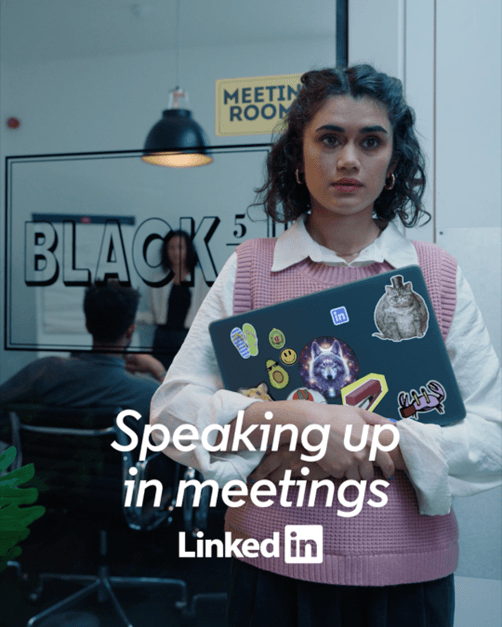
LinkedIn has launched “Know-How That Sticks,” a creative campaign designed with VCCP London, specifically aimed at helping Gen Z professionals navigate the start of their careers.


This new video-first initiative introduces LinkedIn’s immersive video feature, enabling users to access quick, career-focused content through short-form videos, swiped vertically for easy exploration.


With this campaign, LinkedIn offers advice-packed videos that are tailored for young professionals, providing insights on job searching, interviewing, and networking—all essential skills for career growth.


Recognizing that many young professionals feel overwhelmed by conflicting advice, LinkedIn aims to address this by connecting them with credible industry experts and mentors.


The “Know-How That Sticks” campaign includes three short films featuring influencers like Patrick Quinton-Smith, Shola West, and Heather Elkington. In these films, playful animated stickers serve up humorous, sometimes questionable career advice, mirroring the unsolicited guidance Gen Z often encounters.


Each video wraps up with the message: “Get the right know-how, from the right people.”


This launch comes as video content on LinkedIn has surged, with the platform seeing a 34% increase in uploads since 2017 and a 40% higher engagement rate compared to text-based posts.


LinkedIn’s new immersive video format encourages users to access full-screen videos that provide relatable career insights, making the platform a go-to resource for young professionals seeking guidance.


Zara Easton, LinkedIn UK’s Group Head of Brand Marketing, commented, “Our new feature aims to cut through the noise and provide practical, career-focused advice for Gen Z professionals. Through engaging, relevant content from influential voices, we’re empowering young professionals in the fast-paced modern workforce.”


The “Know-How That Sticks” series, running across LinkedIn and Meta, positions LinkedIn as a critical platform for career-minded Gen Zers, offering them tools to feel confident and informed in their professional journeys.

Vulse ArtVulse ArtVulse Art
Vulse Art

You May also be interested in

  • blog img

    Top Jobs Rising in 2026: AI Leads the Way

    LinkedIn's annual Jobs on the Rise report tracks which roles are gaining momentum based on changes in user profiles between 2023 and 2025.The clear headline for 2026: AI-related roles are surging.From AI engineers to data annotators, the list reflects how rapidly businesses are adopting and adapting to new AI tools.This isn't speculation about future trends. It's based on actual hiring patterns and career transitions happening right now.The World Economic Forum's Future of Jobs Report predicted this shift, estimating that 23% of jobs would change by 2027 due to AI and automation. LinkedIn's data suggests we're already seeing that transformation accelerate.The top rising roles (U.S.): a quick snapshotAI Engineers - Building and deploying AI systemsAI Consultants and Strategists - Helping businesses apply AI effectivelyNew Home Sales Specialists - Real estate roles adapting to market shiftsData Annotators - Ensuring AI training data qualityAI/ML Researchers - Advancing the science behind AI modelsHealthcare Reimbursement Specialists - Navigating complex healthcare billingStrategic Advisors and Independent Consultants - Flexible expertise on demandAdvertising Sales Specialists - Adapting to changing media landscapeFounders - More professionals launching their own businessesSales Executives - Enterprise sales remains in high demandWhat's notable: six of the top ten roles are either directly AI-related or reflect broader shifts in how work is organised (consultants, founders, specialists).Gartner's research supports this pattern, showing AI technologies moving rapidly from hype to practical implementation across industries.Why AI roles are growing so fastAI tools that didn't exist a few years ago are now mainstream. ChatGPT reached 100 million users faster than any consumer application in history, and enterprise adoption has followed.Organisations now need:Technical talent to build and maintain AI models. The U.S. Bureau of Labor Statistics projects computer and information technology jobs will grow 15% through 2031, much faster than average.Strategists to apply AI effectively. Building AI is one thing. Knowing where it creates value is another. McKinsey's research estimates generative AI could add $2.6 to $4.4 trillion annually to the global economy, but only if organisations deploy it strategically.Quality-control roles like data annotators to ensure training data is reliable. AI models are only as good as their training data. MIT Technology Review has highlighted how data quality directly impacts AI reliability.Beyond technical jobs, the report highlights a rise in founders and independent consultants. More professionals are choosing flexible or self-employed paths as the market shifts. LinkedIn's Workforce Report shows self-employment and contract work growing steadily across industries.What this means for your careerDon't panic. Adapt thoughtfully.AI isn't simply a replacement for human expertise. These systems extend what people can do, but they don't "understand" outputs the way a trained professional does.Research from Stanford's Human-Centered AI Institute consistently shows that AI performs best when paired with human judgment, not when left to operate autonomously.That means:If you already have domain expertise, learning how to use AI tools will boost your productivity and opportunities. You understand context that AI cannot.If you lack core knowledge in your field, relying solely on AI can produce risky or sub-par results. AI can generate plausible-sounding content that's factually wrong or contextually inappropriate.Focus on complementary skillsSkills that combine domain knowledge, critical thinking, and AI fluency will be the most valuable. Harvard Business Review's analysis puts it simply: "AI won't replace humans. But humans with AI will replace humans without AI."The most valuable skill combinations include:Data literacy - Understanding how to interpret, question, and apply data insights. Data Literacy Project research shows only 24% of employees feel confident working with data.Model evaluation - Knowing when AI outputs are reliable and when they need verification.Prompt engineering - OpenAI's best practices show that how you ask AI matters as much as what you ask.Human judgment - The ability to spot where AI outputs need correction, context, or ethical consideration.Practical steps to prepare and upskillStart with purposeIdentify how AI could augment your current role rather than replace it. Ask yourself: What repetitive tasks consume my time? Where could AI handle first drafts while I focus on refinement?Anthropic's research on AI-assisted work suggests the biggest productivity gains come from using AI for structured, repeatable tasks while reserving human effort for judgment-intensive decisions.Mix learning modesCombine technical tutorials with real-world projects and mentorship. LinkedIn Learning's research shows that employees who apply new skills immediately retain significantly more than those who only complete courses.Online courses for foundational knowledgeSide projects for hands-on practiceMentorship for context and career guidanceCommunity participation for ongoing learningTake advantage of free resourcesLinkedIn Learning is offering free courses tied to the "Jobs on the Rise" skills through February 6 (check the full report for details).Other quality free resources:Google's AI Essentials courseMicrosoft Learn's AI modulesCoursera's AI for Everyone by Andrew NgWhere to learn more (trusted resources)LinkedIn's full Jobs on the Rise 2026 report - The primary source for this analysisWorld Economic Forum Future of Jobs Report - Global perspective on workforce transformationMcKinsey Future of Work insights - Research on AI adoption and workforce implicationsO*NET OnLine - U.S. Department of Labor's detailed job descriptions and skill requirementsBureau of Labor Statistics Occupational Outlook - Official U.S. job growth projectionsHow organisations can respondCompanies should invest in reskilling programmes that pair AI tool training with domain-specific knowledge. PwC's Global Workforce Hopes and Fears Survey found that 74% of workers are ready to learn new skills, but only 40% feel their employer provides adequate upskilling opportunities.The gap between employee willingness and employer investment represents both a risk and an opportunity.Internal mobility matters. LinkedIn's Workplace Learning Report shows employees at companies with strong internal mobility stay nearly 2x longer.Storytelling accelerates culture change. Employee advocacy platforms can help amplify upskilling stories, highlight internal mobility, and showcase how teams are evolving. This makes it easier to attract talent in a competitive market where candidates increasingly research company culture before applying.When employees share their learning journeys and career growth publicly, it signals that your organisation invests in people. Glassdoor research shows 86% of job seekers research company reviews and ratings before applying.The 2026 Jobs on the Rise report is a reminder that change is accelerating. AI roles are rising, but the winners will be professionals and organisations that combine human expertise with the right AI tools.The opportunity isn't about becoming an AI expert overnight. It's about understanding how AI fits into your domain and developing the judgment to use it effectively.Start where you are. Learn continuously. Share what you discover.Curious how employee advocacy can help your team ride this wave?Explore how Vulse can amplify skills, share success stories, and attract top talent. Book a demo to see how employee advocacy supports your workforce development goals.

    Loading

    Top Jobs Rising in 2026: AI Leads the Way

    by - Rob Illidge -

  • blog img

    Why LinkedIn Content Now Shows Up in ChatGPT And What It Means for Employee Advocacy

    Google traffic is down. AI citations are up. And LinkedIn is suddenly one of the most trusted sources for AI tools like ChatGPT and Perplexity.For B2B marketers running employee advocacy programmes, this changes everything.The Shift from Search to AINew data from the Reuters Institute shows that Google search traffic to publishers declined by a third globally in the year to November 2025. Google Discover referrals dropped 21% year on year. Since May 2023, overall external referrals to publisher websites have fallen by 24%.The reason? AI is changing how people find information.Instead of clicking through search results, more people are asking ChatGPT, Perplexity, and Google's AI tools directly. These tools summarise content from across the web and provide answers in a conversational format. For many queries, users never visit the original source at all.According to Press Gazette, publishers expect traffic from search engines to decline by more than 40% over the next three years. This is not a temporary dip. It is a structural shift in how information is discovered and consumed.LinkedIn Is Now a Top Source for AI ToolsHere is where it gets interesting for B2B brands.Research from SEMRush, based on a study of 230,000 prompts across ChatGPT, Google AI, and Perplexity, found that LinkedIn is now the second most cited source in AI chatbot responses, trailing only Reddit.A separate study from Spotlight showed that AI tools are citing LinkedIn sources up to five times more often than before. ChatGPT cites LinkedIn 4.2 times more frequently, and Perplexity cites it 5.7 times more frequently.Of the 19,202 LinkedIn sources cited in the Spotlight analysis, over 15,000 came from LinkedIn Pulse articles specifically.As Social Media Today reported, AI chatbots are putting more trust in LinkedIn, and in LinkedIn articles in particular. This points to a new opportunity for brands and individuals who want to show up in AI-powered search results.What This Means for Employee AdvocacyIf your employees are posting regularly on LinkedIn, they are not just building brand awareness. They are building citable authority.When someone asks an AI tool a question about your industry, the answer may come from content your team published on LinkedIn. That is a level of discoverability that traditional SEO cannot match.This changes the value proposition of employee advocacy. It is no longer just about reach and engagement. It is about becoming a trusted source that AI tools reference when answering questions.For B2B companies, this is significant. Your buyers are already using AI tools for research. If your employees are visible, publishing valuable content, and building authority on LinkedIn, your brand is more likely to appear in those AI-generated answers.How to Optimise LinkedIn Content for AI CitationNot all LinkedIn content is created equal. If you want your posts and articles to be cited by AI tools, there are a few things to keep in mind.Publish LinkedIn articles, not just posts. The Spotlight data showed that the vast majority of LinkedIn citations came from Pulse articles. Long-form content is more likely to be indexed and referenced by AI systems.Answer specific questions. AI tools are looking for clear, authoritative answers to user queries. Structure your content around the questions your audience is asking. Use the question as your headline where possible.Verify your profile. LinkedIn profile verification is a trust signal. AI systems may use this as an indicator of authority when deciding which sources to cite.Keep your career history current. An up-to-date profile with a clear professional history reinforces credibility. AI tools are looking for signals that a source is legitimate and knowledgeable.Write factual, substantive content. AI tools favour content that is informative, well-structured, and easy to extract key points from. Avoid fluff. Get to the point and provide real value.Publish consistently. Topical authority builds over time. Regular publishing signals to AI systems that you are an active, engaged voice in your field.The Opportunity for B2B BrandsThis shift creates a real opportunity for companies investing in employee advocacy.While competitors focus on traditional SEO and paid advertising, you can build a library of LinkedIn content that AI tools trust and cite. Every article your team publishes is a potential answer to a question your buyers are asking.The companies that act now will have a head start. AI citation is not yet a crowded space. The brands that establish authority early will be harder to displace as these systems mature.Employee advocacy has always been about trust. People trust people more than they trust brands. Now AI tools are following the same pattern, favouring content from verified individuals over faceless corporate sources.What Vulse Customers Should Do NextIf you are already running an employee advocacy programme with Vulse, you are well positioned to take advantage of this shift. Here is how to maximise the opportunity:Encourage long-form content. In addition to regular posts, prompt your team to publish LinkedIn articles on topics where your company has expertise. These are more likely to be cited by AI tools.Focus on buyer questions. Create content that answers the questions your prospects are asking. Think about what someone might type into ChatGPT when researching your industry or evaluating solutions like yours.Build topical authority. Concentrate your team's content around specific themes. Consistent publishing on a focused topic signals expertise to AI systems.Track what is working. Use Vulse's analytics to identify which content is generating the most engagement. High-performing posts are likely candidates for expansion into full articles.The rules of discoverability are changing. Google traffic is declining. AI tools are rising. And LinkedIn content is becoming one of the most trusted sources for AI-generated answers.For B2B companies, this is not a threat. It is an opportunity. The brands that invest in employee advocacy now will be the ones AI tools cite tomorrow.

    Loading

    Why LinkedIn Content Now Shows Up in ChatGPT And What It Means for Employee Advocacy

    by - Rob Illidge -

  • blog img

    LinkedIn Simplifies Thought Leader Ads For Easier Discovery

    LinkedIn has made it simpler for brands to discover and sponsor user-generated content (UGC) with a new, streamlined discovery feature in Campaign Manager.This update helps marketers find relevant posts that mention their brand or event across 1st, 2nd and 3rd+ degree connections - then request permission to promote them as Thought Leader Ads.What’s new in Campaign ManagerEasier content discovery: A built-in search and highlight function surfaces posts, articles and newsletter pieces that mention your brand or event.Wider reach: You can now discover content from beyond your immediate network (including 3rd+ degree connections).Partnerships tab: Sponsored content opportunities are shown in a dedicated “Partnerships” area, and you can filter by content type to streamline outreach.Why brands should careThought Leader Ads let companies amplify authentic voices, not just company posts, by sponsoring organic content created by others.LinkedIn reports these ads see about 2x higher click-through rates than comparable single-image ads, making them an attractive option for boosting engagement and credibility.Key benefits:Authenticity: Boosting real users’ posts can feel more trustworthy than brand-only messaging.Efficiency: Built-in discovery reduces time spent hunting for promotable content.Scale: Access to 3rd+ degree posts expands potential sponsorship candidates.How to use LinkedIn Thought Leader Ads (step-by-step)1) Find relevant contentUse the new discovery tools in Campaign Manager’s Partnerships tab to surface posts, LinkedIn articles or newsletters that mention your brand or event.2) Get permissionBefore promoting anything, request sponsorship permission from the content creator. LinkedIn’s workflow in Campaign Manager makes it easier to send and track those requests.3) Launch a campaignOnce approved, you can convert the organic post into a Thought Leader Ad and run it with your chosen targeting and budget.Creator monetization: a possible next stepWhile the current process focuses on sponsorship permission, the improved discovery flow could lay groundwork for future monetization for creators.If LinkedIn decides to share ad revenue with creators whose posts are sponsored, it could create a new incentive for posting brand-positive content.That said, brands and platforms should balance monetization with authentic dialogue; paid incentives can unintentionally skew commentary.Coverage and context on LinkedIn’s broader creator efforts:Best practices for brandsPrioritize relevancy: Sponsor posts that genuinely align with your messaging and values.Be transparent: Clearly communicate sponsorship terms with creators.Measure performance: Compare Thought Leader Ads’ CTR and engagement to other ad types to understand ROI.Respect authenticity: Avoid pressuring creators into overly promotional content; authentic endorsements perform best.LinkedIn’s updated discovery tools make Thought Leader Ads easier to find and activate, opening up new opportunities to amplify user voices and boost campaign performance.As this feature rolls out to more countries, it’s worth testing Thought Leader Ads alongside existing ad formats to see how UGC-driven promotions perform for your brand.

    Loading

    LinkedIn Simplifies Thought Leader Ads For Easier Discovery

    by - Rob Illidge -

Revolutionise Your LinkedIn Output Today

Got a question? Give us a call or start your free trail today