Vulse ArtVulse Art
Home/Linkedin Strategy

LinkedIn Releases Insights On AI Adoption Among B2B Marketers

  • LinkedIn Strategy
blog-image

LinkedIn has released a new report examining how B2B brands are integrating AI into their daily operations and the advantages they are reaping from these emerging technologies.
 

Given LinkedIn’s strong investment in AI-embedding it across nearly every aspect of its platform-it’s no surprise that the report presents a highly optimistic view of AI adoption.


However, its findings are based on direct feedback from 1,250 sales professionals, making it a valuable snapshot of industry sentiment.
 

You can download LinkedIn’s full “The ROI of AI” report here, but let’s break down some of the key takeaways.


AI Adoption in B2B Sales


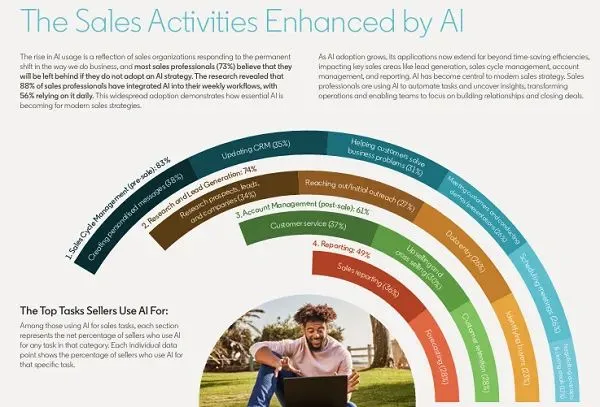
One of the core insights from the report is how B2B marketers are incorporating AI into their workflow across different functions. The adoption rate is particularly high in certain areas, reinforcing AI’s growing role in sales efficiency and decision-making.
 

LinkedIn reports that:
 

74% of sales professionals believe AI is the future of B2B sales.
 

73% of respondents think teams that fail to embrace AI will lag behind competitors.


The Impact of AI on Sales Performance
 

AI isn’t just being adopted; it’s driving tangible improvements in sales performance. According to LinkedIn’s findings:
 

88% of sales executives say AI has had a significant or moderate impact on their sales ROI.
 

84% of salespeople report that AI saves them at least 30 minutes daily on routine tasks.
 

65% of sellers believe AI makes them more likely to exceed their sales quotas.
 

These statistics highlight how AI tools are streamlining workflows, automating repetitive tasks, and ultimately enhancing productivity in sales processes.


How to Integrate AI into Your Sales Strategy
 

For businesses looking to leverage AI, LinkedIn suggests utilizing its Sales Navigator, which incorporates AI-driven insights to help sales teams identify high-value leads, optimize outreach, and personalize engagements.

While this recommendation serves as a promotion for LinkedIn’s own tools, the underlying message remains clear: AI is a powerful enabler of efficiency in B2B sales.


The Future of AI in B2B Marketing
 

AI-driven tools provide businesses with the ability to analyze vast amounts of data, identify patterns, and make informed decisions faster than ever before.


By integrating AI into sales strategies, companies can enhance targeting, improve lead conversion, and drive higher revenue.


However, while AI can offer incredible efficiencies, it’s essential to validate AI-generated insights and ensure they align with business objectives.


Used effectively, AI has the potential to revolutionize sales processes, saving time and maximizing success.

For the full report, download “The ROI of AI”.


For further reading:


LinkedIn Expands Generative AI Push


LinkedIn’s Sales Leader Compass: The ROI of AI

Vulse ArtVulse ArtVulse Art
Vulse Art

You May also be interested in

  • blog img

    LinkedIn Now Lets You Filter Comments by Verified Members

    LinkedIn has quietly rolled out a new comment sorting option that lets users filter replies by verified members only. It is a small interface change with significant implications for anyone using LinkedIn as a B2B content and engagement channel. Here is what the update involves and what it means for brands running employee advocacy programmes. What LinkedIn Has Changed LinkedIn has added a third sort option to post comments alongside the existing Most Relevant and Most Recent filters. The new option is called Verified Members, and selecting it shows only comments from users who have confirmed their identity on the platform. According to LinkedIn's own Help Centre documentation, the feature is designed to help members find authentic comments on posts with large comment volumes. The Verified Members filter surfaces insights from trusted professionals while reducing noise from automated, generic, or inauthentic comments. The feature is currently rolling out to a portion of users rather than the full platform, so you may not see it in your account yet. How LinkedIn Verification Works Unlike verification on Meta or X, LinkedIn verification is free. Members can confirm their identity through third-party support partners or by submitting government ID information directly. LinkedIn reported in December 2024 that more than 100 million members had verified their identity on the platform. Given that LinkedIn has over one billion members in total, verified accounts still represent roughly 10 percent of the user base, which is why the filter is a meaningful signal rather than a universal one. Why LinkedIn Is Prioritising Verified Content The timing of this update is not accidental. LinkedIn content has become a leading source for AI-generated answers, with research showing LinkedIn is among the most cited platforms by AI chatbots when generating professional and business-related responses. That citation value depends entirely on the quality and authenticity of the content being cited. If bot-generated or spam comments dilute the signal, LinkedIn's value as a trusted professional data source weakens. Surfacing verified member content is one way to protect the integrity of that data stream. There is also a straightforward commercial incentive: the more LinkedIn can demonstrate that its platform hosts authentic, high-quality professional conversations, the stronger its case for Premium subscriptions, advertising investment, and enterprise product sales. What This Means for Employee Advocacy Teams For B2B brands running employee advocacy programmes, this update has three direct implications. Verified employees carry more weight in comments. If your employees are engaging with prospects' posts, commenting on industry conversations, or responding to your own company content, a verified profile now places them in the priority tier when others filter by verification. An unverified employee advocate may not appear at all in filtered views. Verification is now a baseline, not a bonus. Until now, LinkedIn verification was something advocates could optionally pursue. This update shifts it closer to a minimum standard for anyone whose LinkedIn engagement is part of a broader business development or thought leadership strategy. Comment engagement on company posts becomes more valuable. Posts that attract verified member comments will produce higher-quality filtered feeds. Encouraging senior leaders, subject matter experts, and verified employees to comment on company content is now a deliberate reach and trust strategy, not just a vanity metric. What Advocacy Teams Should Do Now Audit your advocate pool for verification status. Identify which of your active employee advocates have completed LinkedIn's identity verification. For any unverified advocates, share LinkedIn's verification instructions and make verification part of your programme onboarding checklist. Update your advocacy programme guidelines. If you maintain a content kit, employee playbook, or onboarding document for your advocacy programme, add LinkedIn verification as a recommended first step. It takes minutes and the benefit compounds over time as the filter becomes more widely used. Prioritise comment engagement, not just post sharing. Employee advocacy programmes typically focus on sharing content from a library. This update is a prompt to also encourage employees to comment thoughtfully on relevant posts in their feed, particularly high-volume posts in your industry where a verified comment in the filtered view gives disproportionate visibility. Track verified engagement separately. If you are measuring your advocacy programme's impact, start segmenting engagement data by whether the interacting accounts are verified. This will become a more meaningful quality signal as LinkedIn continues to weight verified activity in its surfacing decisions. The Bigger Picture This update sits alongside a series of moves LinkedIn has made in 2026 to improve content quality and deepen the value of its professional data layer. Recent changes include expanded AI-powered conversational search, Crosscheck for comparing AI model outputs, and a leadership transition focused on AI development. The direction is consistent: LinkedIn is investing heavily in the credibility and quality of its professional content ecosystem. For brands whose growth depends on organic LinkedIn reach, that investment is only worth capturing if the humans representing your company in the feed are verified, active, and producing content that stands up to scrutiny. Employee advocacy built on authentic, verified professional voices is not just a nice-to-have in that environment. It is increasingly the baseline for visibility. Frequently Asked Questions What is LinkedIn's verified replies filter? It is a new comment sorting option that lets users view only comments from verified members. It sits alongside the existing Most Relevant and Most Recent filters and is designed to reduce spam and bot-generated comments in high-volume post discussions. Is LinkedIn verification free? Yes. Unlike Meta or X, LinkedIn verification does not require a paid subscription. Members can verify their identity through LinkedIn's third-party support partners or by submitting government ID information. Full instructions are available in LinkedIn's Help Centre. How many LinkedIn members are verified? As of December 2024, LinkedIn reported that more than 100 million members had verified their identity on the platform. LinkedIn has over one billion members in total, meaning verified accounts represent approximately 10 percent of the full user base. Does LinkedIn verification improve post reach? Not directly in terms of algorithmic distribution. However, verified member comments are now prioritised in the new filter view, which means verified advocates are more likely to be seen when users sort comments by verification status on high-volume posts. Should employee advocates get verified on LinkedIn? Yes. With LinkedIn now surfacing verified member comments in a dedicated filter, unverified advocates risk being invisible in filtered comment views. Verification should be treated as a standard onboarding step for any employee participating in a formal advocacy programme. What is the difference between LinkedIn verification and LinkedIn Premium? LinkedIn verification confirms a member's real-world identity and is free. LinkedIn Premium is a paid subscription tier that unlocks additional features including InMail credits, profile insights, and learning tools. The two are independent of each other: a member can be verified without Premium and vice versa. Will this filter affect how company page posts perform? Indirectly. Posts that attract substantial verified member engagement will produce richer, higher-quality filtered comment feeds, which may encourage more users to engage with that content. Brands that actively encourage verified employees to comment on company posts are likely to benefit as the filter becomes more widely adopted.

    Loading

    LinkedIn Now Lets You Filter Comments by Verified Members

    by - Rob Illidge -

  • blog img

    LinkedIn Content Benchmarks 2026: Which Post Format Drives Most Engagement

    If you are still guessing which LinkedIn content format to prioritise, new benchmark data from 1.3 million posts makes the answer clear: native document posts (uploaded PDFs displayed as carousels) generate the highest engagement rate of any content type on the platform at 7.00%, followed by multi-image posts at 6.45% and video at 6.00%. This matters because LinkedIn's overall engagement rate has actually increased 8% year-over-year to an average of 5.20%, even as organic reach continues to decline. The platform is rewarding depth and substance over volume, and the formats that keep people on the page longest are winning. This guide breaks down the latest Socialinsider 2026 LinkedIn Benchmarks data, explains what it means for your content strategy, and shows how employee advocacy programmes can use these insights to maximise performance. Document Posts Now Outperform Every Other LinkedIn Format The biggest finding from the Socialinsider study is that native document posts have overtaken all other content types for engagement. As Social Media Today reported, this is a significant departure from other social platforms where short-form video dominates. Here is how each format performed based on average engagement rate by impressions in 2025: Native documents: 7.00% (up 14% year-over-year) Multi-image posts: 6.45% Video: 6.00% (up 7% YoY) Image: 5.30% (up 9% YoY) Text: 4.50% (up 12% YoY) Poll: 4.20% Link: 3.25% The year-over-year trend is notable. Engagement grew across every content format except polls and links. Document posts saw the largest increase at 14%, but even simple text posts climbed 12%. LinkedIn users are engaging more across the board. Julia Holmqvist, Social Media Manager at Semrush, explained the document trend well in the Socialinsider report: documents perform because they deliver downloadable, practical value like frameworks, templates, and checklists in a format that is easy to scan and save for later. This aligns with what LinkedIn's own algorithm now rewards: dwell time. Document carousels require swiping through multiple slides, which keeps users on the post longer than almost any other format. That extended attention signals quality to the algorithm and triggers broader distribution. Multi-Image Posts Drive the Most Likes While documents lead on overall engagement rate, the data shows a different winner for likes specifically: multi-image posts generate the most likes across every page size. For pages with 100K to 1M followers, multi-image posts average 180 likes per post compared to 155 for video and 30 for native documents. The pattern holds for smaller pages too, though at lower absolute numbers. This creates a useful strategic distinction. If your goal is overall engagement (comments, shares, saves, clicks), prioritise documents. If your immediate goal is social proof through visible like counts, multi-image posts are your best option. For employee advocacy content, this distinction matters. Employees sharing document carousels will generate deeper engagement that drives profile visits and conversations. Employees sharing multi-image posts will generate higher visible reaction counts that build credibility in the feed. Both have a place in a well-rounded advocacy programme. Video Views Are Declining Despite More Video Being Posted One of the most counterintuitive findings in the data is that LinkedIn video views dropped 36% year-over-year across all page sizes, even as brands doubled their video posting frequency from 2 to 4 posts per month. The decline is consistent across every audience tier. Pages with 10K to 50K followers saw average video views drop from 1,000 to Even the largest pages (100K to 1M followers) saw views fall from 2,430 to 1,This does not mean video is dead on LinkedIn. Video still generates a 6.00% engagement rate, which is above the platform average. But it does suggest that the market is saturated with video content, and the returns are diminishing as more brands compete for attention in the same format. The Socialinsider report includes a useful insight from Semrush's social team: LinkedIn is not a video-first platform the way TikTok or Instagram are. Users do not open LinkedIn to scroll through video feeds. They come for professional knowledge sharing, and the formats built for that purpose (documents, text, images) are outperforming video on the metrics that matter. For employee advocacy, this reinforces the case for document carousels and well-crafted text posts over video. Most employees are more comfortable creating a PDF or writing a text post than recording and editing video, and the data shows those formats perform just as well or better. Impressions Vary Dramatically by Page Size and Format The benchmark data reveals how much content performance depends on audience size. The right format for a page with 5,000 followers is not the same as the right format for a page with 100,For pages with under 50K followers, multi-image posts consistently generate the most impressions per post. A page with 10K to 50K followers averages 1,850 impressions per multi-image post compared to 1,420 for video and 1,150 for native documents. For pages with over 50K followers, polls become the highest-impression format. Pages with 100K to 1M followers average 9,797 impressions per poll compared to 3,867 for multi-image posts. This is a significant finding for employee advocacy. Most employee LinkedIn profiles have follower counts in the low thousands, which means the multi-image and document formats are their best options for maximising both reach and engagement. Polls may work well for executive profiles with larger followings but are less effective for the broader employee base. Posting Frequency Is Increasing Across Visual Formats Brands are posting more on LinkedIn, particularly in visual formats. Image posts increased from an average of 5 to 7 per month. Video doubled from 2 to 4 per month. Native document posts rose from 1 to 2 per month. This increase in posting frequency aligns with Buffer's finding that top-performing LinkedIn accounts post more frequently and more consistently than the median account. The "no-post penalty" is real: accounts that skip a week consistently underperform their own baseline growth rate. For employee advocacy programmes, the practical takeaway is straightforward. Encourage employees to post at least 2 to 3 times per week. Provide them with a mix of content formats, particularly documents and multi-image posts. And make the content creation process as frictionless as possible so consistency does not feel like a burden. Our employee advocacy training guide covers how to build posting habits that sustain momentum without burning employees out. Audience Growth Is Slowing, Especially for Large Pages LinkedIn follower growth rates declined across every page size in Pages with 1K to 5K followers still saw a respectable 24.5% average growth rate, but pages with 100K to 1M followers saw growth slow sharply to just 6.4%, down from 21.6% the previous year. This slowdown has a direct strategic implication: growing an audience through your company page alone is increasingly difficult. The brands that maintain healthy growth rates are those that supplement company page content with employee-driven distribution. Our analysis of 400 million LinkedIn impressions found that employee posts generate 14 times more engagement than company page content. When audience growth on your company page stalls, activating employee voices is the most effective lever available. Employee networks are roughly 12 times larger than company follower bases, and the LinkedIn algorithm allocates approximately 65% of feed real estate to personal profiles versus just 5% for company pages. What This Means for Your LinkedIn Strategy in 2026 The Socialinsider data points to a clear set of priorities for marketing teams. Lead with documents and carousels. They generate the highest engagement rate and align with what LinkedIn's algorithm rewards: dwell time and substantive content. Invest in creating original frameworks, research summaries, checklists, and guides in PDF format. Use multi-image posts for visibility and social proof. When you need likes and impressions rather than deep engagement, multi-image posts are consistently the top performer across page sizes under 50K followers. Be strategic with video. Video still works on LinkedIn, but the declining returns mean it should complement your strategy rather than dominate it. Use video for content that genuinely benefits from the format, like executive interviews, behind-the-scenes footage, or product demonstrations, rather than defaulting to video for everything. Post consistently. Frequency matters. The data shows brands are increasing output across visual formats, and top performers post more often and more consistently than average accounts. Aim for at least 2 to 3 posts per week per employee in your advocacy programme. Invest in employee advocacy. With company page growth slowing and the algorithm favouring personal profiles, employee-driven content is the highest-leverage organic strategy available. Equip your team with document templates, multi-image assets, and clear guidelines. For practical guidance on getting started, see our employee advocacy buyer's guide. Personalise everything. The algorithm penalises mass-identical resharing. When employees share content from your advocacy programme, even a single line of personal commentary transforms a templated share into authentic content that performs dramatically better. Frequently Asked Questions What is the best content format on LinkedIn in 2026? Native document posts (uploaded PDFs displayed as carousels) generate the highest average engagement rate at 7.00%, according to Socialinsider's analysis of 1.3 million LinkedIn posts. Multi-image posts follow at 6.45%, and video at 6.00%. What is a good engagement rate on LinkedIn? LinkedIn's overall average engagement rate by impressions is 5.20% in Content above this threshold is performing better than typical. Native documents average 7.00%, making them the format most likely to exceed the benchmark. Are LinkedIn video views declining? Yes. Average video views dropped 36% year-over-year across all page sizes, even as brands doubled their video posting frequency. Video still generates above-average engagement rates, but the returns are diminishing as more content competes in the format. How often should a company post on LinkedIn? Benchmark data shows brands are increasing their posting frequency, particularly for images (7 per month) and video (4 per month). Top-performing accounts post more frequently and consistently than the median. For employee advocacy, aim for 2 to 3 posts per week per advocate. Why is LinkedIn audience growth slowing? Follower growth rates declined across all page sizes in Pages with 100Kfollowers saw the sharpest slowdown, from 21.6% to 6.4% average growth. The brands maintaining growth are those supplementing company page content with employee-driven distribution through advocacy programmes. Do document posts work for employee advocacy? Yes. Documents are an ideal format for employee advocacy because they showcase expertise through practical resources like frameworks, checklists, and research summaries. They generate the highest engagement rate on the platform and align with what LinkedIn's algorithm rewards: dwell time and substantive content. Ready to equip your team with the content formats that actually work on LinkedIn? Vulse helps marketing teams create, distribute, and measure employee content that drives real engagement. Start your free trial or book a demo to see how it works.

    Loading

    LinkedIn Content Benchmarks 2026: Which Post Format Drives Most Engagement

    by - Rob Illidge -

  • blog img

    How To Use LinkedIn Articles And Newsletters To Scale Employee Thought Leadership

    In this exclusive guide, we'll show you how B2B marketing and HR teams can use LinkedIn long-form content, specifically Articles and Newsletters, to build scalable employee thought leadership that drives trust, discoverability, and pipeline signals.Purpose: Practical steps to launch and scale employee-written LinkedIn Articles and Newsletters.Outcome: Increased discoverability, shareable assets, and repeatable workflows for employee advocates.Who this helps: Marketing managers, internal comms, and HR teams running employee advocacy programs.Why long-form content matters for employee personal brandsShort posts amplify reach, but Articles and Newsletters create lasting assets.They index on LinkedIn and search engines, demonstrate expertise, and give employees a reusable content hub for speaking, sales enablement, and recruiting.LinkedIn’s own guidance on newsletters and articles shows they help authors build a subscriber base and extend reach beyond a single post. See LinkedIn’s help center for how LinkedIn newsletters work.Three reasons to include Articles and Newsletters in your employee advocacy playbookSearchable credibility: Articles live on the author’s profile and can be found via Google and LinkedIn search.Subscriber momentum: Newsletters create an opt-in audience that notifies subscribers when new issues publish.Repurposable assets: Long-form pieces feed shorter posts, videos, and sales enablement collateral.How to run a low-risk pilot for employee Articles and NewslettersStart small with a 6-week pilot that focuses on coaching, templates, and measurement.Week 0: Select authors and set goalsChoose 4 to 8 employees across sales, product, and customer success.Set simple goals: subscribers, article views, and lead signals from comments or messages.Week 1-2: Train and templateRun a two-hour workshop on topic selection and storytelling. Use practical templates: intro hook, 3 insight sections, and action items.Provide a headline swipe file and SEO tips for LinkedIn Articles.Week 3-6: Publish and amplifyPublish one article per author and convert it into a weekly or biweekly newsletter issue if traction appears.Amplify through employee networks with a simple share kit: suggested post copy, hero image, and tagging guidelines.Editorial and governance rules that keep the program scalableLong form introduces brand and compliance risk if unmanaged.Put straightforward governance in place:Lightweight editorial review for claims and sensitive content.Ownership rules: authors own voice, company reviews for legal or customer references.Republishing policy: who can repurpose company blog content and how to credit sources.Measurement: metrics that matterMeasure both direct and downstream impact.Direct: article views, read time, newsletter subscribers, and engagement rate.Downstream: inbound messages, demo requests mentioning content, and link clicks to gated assets.Track a small set of KPIs and add qualitative win stories from sales and recruiting.Repurposing playbook: get more from each long form pieceExtract 3–5 short posts promoting key quotes or stats.Create a 60–90 second video summarizing the article for LinkedIn native video.Convert article sections into a downloadable slide or checklist for lead capture.Tools such as an employee advocacy platform can automate content distribution and track amplification across the team.Best practices and examplesEncourage authenticity and useful takeaways. HubSpot’s guide to LinkedIn Articles is a practical resource for structure and optimization.Also, review industry thought leadership research to understand what audiences value in long-form content.Tip: Start with customer problems, lessons learned, or unique frameworks rather than promotional pieces. Readers subscribe for insights, not pitches.Questions AnswersQ: Who should own editorial coaching for employee newsletters?A: A cross-functional content lead or communications manager should coach authors, supported by subject matter reviewers.Q: How often should employees publish newsletters?A: Start with biweekly or monthly cadence. Frequency should match the author's bandwidth and the audience response rate.Q: Can company content be republished as employee articles?A: Yes, with clear attribution and small edits to reflect the author voice. Include a republishing clause in your governance doc.

    Loading

    How To Use LinkedIn Articles And Newsletters To Scale Employee Thought Leadership

    by - Rob Illidge -

Revolutionise Your LinkedIn Output Today

Got a question? Give us a call or start your free trail today