Vulse ArtVulse Art
Home/Linkedin Strategy

LinkedIn Integrates Calendly For Appointment Booking

  • LinkedIn Strategy
blog-image

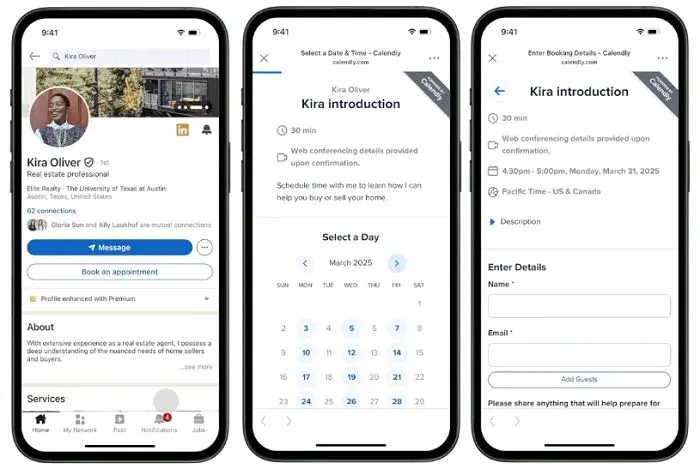
For LinkedIn Premium users, networking just got easier. LinkedIn has officially launched a new integration with Calendly, allowing professionals to embed a ‘Book an Appointment’ button directly on their profiles. This new feature aims to remove friction from the meeting scheduling process, making it more efficient to connect with potential clients, partners, or employers.
 

How The LinkedIn & Calendly Integration Works
 

With this update, Premium Business, Sales Navigator, and Recruiter users can now add a custom call-to-action (CTA) button on their profiles. This button directs visitors to their Calendly scheduling page, where they can easily book a meeting based on available time slots.
 

For professionals and businesses leveraging LinkedIn for lead generation, this update can be a game-changer. Instead of relying on back-and-forth messaging to coordinate meetings, potential clients or connections can instantly secure a slot-boosting efficiency and response rates.
 

The Impact of LinkedIn’s Custom CTA Buttons
 

LinkedIn first introduced custom profile buttons in 2023, offering Premium users the ability to add CTAs such as:
 

  • Visit My Website
  • View My Services
  • Book an Appointment
     

Since launch, over one million Premium users and Enterprise accounts have adopted the feature, with LinkedIn reporting a 25% increase in profile views for users utilizing these CTAs.


More importantly, the addition of Calendly integration takes this a step further, facilitating direct action rather than passive engagement.
 

Why This Matters For Professionals
 

More profile views are great, but what professionals truly need is conversion-whether it’s securing a sales call, booking a recruitment interview, or arranging a networking meeting. This integration helps bridge that gap by allowing potential clients and connections to take immediate action.
 

As LinkedIn user Liam Darmody shared, implementing the Calendly link has significantly improved his inbound lead process, resulting in over 200 new business meetings since adding it to his profile. This demonstrates the tangible benefits of reducing friction in the booking process.
 

Who Can Access This Feature?
 

The LinkedIn Calendly integration is currently available for:
 

  • Premium Business Subscribers
  • Sales Navigator Users
  • Recruiter Users
     

If you're using LinkedIn as a primary networking or business development tool, upgrading to Premium may be worth considering to take advantage of this functionality.
 

How To Set Up Your LinkedIn Calendly Integration
 

  1. Go to your LinkedIn Profile and navigate to your custom CTA settings.
  2. Select ‘Book an Appointment’ as your CTA option.
  3. Link your Calendly account by entering your scheduling page URL.
  4. Save changes, and your new button will appear on your LinkedIn profile.
     

With this latest feature, LinkedIn is making it easier than ever to turn profile visits into valuable conversations. Whether you’re a freelancer, recruiter, or business owner, integrating Calendly into your LinkedIn profile can help streamline appointment scheduling and boost engagement.


Looking to maximize your LinkedIn presence and lead generation efforts? Vulse helps you optimize your LinkedIn strategy with data-backed content recommendations, engagement analytics, and automated post-scheduling.


Sign up today to take your LinkedIn networking to the next level.


Vulse ArtVulse ArtVulse Art
Vulse Art

You May also be interested in

  • blog img

    How To Use LinkedIn Articles To Build Thought Leadership And Get Cited by AI Search

    Most marketers default to short LinkedIn feed posts because they are quick to write and generate immediate engagement. But if authority, search visibility, and AI citations are part of your strategy, you are leaving value on the table by ignoring LinkedIn Articles. The data makes this clear. Long-form articles and newsletters account for 60% of all AI citations from LinkedIn content, according to LinkedIn's own internal data. Feed posts drive daily visibility. Articles build the compounding authority that gets your brand cited by ChatGPT, Perplexity, and Google when buyers research your industry. The most effective LinkedIn strategies use both formats for different purposes. This guide explains when to use each, how to publish Articles that perform, and why long-form content is now a critical part of any employee advocacy and thought leadership programme. LinkedIn Articles vs Posts: What Each Format Does Best Feed posts and Articles are not competing formats. They serve different stages of the content funnel, and understanding the distinction is what separates good LinkedIn strategies from great ones. Feed posts are best for daily visibility, conversation starters, quick takes, and staying top of mind. They perform well at 200 to 300 words, generate engagement within hours, and benefit from LinkedIn's real-time algorithmic distribution. But they fade quickly. A feed post's lifespan is measured in hours to days, and they are rarely surfaced by search engines or AI tools. LinkedIn Articles are best for establishing deep expertise, earning search engine visibility, and building citable authority. They support rich formatting including headings, images, embedded video, pull quotes, and hyperlinks. They live permanently on your profile, are fully indexed by Google and Bing, and can be cited by AI search tools when answering professional queries. Here is how the two formats compare across the metrics that matter: Discoverability. Feed posts depend almost entirely on the LinkedIn algorithm for distribution. Articles are indexed by external search engines, meaning they can drive traffic from Google, AI search, and direct links indefinitely. Depth and structure. Feed posts work best as single-idea content. Articles support the heading hierarchies, internal links, and detailed formatting that LinkedIn's algorithm now uses for topical authority scoring. Lifespan. A strong feed post generates most of its engagement within 48 hours. A strong Article can continue earning views, inbound enquiries, and AI citations for months. AI citation potential. 95% of all AI citations of LinkedIn content come from original posts, not reshares. But within that original content, long-form Articles and newsletters are cited most often because they provide the depth that AI systems need to extract reliable answers. Newsletter integration. Articles can be published as recurring Newsletters, which build a subscriber base that receives notifications each time you publish. Feed posts have no equivalent subscriber mechanism. Analytics depth. Both formats offer engagement metrics, but Articles provide firmographic analytics showing which industries, job titles, company sizes, and locations engage with your content. This data is invaluable for understanding whether you are reaching decision-makers. The practical takeaway: use feed posts to stay visible and start conversations. Use Articles to build the deep, searchable authority that compounds over time. The best strategies do both. Why LinkedIn Articles Matter for AI Search Discoverability AI search engines are increasingly citing LinkedIn as a primary source for professional queries. Profound's research ranks LinkedIn as the most cited domain for professional queries across major AI search platforms. This makes LinkedIn content a direct input into how AI tools answer questions about your industry, your company, and your area of expertise. Articles are particularly well-suited for AI citation because they provide the depth and structure that large language models need to extract reliable answers. A 1,000-word Article with clear headings, specific data points, and original analysis gives an AI system far more to work with than a short feed post. LinkedIn's own guidance confirms that content substantial enough to provide meaningful answers, often in the 800 to 1,200 word range, performs best for AI discoverability. Originality is also critical: the vast majority of AI citations come from original content, not reshared material. For a deeper look at how to structure content for AI citation, see our guide on optimising employee advocacy content for AI search. How to Publish a LinkedIn Article That Performs Write a Headline That Answers a Question Your headline determines whether someone clicks through from the feed or from a search result. Effective Article headlines communicate a complete idea and mirror the way professionals search for information. "How B2B Companies Use Employee Advocacy to Generate Pipeline" outperforms "Employee Advocacy Tips" because it tells both readers and AI systems exactly what the piece covers. LinkedIn uses the first line of your post or Article title as the basis for its URL structure, which influences how search engines categorise and rank your content. Make that first line count. Structure for Both Readers and AI Use clear heading hierarchies (H2 and H3 tags) to break your Article into scannable sections. Each section should answer a specific sub-question and make sense on its own if extracted by an AI tool. This approach aligns with LinkedIn's recommendation to write for snippets: assume your content will be pulled into AI-generated answers without its surrounding context. Lead with a summary or key takeaway at the top of the Article. This gives busy readers the core message immediately and provides AI systems with a clean excerpt to cite. Set SEO Metadata Before Publishing LinkedIn's Article editor includes fields for SEO title, description, and tags. Use these to control how your Article appears in search results. Write your meta description as a direct, concise answer to the primary question the Article addresses, and keep it between 140 and 160 characters. For guidance on SEO metadata best practices, see Google's documentation on search essentials. Include Original Data and Specific Examples Articles that contain original data, proprietary insights, or detailed case studies are significantly more likely to be cited and shared. Generic advice that could appear on any marketing blog does not earn citations from AI systems or engagement from professional readers. If your company has access to platform analytics, customer data, or campaign results, use those numbers in your Articles. Our analysis of 400 million LinkedIn impressions is an example of how first-party data can drive both engagement and authority. Review Performance with Firmographic Data After publishing, use LinkedIn's native analytics to track reach, engagement, and reader demographics. Pay attention to which industries, job titles, and company sizes engage with your content. This data tells you whether your Articles are reaching decision-makers or just generating views from the wrong audience. For a detailed look at what metrics matter most, see our post on LinkedIn posting best practices. How LinkedIn Articles Fit Into Your Content Strategy Repurpose Across Channels A single LinkedIn Article can feed multiple content touchpoints. Turn key sections into shorter LinkedIn feed posts. Include the Article link in email signatures and newsletters. Reference it in sales outreach when a prospect asks about a topic you have covered in depth. This repurposing strategy extends the Article's reach beyond LinkedIn's platform and creates a hub-and-spoke content structure where the Article serves as the pillar and shorter content pieces drive traffic back to it. Build a Newsletter Audience LinkedIn's Newsletter feature lets you convert Article readers into subscribers who receive notifications each time you publish. This is one of the few organic distribution channels on LinkedIn that does not depend on the feed algorithm for reach. Newsletters are particularly valuable for employee advocacy programmes. When subject matter experts within your company publish recurring Newsletters on their areas of expertise, they build a direct audience that compounds over time. Each edition reinforces their topical authority, which the LinkedIn algorithm rewards with better distribution for all of their content, including shorter feed posts. Empower Employees to Publish The most effective Article strategies are not limited to the marketing team. Encourage executives, sales leaders, and subject matter experts to publish Articles on topics where they have genuine expertise. Employee-published content generates 14 times more engagement than company page content, and that advantage extends to long-form Articles as well. The key is to support employees with topic suggestions, editing assistance, and a clear understanding of how publishing builds their personal brand alongside the company's. For a step-by-step framework, see our employee advocacy training guide. Amplify With Paid Distribution LinkedIn's Article and Newsletter Ads allow you to promote long-form content to targeted professional audiences. Use organic engagement data to identify which Articles resonate most, then amplify those with paid distribution. This approach is more cost-effective than promoting content blind, because you already have proof that the material drives engagement. For more on combining organic and paid strategies, see our guide on Thought Leader Ads. Content Best Practices for LinkedIn Articles in 2026 Lead with value, not preamble. Open with your most important insight or a clear summary of what readers will learn. The first two lines determine whether someone continues reading. Keep sections short and scannable. Use subheadings, short paragraphs, and formatting to guide readers through the piece. LinkedIn's algorithm measures dwell time, and well-formatted content keeps people reading longer. Aim for 800 to 1,200 words. This range provides enough depth to demonstrate expertise and satisfy AI extraction requirements without losing reader attention. LinkedIn's early testing suggests this length performs best for discoverability. Include specific numbers and evidence. Statements like "employee advocacy reduces cost per click to under $1 compared to $5 to $10 for LinkedIn Ads" are more citable and more credible than vague claims about "improving performance." Write in your own voice. LinkedIn's algorithm actively deprioritises generic AI-generated content. Use AI tools to support your workflow, but make sure the final output reflects genuine expertise and a human perspective. Update and refresh published Articles. Add a "Last updated" note when you revise content. AI search engines and LinkedIn's own system both use freshness as a ranking signal. Revisiting high-performing Articles every 6 to 12 months keeps them relevant and discoverable. Checklist Before You Publish Use this as a final review before hitting publish on any LinkedIn Article. Headline and cover image. Does the headline communicate a complete idea? Is the cover image relevant and professional? Summary or key takeaway. Does the Article open with a clear statement of what readers will learn or gain? Structure and formatting. Are headings, subheadings, and paragraphs structured logically? Can each section stand alone if extracted by an AI tool? Links and references. Have you linked to supporting resources, both internal and external? Are sources for data points and claims clearly attributed? SEO metadata. Have you set the SEO title, description, and tags in the Article settings? Promotion plan. Do you have a plan for sharing the Article through employee posts, email, and paid amplification if relevant? Frequently Asked Questions What is the ideal length for a LinkedIn Article? LinkedIn's own testing suggests that Articles in the 800 to 1,200 word range perform best for both reader engagement and AI search discoverability. The goal is to provide enough depth to demonstrate expertise without losing reader attention. Do LinkedIn Articles appear in Google search results? Yes. LinkedIn Articles are fully indexed by Google, Bing, and other search engines. They can also be cited by AI search tools like ChatGPT and Perplexity when answering professional queries. How are LinkedIn Articles different from Newsletters? Articles are standalone long-form posts. Newsletters are recurring Article series that allow readers to subscribe and receive notifications each time you publish. Newsletters build a direct distribution channel that does not depend on the feed algorithm. Should employees publish LinkedIn Articles or just feed posts? Both. Feed posts are better for daily engagement and visibility. Articles are better for establishing deep expertise on specific topics and building long-term discoverability through search engines and AI citation. The most effective employee advocacy programmes use a combination of both formats. Do LinkedIn Articles count toward topical authority in the algorithm? Yes. LinkedIn's algorithm evaluates the full body of content a person publishes, including Articles, when determining topical authority. Professionals who publish consistent, substantive Articles on a specific domain see that authority reflected in how all their content is ranked. Can I republish blog content as a LinkedIn Article? You can, but original content performs significantly better. If you repurpose blog content, adapt it for the LinkedIn audience by adding personal perspective, updating data points, and adjusting the format for on-platform readability. Avoid publishing exact duplicates. Ready to turn your team into LinkedIn thought leaders? Vulse helps marketing teams create, distribute, and measure employee content that builds authority and drives pipeline. Start your free trial or book a demo to see how it works.

    Loading

    How To Use LinkedIn Articles To Build Thought Leadership And Get Cited by AI Search

    by - Rob Illidge -

  • blog img

    How To Use LinkedIn Articles And Newsletters To Scale Employee Thought Leadership

    In this exclusive guide, we'll show you how B2B marketing and HR teams can use LinkedIn long-form content, specifically Articles and Newsletters, to build scalable employee thought leadership that drives trust, discoverability, and pipeline signals.Purpose: Practical steps to launch and scale employee-written LinkedIn Articles and Newsletters.Outcome: Increased discoverability, shareable assets, and repeatable workflows for employee advocates.Who this helps: Marketing managers, internal comms, and HR teams running employee advocacy programs.Why long-form content matters for employee personal brandsShort posts amplify reach, but Articles and Newsletters create lasting assets.They index on LinkedIn and search engines, demonstrate expertise, and give employees a reusable content hub for speaking, sales enablement, and recruiting.LinkedIn’s own guidance on newsletters and articles shows they help authors build a subscriber base and extend reach beyond a single post. See LinkedIn’s help center for how LinkedIn newsletters work.Three reasons to include Articles and Newsletters in your employee advocacy playbookSearchable credibility: Articles live on the author’s profile and can be found via Google and LinkedIn search.Subscriber momentum: Newsletters create an opt-in audience that notifies subscribers when new issues publish.Repurposable assets: Long-form pieces feed shorter posts, videos, and sales enablement collateral.How to run a low-risk pilot for employee Articles and NewslettersStart small with a 6-week pilot that focuses on coaching, templates, and measurement.Week 0: Select authors and set goalsChoose 4 to 8 employees across sales, product, and customer success.Set simple goals: subscribers, article views, and lead signals from comments or messages.Week 1-2: Train and templateRun a two-hour workshop on topic selection and storytelling. Use practical templates: intro hook, 3 insight sections, and action items.Provide a headline swipe file and SEO tips for LinkedIn Articles.Week 3-6: Publish and amplifyPublish one article per author and convert it into a weekly or biweekly newsletter issue if traction appears.Amplify through employee networks with a simple share kit: suggested post copy, hero image, and tagging guidelines.Editorial and governance rules that keep the program scalableLong form introduces brand and compliance risk if unmanaged.Put straightforward governance in place:Lightweight editorial review for claims and sensitive content.Ownership rules: authors own voice, company reviews for legal or customer references.Republishing policy: who can repurpose company blog content and how to credit sources.Measurement: metrics that matterMeasure both direct and downstream impact.Direct: article views, read time, newsletter subscribers, and engagement rate.Downstream: inbound messages, demo requests mentioning content, and link clicks to gated assets.Track a small set of KPIs and add qualitative win stories from sales and recruiting.Repurposing playbook: get more from each long form pieceExtract 3–5 short posts promoting key quotes or stats.Create a 60–90 second video summarizing the article for LinkedIn native video.Convert article sections into a downloadable slide or checklist for lead capture.Tools such as an employee advocacy platform can automate content distribution and track amplification across the team.Best practices and examplesEncourage authenticity and useful takeaways. HubSpot’s guide to LinkedIn Articles is a practical resource for structure and optimization.Also, review industry thought leadership research to understand what audiences value in long-form content.Tip: Start with customer problems, lessons learned, or unique frameworks rather than promotional pieces. Readers subscribe for insights, not pitches.Questions AnswersQ: Who should own editorial coaching for employee newsletters?A: A cross-functional content lead or communications manager should coach authors, supported by subject matter reviewers.Q: How often should employees publish newsletters?A: Start with biweekly or monthly cadence. Frequency should match the author's bandwidth and the audience response rate.Q: Can company content be republished as employee articles?A: Yes, with clear attribution and small edits to reflect the author voice. Include a republishing clause in your governance doc.

    Loading

    How To Use LinkedIn Articles And Newsletters To Scale Employee Thought Leadership

    by - Rob Illidge -

  • blog img

    Top Jobs Rising in 2026: AI Leads the Way

    LinkedIn's annual Jobs on the Rise report tracks which roles are gaining momentum based on changes in user profiles between 2023 and 2025.The clear headline for 2026: AI-related roles are surging.From AI engineers to data annotators, the list reflects how rapidly businesses are adopting and adapting to new AI tools.This isn't speculation about future trends. It's based on actual hiring patterns and career transitions happening right now.The World Economic Forum's Future of Jobs Report predicted this shift, estimating that 23% of jobs would change by 2027 due to AI and automation. LinkedIn's data suggests we're already seeing that transformation accelerate.The top rising roles (U.S.): a quick snapshotAI Engineers - Building and deploying AI systemsAI Consultants and Strategists - Helping businesses apply AI effectivelyNew Home Sales Specialists - Real estate roles adapting to market shiftsData Annotators - Ensuring AI training data qualityAI/ML Researchers - Advancing the science behind AI modelsHealthcare Reimbursement Specialists - Navigating complex healthcare billingStrategic Advisors and Independent Consultants - Flexible expertise on demandAdvertising Sales Specialists - Adapting to changing media landscapeFounders - More professionals launching their own businessesSales Executives - Enterprise sales remains in high demandWhat's notable: six of the top ten roles are either directly AI-related or reflect broader shifts in how work is organised (consultants, founders, specialists).Gartner's research supports this pattern, showing AI technologies moving rapidly from hype to practical implementation across industries.Why AI roles are growing so fastAI tools that didn't exist a few years ago are now mainstream. ChatGPT reached 100 million users faster than any consumer application in history, and enterprise adoption has followed.Organisations now need:Technical talent to build and maintain AI models. The U.S. Bureau of Labor Statistics projects computer and information technology jobs will grow 15% through 2031, much faster than average.Strategists to apply AI effectively. Building AI is one thing. Knowing where it creates value is another. McKinsey's research estimates generative AI could add $2.6 to $4.4 trillion annually to the global economy, but only if organisations deploy it strategically.Quality-control roles like data annotators to ensure training data is reliable. AI models are only as good as their training data. MIT Technology Review has highlighted how data quality directly impacts AI reliability.Beyond technical jobs, the report highlights a rise in founders and independent consultants. More professionals are choosing flexible or self-employed paths as the market shifts. LinkedIn's Workforce Report shows self-employment and contract work growing steadily across industries.What this means for your careerDon't panic. Adapt thoughtfully.AI isn't simply a replacement for human expertise. These systems extend what people can do, but they don't "understand" outputs the way a trained professional does.Research from Stanford's Human-Centered AI Institute consistently shows that AI performs best when paired with human judgment, not when left to operate autonomously.That means:If you already have domain expertise, learning how to use AI tools will boost your productivity and opportunities. You understand context that AI cannot.If you lack core knowledge in your field, relying solely on AI can produce risky or sub-par results. AI can generate plausible-sounding content that's factually wrong or contextually inappropriate.Focus on complementary skillsSkills that combine domain knowledge, critical thinking, and AI fluency will be the most valuable. Harvard Business Review's analysis puts it simply: "AI won't replace humans. But humans with AI will replace humans without AI."The most valuable skill combinations include:Data literacy - Understanding how to interpret, question, and apply data insights. Data Literacy Project research shows only 24% of employees feel confident working with data.Model evaluation - Knowing when AI outputs are reliable and when they need verification.Prompt engineering - OpenAI's best practices show that how you ask AI matters as much as what you ask.Human judgment - The ability to spot where AI outputs need correction, context, or ethical consideration.Practical steps to prepare and upskillStart with purposeIdentify how AI could augment your current role rather than replace it. Ask yourself: What repetitive tasks consume my time? Where could AI handle first drafts while I focus on refinement?Anthropic's research on AI-assisted work suggests the biggest productivity gains come from using AI for structured, repeatable tasks while reserving human effort for judgment-intensive decisions.Mix learning modesCombine technical tutorials with real-world projects and mentorship. LinkedIn Learning's research shows that employees who apply new skills immediately retain significantly more than those who only complete courses.Online courses for foundational knowledgeSide projects for hands-on practiceMentorship for context and career guidanceCommunity participation for ongoing learningTake advantage of free resourcesLinkedIn Learning is offering free courses tied to the "Jobs on the Rise" skills through February 6 (check the full report for details).Other quality free resources:Google's AI Essentials courseMicrosoft Learn's AI modulesCoursera's AI for Everyone by Andrew NgWhere to learn more (trusted resources)LinkedIn's full Jobs on the Rise 2026 report - The primary source for this analysisWorld Economic Forum Future of Jobs Report - Global perspective on workforce transformationMcKinsey Future of Work insights - Research on AI adoption and workforce implicationsO*NET OnLine - U.S. Department of Labor's detailed job descriptions and skill requirementsBureau of Labor Statistics Occupational Outlook - Official U.S. job growth projectionsHow organisations can respondCompanies should invest in reskilling programmes that pair AI tool training with domain-specific knowledge. PwC's Global Workforce Hopes and Fears Survey found that 74% of workers are ready to learn new skills, but only 40% feel their employer provides adequate upskilling opportunities.The gap between employee willingness and employer investment represents both a risk and an opportunity.Internal mobility matters. LinkedIn's Workplace Learning Report shows employees at companies with strong internal mobility stay nearly 2x longer.Storytelling accelerates culture change. Employee advocacy platforms can help amplify upskilling stories, highlight internal mobility, and showcase how teams are evolving. This makes it easier to attract talent in a competitive market where candidates increasingly research company culture before applying.When employees share their learning journeys and career growth publicly, it signals that your organisation invests in people. Glassdoor research shows 86% of job seekers research company reviews and ratings before applying.The 2026 Jobs on the Rise report is a reminder that change is accelerating. AI roles are rising, but the winners will be professionals and organisations that combine human expertise with the right AI tools.The opportunity isn't about becoming an AI expert overnight. It's about understanding how AI fits into your domain and developing the judgment to use it effectively.Start where you are. Learn continuously. Share what you discover.Curious how employee advocacy can help your team ride this wave?Explore how Vulse can amplify skills, share success stories, and attract top talent. Book a demo to see how employee advocacy supports your workforce development goals.

    Loading

    Top Jobs Rising in 2026: AI Leads the Way

    by - Rob Illidge -

Revolutionise Your LinkedIn Output Today

Got a question? Give us a call or start your free trail today