Vulse ArtVulse Art
Home/Linkedin Strategy

LinkedIn Sales Navigator is Improving Relationships with New AI Elements

  • LinkedIn Strategy
blog-image

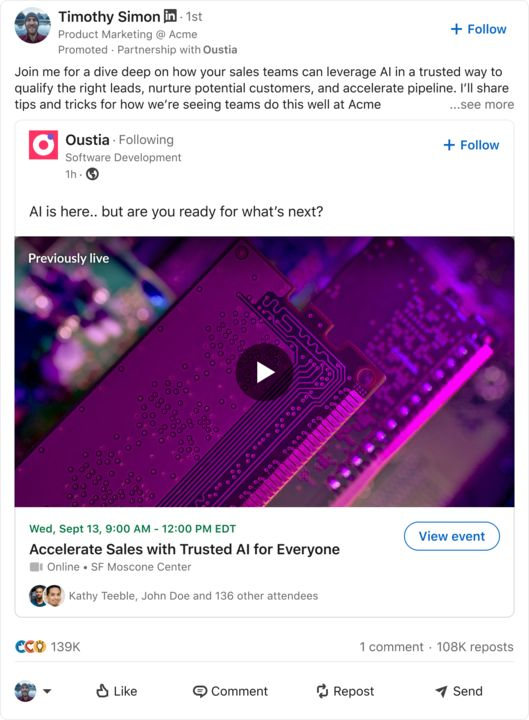
LinkedIn is continuing its integration of AI, unveiling two innovative features within its Sales Navigator platform. These updates are engineered to empower marketers in their pursuit of promising prospects. Let's dive into what's new.


Account IQ


The first of these new features is "Account IQ," which leverages generative AI to give a clear overview of a specific company. This means you can now gain access to information about a company such as their current performance, strategic priorities, key challenges, and even the top executives steering the ship. This, when used right, is your new secret weapon for understanding your target businesses more intimately.


Account IQ blends real-time LinkedIn data with third-party data, creating a well-rounded snapshot of a company. This is key for marketers who want to quickly get a handle on their prospects. As valuable and insightful as this new tool is, it's still advised that you verify the information before you incorporate it into your sales strategies.


Relationship Maps


The second new addition is the "Relationship Map," which is a visual representation of the buyer circle hierarchies within a business. This feature provides insights into how different staff members interact and work together, helping you identify opportunities to connect more effectively.


Relationship Map ensures you're well informed about the key decision-makers within a business, reducing the risk of stalled deals if there was a sudden shift in key relationships. It also helps the process of collaboration among account teams by offering a real-time, shareable view of the individuals involved.


Moreover, the Relationship Map keeps you updated on relevant events like recent job changes or mentions in the news, making it easier for you to build and nurture relationships with multiple stakeholders. It also spotlights recent LinkedIn posts by your contacts, providing you with a simple way to stay on their radar within the app.


These new, dynamic features within LinkedIn's Sales Navigator are definitely game-changers for building professional relationships. Depending on your specific marketing focus, the value of them to you may vary but they are guaranteed to provide you with more tools to maintain meaningful connections, enhance engagement, and build your network. LinkedIn's continued commitment to AI-driven tools is exciting and it's making relationship-building more efficient and effective than ever before.

Vulse ArtVulse ArtVulse Art
Vulse Art

You May also be interested in

  • blog img

    LinkedIn Now Lets You Filter Comments by Verified Members

    LinkedIn has quietly rolled out a new comment sorting option that lets users filter replies by verified members only. It is a small interface change with significant implications for anyone using LinkedIn as a B2B content and engagement channel. Here is what the update involves and what it means for brands running employee advocacy programmes. What LinkedIn Has Changed LinkedIn has added a third sort option to post comments alongside the existing Most Relevant and Most Recent filters. The new option is called Verified Members, and selecting it shows only comments from users who have confirmed their identity on the platform. According to LinkedIn's own Help Centre documentation, the feature is designed to help members find authentic comments on posts with large comment volumes. The Verified Members filter surfaces insights from trusted professionals while reducing noise from automated, generic, or inauthentic comments. The feature is currently rolling out to a portion of users rather than the full platform, so you may not see it in your account yet. How LinkedIn Verification Works Unlike verification on Meta or X, LinkedIn verification is free. Members can confirm their identity through third-party support partners or by submitting government ID information directly. LinkedIn reported in December 2024 that more than 100 million members had verified their identity on the platform. Given that LinkedIn has over one billion members in total, verified accounts still represent roughly 10 percent of the user base, which is why the filter is a meaningful signal rather than a universal one. Why LinkedIn Is Prioritising Verified Content The timing of this update is not accidental. LinkedIn content has become a leading source for AI-generated answers, with research showing LinkedIn is among the most cited platforms by AI chatbots when generating professional and business-related responses. That citation value depends entirely on the quality and authenticity of the content being cited. If bot-generated or spam comments dilute the signal, LinkedIn's value as a trusted professional data source weakens. Surfacing verified member content is one way to protect the integrity of that data stream. There is also a straightforward commercial incentive: the more LinkedIn can demonstrate that its platform hosts authentic, high-quality professional conversations, the stronger its case for Premium subscriptions, advertising investment, and enterprise product sales. What This Means for Employee Advocacy Teams For B2B brands running employee advocacy programmes, this update has three direct implications. Verified employees carry more weight in comments. If your employees are engaging with prospects' posts, commenting on industry conversations, or responding to your own company content, a verified profile now places them in the priority tier when others filter by verification. An unverified employee advocate may not appear at all in filtered views. Verification is now a baseline, not a bonus. Until now, LinkedIn verification was something advocates could optionally pursue. This update shifts it closer to a minimum standard for anyone whose LinkedIn engagement is part of a broader business development or thought leadership strategy. Comment engagement on company posts becomes more valuable. Posts that attract verified member comments will produce higher-quality filtered feeds. Encouraging senior leaders, subject matter experts, and verified employees to comment on company content is now a deliberate reach and trust strategy, not just a vanity metric. What Advocacy Teams Should Do Now Audit your advocate pool for verification status. Identify which of your active employee advocates have completed LinkedIn's identity verification. For any unverified advocates, share LinkedIn's verification instructions and make verification part of your programme onboarding checklist. Update your advocacy programme guidelines. If you maintain a content kit, employee playbook, or onboarding document for your advocacy programme, add LinkedIn verification as a recommended first step. It takes minutes and the benefit compounds over time as the filter becomes more widely used. Prioritise comment engagement, not just post sharing. Employee advocacy programmes typically focus on sharing content from a library. This update is a prompt to also encourage employees to comment thoughtfully on relevant posts in their feed, particularly high-volume posts in your industry where a verified comment in the filtered view gives disproportionate visibility. Track verified engagement separately. If you are measuring your advocacy programme's impact, start segmenting engagement data by whether the interacting accounts are verified. This will become a more meaningful quality signal as LinkedIn continues to weight verified activity in its surfacing decisions. The Bigger Picture This update sits alongside a series of moves LinkedIn has made in 2026 to improve content quality and deepen the value of its professional data layer. Recent changes include expanded AI-powered conversational search, Crosscheck for comparing AI model outputs, and a leadership transition focused on AI development. The direction is consistent: LinkedIn is investing heavily in the credibility and quality of its professional content ecosystem. For brands whose growth depends on organic LinkedIn reach, that investment is only worth capturing if the humans representing your company in the feed are verified, active, and producing content that stands up to scrutiny. Employee advocacy built on authentic, verified professional voices is not just a nice-to-have in that environment. It is increasingly the baseline for visibility. Frequently Asked Questions What is LinkedIn's verified replies filter? It is a new comment sorting option that lets users view only comments from verified members. It sits alongside the existing Most Relevant and Most Recent filters and is designed to reduce spam and bot-generated comments in high-volume post discussions. Is LinkedIn verification free? Yes. Unlike Meta or X, LinkedIn verification does not require a paid subscription. Members can verify their identity through LinkedIn's third-party support partners or by submitting government ID information. Full instructions are available in LinkedIn's Help Centre. How many LinkedIn members are verified? As of December 2024, LinkedIn reported that more than 100 million members had verified their identity on the platform. LinkedIn has over one billion members in total, meaning verified accounts represent approximately 10 percent of the full user base. Does LinkedIn verification improve post reach? Not directly in terms of algorithmic distribution. However, verified member comments are now prioritised in the new filter view, which means verified advocates are more likely to be seen when users sort comments by verification status on high-volume posts. Should employee advocates get verified on LinkedIn? Yes. With LinkedIn now surfacing verified member comments in a dedicated filter, unverified advocates risk being invisible in filtered comment views. Verification should be treated as a standard onboarding step for any employee participating in a formal advocacy programme. What is the difference between LinkedIn verification and LinkedIn Premium? LinkedIn verification confirms a member's real-world identity and is free. LinkedIn Premium is a paid subscription tier that unlocks additional features including InMail credits, profile insights, and learning tools. The two are independent of each other: a member can be verified without Premium and vice versa. Will this filter affect how company page posts perform? Indirectly. Posts that attract substantial verified member engagement will produce richer, higher-quality filtered comment feeds, which may encourage more users to engage with that content. Brands that actively encourage verified employees to comment on company posts are likely to benefit as the filter becomes more widely adopted.

    Loading

    LinkedIn Now Lets You Filter Comments by Verified Members

    by - Rob Illidge -

  • blog img

    LinkedIn Crosscheck: Test AI Models for Free Inside LinkedIn

    LinkedIn has launched a feature that lets Premium subscribers compare AI models from OpenAI, Anthropic, Google, Microsoft and others, side by side, without paying for separate subscriptions or hitting token limits. The feature is called Crosscheck, and it is rolling out now to LinkedIn Premium subscribers in the United States, with broader availability planned for additional countries and free users. How LinkedIn Crosscheck Works Crosscheck is described by LinkedIn's Chief Product Officer Hari Srinivasan as a "blind taste test" for AI models. The experience works like this: You enter a text prompt LinkedIn returns two answers, each generated by a different AI model You choose which answer you prefer Only after making your selection does LinkedIn reveal which models produced each response The feature already supports a wide range of models. Early testing has returned responses from Anthropic, Google, MoonshotAI, Mistral, and Amazon, with more expected to be added. Crosscheck also has its own leaderboard tracking how professionals across different industries rate the various models against each other. What Crosscheck Does and Does Not Support Crosscheck is currently text-only. You cannot generate images, upload files, or access the more advanced capabilities available directly on each AI platform's native interface. What you do get is unlimited text-based conversations with no token limits, and no requirement to sign up for additional paid subscriptions to access models you want to try. On data sharing: LinkedIn states that anonymised usage data is shared with the AI model providers to help them understand performance across different professional roles and industries. According to LinkedIn's own documentation, no personally identifiable information is passed to model builders. Why This Matters for B2B Content and Advocacy Teams For marketing, content, and employee advocacy teams already working inside LinkedIn, Crosscheck removes a meaningful barrier. Testing whether Claude, Gemini, or GPT-4o produces better output for a specific use case, such as a thought leadership post, a comment response, or a newsletter section, has historically required maintaining multiple subscriptions and switching between platforms. Crosscheck consolidates that comparison inside a platform your team is already using every day. A few practical implications worth considering: For content quality benchmarking. If your team uses AI to support LinkedIn post drafting or employee content kits, Crosscheck gives you a fast, free way to identify which model produces output that resonates with your specific audience and industry vertical. For employee advocates. Employees who are less familiar with AI tools now have a low-friction way to experiment with AI assistance directly inside LinkedIn, without needing separate accounts or training on new platforms. For advocacy programme managers. The Crosscheck leaderboard, broken down by industry, could become a useful proxy for understanding which AI models are gaining traction among your target audience, informing both content strategy and tool selection. What to Watch Crosscheck is currently an early-stage product from LinkedIn Labs, and Srinivasan has acknowledged there is work to do on speed, model range, and supported prompt types. It is also US-only for LinkedIn Premium users at launch, which limits immediate access for UK and European teams. That said, LinkedIn's track record of rolling features out globally after US pilots, combined with the stated intention to extend access to free users, suggests Crosscheck will reach wider audiences within months rather than years. The Bigger Picture for LinkedIn Content Strategy LinkedIn's move to embed AI model comparison directly into the platform is part of a broader pattern. Over the past 18 months, LinkedIn has introduced AI writing assistance, AI-powered post suggestions, and now a structured way to evaluate models against each other, all within the interface where B2B professionals are already spending time. For teams running employee advocacy programmes, this trajectory reinforces a simple strategic point: LinkedIn is becoming a content production and evaluation environment, not just a distribution channel. The tools employees need to create, refine, and share professional content are converging in one place. If your team is not yet building a structured approach to LinkedIn content and employee advocacy, the platform's own investment in AI tooling is accelerating the gap between organisations that are and organisations that are not. Frequently Asked Questions What is LinkedIn Crosscheck? LinkedIn Crosscheck is a feature from LinkedIn Labs that lets Premium subscribers compare responses from different AI models side by side using a blind test format. You enter a prompt, receive two anonymous answers from different models, choose the one you prefer, and then LinkedIn reveals which models produced each response. Which AI models does LinkedIn Crosscheck include? At launch, Crosscheck includes models from Anthropic, Google, MoonshotAI, Mistral, and Amazon, with more expected to be added. LinkedIn has confirmed it plans to expand the model range as the feature develops. Is LinkedIn Crosscheck free to use? Crosscheck is currently available at no additional cost to LinkedIn Premium subscribers in the United States. LinkedIn has stated it plans to extend access to free users and additional countries, though no confirmed timeline has been given. Does LinkedIn Crosscheck share my data with AI companies? Yes. According to LinkedIn's documentation, anonymised usage data is shared with AI model providers to help them understand how their models perform across different professional roles and industries. LinkedIn states that no personally identifiable information is shared with model builders. Can I use LinkedIn Crosscheck to generate images or upload files? No. Crosscheck currently supports text-based prompts only. Image generation, file uploads, and the more advanced tools available natively on each AI platform are not supported within Crosscheck. Is there a limit on how many prompts I can send in LinkedIn Crosscheck? No. LinkedIn has confirmed there are no token limits or usage caps on text-based conversations within Crosscheck, which is one of its main advantages over testing models through their native platforms on free or limited tiers. How can employee advocacy teams use LinkedIn Crosscheck? Advocacy teams can use Crosscheck to benchmark which AI models produce the best output for specific LinkedIn use cases, such as thought leadership posts, comment responses, or newsletter sections. It is also a useful onboarding tool for employee advocates who are new to AI writing assistance, as it removes the need to sign up for separate platforms. Where can I access LinkedIn Crosscheck? Crosscheck is available through LinkedIn Labs for LinkedIn Premium subscribers in the United States.

    Loading

    LinkedIn Crosscheck: Test AI Models for Free Inside LinkedIn

    by - Rob Illidge -

  • blog img

    LinkedIn Content Benchmarks 2026: Which Post Format Drives Most Engagement

    If you are still guessing which LinkedIn content format to prioritise, new benchmark data from 1.3 million posts makes the answer clear: native document posts (uploaded PDFs displayed as carousels) generate the highest engagement rate of any content type on the platform at 7.00%, followed by multi-image posts at 6.45% and video at 6.00%. This matters because LinkedIn's overall engagement rate has actually increased 8% year-over-year to an average of 5.20%, even as organic reach continues to decline. The platform is rewarding depth and substance over volume, and the formats that keep people on the page longest are winning. This guide breaks down the latest Socialinsider 2026 LinkedIn Benchmarks data, explains what it means for your content strategy, and shows how employee advocacy programmes can use these insights to maximise performance. Document Posts Now Outperform Every Other LinkedIn Format The biggest finding from the Socialinsider study is that native document posts have overtaken all other content types for engagement. As Social Media Today reported, this is a significant departure from other social platforms where short-form video dominates. Here is how each format performed based on average engagement rate by impressions in 2025: Native documents: 7.00% (up 14% year-over-year) Multi-image posts: 6.45% Video: 6.00% (up 7% YoY) Image: 5.30% (up 9% YoY) Text: 4.50% (up 12% YoY) Poll: 4.20% Link: 3.25% The year-over-year trend is notable. Engagement grew across every content format except polls and links. Document posts saw the largest increase at 14%, but even simple text posts climbed 12%. LinkedIn users are engaging more across the board. Julia Holmqvist, Social Media Manager at Semrush, explained the document trend well in the Socialinsider report: documents perform because they deliver downloadable, practical value like frameworks, templates, and checklists in a format that is easy to scan and save for later. This aligns with what LinkedIn's own algorithm now rewards: dwell time. Document carousels require swiping through multiple slides, which keeps users on the post longer than almost any other format. That extended attention signals quality to the algorithm and triggers broader distribution. Multi-Image Posts Drive the Most Likes While documents lead on overall engagement rate, the data shows a different winner for likes specifically: multi-image posts generate the most likes across every page size. For pages with 100K to 1M followers, multi-image posts average 180 likes per post compared to 155 for video and 30 for native documents. The pattern holds for smaller pages too, though at lower absolute numbers. This creates a useful strategic distinction. If your goal is overall engagement (comments, shares, saves, clicks), prioritise documents. If your immediate goal is social proof through visible like counts, multi-image posts are your best option. For employee advocacy content, this distinction matters. Employees sharing document carousels will generate deeper engagement that drives profile visits and conversations. Employees sharing multi-image posts will generate higher visible reaction counts that build credibility in the feed. Both have a place in a well-rounded advocacy programme. Video Views Are Declining Despite More Video Being Posted One of the most counterintuitive findings in the data is that LinkedIn video views dropped 36% year-over-year across all page sizes, even as brands doubled their video posting frequency from 2 to 4 posts per month. The decline is consistent across every audience tier. Pages with 10K to 50K followers saw average video views drop from 1,000 to Even the largest pages (100K to 1M followers) saw views fall from 2,430 to 1,This does not mean video is dead on LinkedIn. Video still generates a 6.00% engagement rate, which is above the platform average. But it does suggest that the market is saturated with video content, and the returns are diminishing as more brands compete for attention in the same format. The Socialinsider report includes a useful insight from Semrush's social team: LinkedIn is not a video-first platform the way TikTok or Instagram are. Users do not open LinkedIn to scroll through video feeds. They come for professional knowledge sharing, and the formats built for that purpose (documents, text, images) are outperforming video on the metrics that matter. For employee advocacy, this reinforces the case for document carousels and well-crafted text posts over video. Most employees are more comfortable creating a PDF or writing a text post than recording and editing video, and the data shows those formats perform just as well or better. Impressions Vary Dramatically by Page Size and Format The benchmark data reveals how much content performance depends on audience size. The right format for a page with 5,000 followers is not the same as the right format for a page with 100,For pages with under 50K followers, multi-image posts consistently generate the most impressions per post. A page with 10K to 50K followers averages 1,850 impressions per multi-image post compared to 1,420 for video and 1,150 for native documents. For pages with over 50K followers, polls become the highest-impression format. Pages with 100K to 1M followers average 9,797 impressions per poll compared to 3,867 for multi-image posts. This is a significant finding for employee advocacy. Most employee LinkedIn profiles have follower counts in the low thousands, which means the multi-image and document formats are their best options for maximising both reach and engagement. Polls may work well for executive profiles with larger followings but are less effective for the broader employee base. Posting Frequency Is Increasing Across Visual Formats Brands are posting more on LinkedIn, particularly in visual formats. Image posts increased from an average of 5 to 7 per month. Video doubled from 2 to 4 per month. Native document posts rose from 1 to 2 per month. This increase in posting frequency aligns with Buffer's finding that top-performing LinkedIn accounts post more frequently and more consistently than the median account. The "no-post penalty" is real: accounts that skip a week consistently underperform their own baseline growth rate. For employee advocacy programmes, the practical takeaway is straightforward. Encourage employees to post at least 2 to 3 times per week. Provide them with a mix of content formats, particularly documents and multi-image posts. And make the content creation process as frictionless as possible so consistency does not feel like a burden. Our employee advocacy training guide covers how to build posting habits that sustain momentum without burning employees out. Audience Growth Is Slowing, Especially for Large Pages LinkedIn follower growth rates declined across every page size in Pages with 1K to 5K followers still saw a respectable 24.5% average growth rate, but pages with 100K to 1M followers saw growth slow sharply to just 6.4%, down from 21.6% the previous year. This slowdown has a direct strategic implication: growing an audience through your company page alone is increasingly difficult. The brands that maintain healthy growth rates are those that supplement company page content with employee-driven distribution. Our analysis of 400 million LinkedIn impressions found that employee posts generate 14 times more engagement than company page content. When audience growth on your company page stalls, activating employee voices is the most effective lever available. Employee networks are roughly 12 times larger than company follower bases, and the LinkedIn algorithm allocates approximately 65% of feed real estate to personal profiles versus just 5% for company pages. What This Means for Your LinkedIn Strategy in 2026 The Socialinsider data points to a clear set of priorities for marketing teams. Lead with documents and carousels. They generate the highest engagement rate and align with what LinkedIn's algorithm rewards: dwell time and substantive content. Invest in creating original frameworks, research summaries, checklists, and guides in PDF format. Use multi-image posts for visibility and social proof. When you need likes and impressions rather than deep engagement, multi-image posts are consistently the top performer across page sizes under 50K followers. Be strategic with video. Video still works on LinkedIn, but the declining returns mean it should complement your strategy rather than dominate it. Use video for content that genuinely benefits from the format, like executive interviews, behind-the-scenes footage, or product demonstrations, rather than defaulting to video for everything. Post consistently. Frequency matters. The data shows brands are increasing output across visual formats, and top performers post more often and more consistently than average accounts. Aim for at least 2 to 3 posts per week per employee in your advocacy programme. Invest in employee advocacy. With company page growth slowing and the algorithm favouring personal profiles, employee-driven content is the highest-leverage organic strategy available. Equip your team with document templates, multi-image assets, and clear guidelines. For practical guidance on getting started, see our employee advocacy buyer's guide. Personalise everything. The algorithm penalises mass-identical resharing. When employees share content from your advocacy programme, even a single line of personal commentary transforms a templated share into authentic content that performs dramatically better. Frequently Asked Questions What is the best content format on LinkedIn in 2026? Native document posts (uploaded PDFs displayed as carousels) generate the highest average engagement rate at 7.00%, according to Socialinsider's analysis of 1.3 million LinkedIn posts. Multi-image posts follow at 6.45%, and video at 6.00%. What is a good engagement rate on LinkedIn? LinkedIn's overall average engagement rate by impressions is 5.20% in Content above this threshold is performing better than typical. Native documents average 7.00%, making them the format most likely to exceed the benchmark. Are LinkedIn video views declining? Yes. Average video views dropped 36% year-over-year across all page sizes, even as brands doubled their video posting frequency. Video still generates above-average engagement rates, but the returns are diminishing as more content competes in the format. How often should a company post on LinkedIn? Benchmark data shows brands are increasing their posting frequency, particularly for images (7 per month) and video (4 per month). Top-performing accounts post more frequently and consistently than the median. For employee advocacy, aim for 2 to 3 posts per week per advocate. Why is LinkedIn audience growth slowing? Follower growth rates declined across all page sizes in Pages with 100Kfollowers saw the sharpest slowdown, from 21.6% to 6.4% average growth. The brands maintaining growth are those supplementing company page content with employee-driven distribution through advocacy programmes. Do document posts work for employee advocacy? Yes. Documents are an ideal format for employee advocacy because they showcase expertise through practical resources like frameworks, checklists, and research summaries. They generate the highest engagement rate on the platform and align with what LinkedIn's algorithm rewards: dwell time and substantive content. Ready to equip your team with the content formats that actually work on LinkedIn? Vulse helps marketing teams create, distribute, and measure employee content that drives real engagement. Start your free trial or book a demo to see how it works.

    Loading

    LinkedIn Content Benchmarks 2026: Which Post Format Drives Most Engagement

    by - Rob Illidge -

Revolutionise Your LinkedIn Output Today

Got a question? Give us a call or start your free trail today