Vulse ArtVulse Art
Home/Linkedin Strategy

LinkedIn Updates Ad Campaign Naming: What Marketers Need to Know

  • LinkedIn Strategy
blog-image

LinkedIn is making a small but significant change to its Campaign Manager, updating the names of key campaign elements to better align with industry standards.


While this update doesn’t affect functionality, it could confuse marketers who are used to the old naming conventions.


What’s Changing in LinkedIn Campaign Manager
 

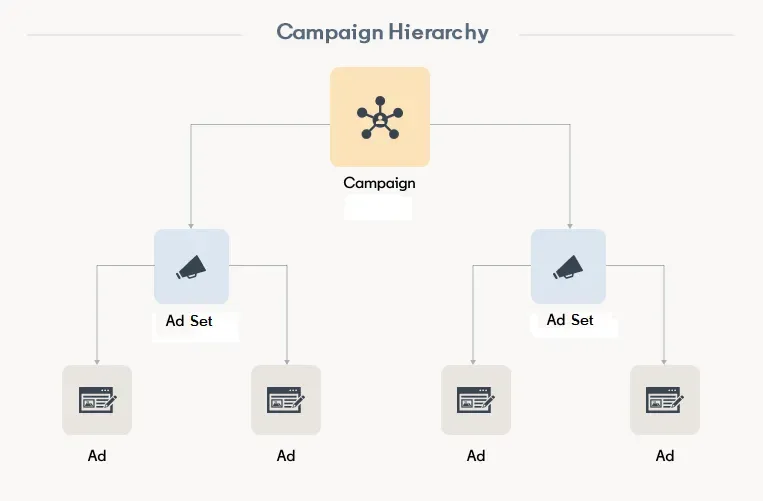
LinkedIn recently announced that it will rename some elements within the campaign hierarchy, also referred to as the ad campaign structure. As LinkedIn explains:
 

“To improve clarity across Campaign Manager, we’re updating the naming of entities within the campaign hierarchy. This hierarchy defines how campaigns are organized and managed.” 


Starting next month, the following changes will take effect:
 

Campaign Groups → now called Campaigns
 

Campaigns → now called Ad Sets
 

For a visual overview of LinkedIn’s updated ad structure, see this guide from Social Media Today.
 

Why LinkedIn is Updating Names
 

These updates are designed to simplify LinkedIn ad management and make it more intuitive for new advertisers. LinkedIn says:
 

“These updates align with industry-standard naming used in other ad management platforms, making it easier for new advertisers to get started. This also simplifies workflows and navigation, helping you manage campaigns more intuitively and enabling new features to perform at their full potential.”


In short, while the change is largely cosmetic, it brings LinkedIn more in line with other platforms like Facebook Ads and Google Ads, helping marketers transition between networks more easily.
 

What Marketers Should Do
 

For most marketers, there’s no action needed; your campaigns and ad sets will continue to run as normal.
 

However, if you’re used to LinkedIn’s previous structure, it’s worth noting the updates to avoid confusion when navigating Campaign Manager.
 

If you manage multiple campaigns or work with a marketing team, consider sharing this update with your colleagues to ensure everyone is on the same page.

Vulse ArtVulse ArtVulse Art
Vulse Art

You May also be interested in

  • blog img

    LinkedIn In-Network vs Out-of-Network Reach: What the New Metric Means And How to Use It

    LinkedIn has started showing creators exactly where their reach comes from. As of early June 2026, your post analytics now split impressions into two groups: people already in your network, and people who are not. It is a small interface change with a big strategic message, because the second number is the one that quietly decides whether your audience grows or stays the same. Here is the short version. In-network reach is the share of your impressions that came from your existing followers and connections. Out-of-network reach is the share that came from everyone else: people who found you through feed recommendations, reshares, and search. If you care about growth, personal branding, or proving that employee advocacy actually works, out-of-network reach is now the clearest signal you have. Key takeaways LinkedIn now breaks post reach into in-network and out-of-network percentages, shown in the discovery section under impressions. In-network reach measures how well content resonates with the audience you already have. Out-of-network reach measures how far it travels to new people. Out-of-network reach is the better proxy for audience growth, brand awareness, and advocacy performance. The update arrives alongside a refreshed, more compact format for document posts, which remain one of LinkedIn's highest-engagement formats. You can act on this immediately by tracking the split over time and doubling down on the content that consistently reaches beyond your own network. What changed in LinkedIn post analytics LinkedIn's director of creator products, Sam Corrao Clanon, confirmed the rollout in a public post on LinkedIn, and it was first reported by Social Media Today. As the feature ramps up globally, creators will see a percentage breakdown inside their post analytics that shows who saw a given post, grouped by whether or not those viewers already followed or connected with them. You will find it in the discovery section of your post analytics, sitting under your impressions count. Rather than a single reach figure, you now get the story behind that figure: how much of it stayed inside your circle, and how much spilled outside it. What is in-network reach on LinkedIn? In-network reach is the percentage of your post's impressions that came from people who already follow you or are connected to you. These are the people who chose to see your content. When in-network reach is high and engagement is strong, it tells you the post landed well with the audience you have built. It is a measure of resonance and loyalty. A post that performs almost entirely in-network is not a failure. Deep engagement from your core audience builds trust, keeps you top of mind, and often seeds the early activity that the algorithm needs before it decides whether to push a post further. What is out-of-network reach on LinkedIn? Out-of-network reach is the percentage of your reach that came from people who were not following or connected to you at the time. According to Corrao Clanon, these viewers discover you through distribution surfaces such as feed recommendations, reshares, and search. In plain terms, out-of-network reach is LinkedIn telling you, "this post escaped your bubble." It is the closest thing the platform gives you to a built-in audience growth metric, because every out-of-network impression is a chance to win a new follower, a new connection, or a new customer. Why out-of-network reach is the metric that matters most For years, LinkedIn reporting forced everyone to treat reach as a single lump sum. That hid the most important distinction in content strategy: the difference between talking to the same people again and reaching someone new. The reason the split matters comes down to how the LinkedIn feed works. The algorithm rewards content that earns early engagement and then keeps performing when shown to people beyond the author's network. Posts that travel out-of-network are, by definition, the posts the algorithm decided were worth recommending to strangers. Tracking that percentage tells you which topics, hooks, and formats have genuine pull, rather than which ones simply please the audience you already have. This is also why the metric is so valuable for two specific goals. What it means for employee advocacy The entire point of employee advocacy is to reach audiences a single company page never could. When ten, fifty, or five hundred employees post, the prize is not just more impressions, it is impressions in front of new, relevant people: their networks, and the networks beyond those. Until now, that promise was hard to prove. Out-of-network reach changes that. An advocacy programme that is working will show meaningful out-of-network percentages across its advocates, which is concrete evidence that employee content is expanding the company's audience rather than recycling it. If you manage advocates across an organisation, this is the number to put in front of your leadership. Tools that pull this data across a whole team, like Vulse's multiple account manager and automated content reports, make it possible to monitor reach quality at scale instead of one profile at a time. What it means for personal branding If you are building a personal brand, follower growth is the long game, and out-of-network reach is the leading indicator. A profile that consistently reaches outside its own network is a profile that is compounding. One that does not is, at best, holding steady. The practical move is to compare your two numbers across many posts and learn your own pattern. Some content will deepen relationships with your existing audience. Other content will introduce you to new people. The best creators do both on purpose, and they use live LinkedIn post analytics to know which is which. This new breakdown builds neatly on top of LinkedIn's earlier post performance alerts, giving you a fuller picture of how each post shapes your professional presence. How to increase your out-of-network reach You cannot control the algorithm, but you can give it more of what it rewards. Based on how out-of-network distribution works, here is where to focus. Lead with a hook that works without context. Out-of-network viewers do not know you. The first two lines have to earn the click on their own, with no assumption of prior trust. Write for shareability. Reshares are a primary out-of-network surface. Strong opinions, useful frameworks, and genuinely surprising data get shared. Vague updates do not. Use formats that travel. Document posts and carousels continue to perform strongly for engagement and dwell time, which helps content qualify for wider distribution. Make it search-friendly. Search is now an explicit out-of-network surface. Use the words your audience actually searches for, in your hook and throughout the post, rather than only insider jargon. Post consistently. A steady cadence gives the algorithm more chances to find your breakout posts. A reliable LinkedIn post scheduler and an AI post generator remove the friction that usually kills consistency. The document posts change, briefly Alongside the analytics update, LinkedIn refreshed how document posts appear in the feed, presenting them in a more compact, streamlined carousel format. It is a minor visual change, but a relevant one given that research has found document posts generate the highest engagement of any LinkedIn content type. A cleaner in-feed display could affect how often people stop, swipe, and engage, so it is worth watching your own document post performance over the coming weeks. How to track the in-network split over time A single post's breakdown is interesting. The trend across dozens of posts is where the strategy lives. The goal is to spot which themes reliably push you out-of-network, then build more content around them while still feeding your core audience the in-depth material that keeps them engaged. This is exactly the kind of analysis that is painful to do by hand and easy to do with the right reporting. If you run content for a team, especially in a sector where consistency and compliance both matter, a purpose-built LinkedIn content tool for professional services turns the raw numbers into a weekly view of what to do next. Frequently asked questions What is the difference between in-network and out-of-network reach on LinkedIn? In-network reach is the share of impressions from people who already follow or are connected to you. Out-of-network reach is the share from people who are not, who found your content through feed recommendations, reshares, or search. Where do I find out-of-network reach in LinkedIn analytics? It appears as a percentage breakdown in the discovery section of your post analytics, located under your impressions, as the feature rolls out globally through Is out-of-network reach good or bad? High out-of-network reach is generally a positive growth signal, because it means your content is reaching new people. In-network reach is not bad, though. It reflects how strongly your existing audience engages. Healthy accounts pay attention to both. Why does out-of-network reach matter for employee advocacy? Because expanding the company's audience is the entire goal of advocacy. Out-of-network reach gives advocacy managers direct evidence that employee posts are reaching new, relevant people rather than recirculating among the same connections. How can I increase my out-of-network reach on LinkedIn? Lead with a strong standalone hook, write content people want to reshare, use high-engagement formats like documents, include the terms your audience searches for, and post consistently so the algorithm has more chances to recommend your best work. Want to see exactly how far your team's LinkedIn content travels, and turn that into a report your leadership understands? See how Vulse works.

    Loading

    LinkedIn In-Network vs Out-of-Network Reach: What the New Metric Means And How to Use It

    by - Rob Illidge -

  • blog img

    How LinkedIn's 2026 Algorithm Works and What It Means for Your Content Strategy

    LinkedIn has rebuilt its feed algorithm from the ground up. This means changes for everything we have been doing so far as marketers. Don't worry tough. At Vulse, we got you covered. The platform replaced five separate content retrieval systems with a single AI-powered ranking model that understands what posts actually mean, not just what keywords they contain. For marketing professionals, the practical impact is significant: organic reach per post has dropped roughly 50%, but the impressions that remain are far more targeted. Personal profiles now command an estimated 65% of feed allocation while company pages receive just 5%. This guide explains how the new algorithm works, what content it rewards and suppresses, and how to adapt your LinkedIn strategy to maintain visibility in What LinkedIn Changed and Why It Matters LinkedIn disclosed the technical details of this overhaul in a March 2026 engineering blog post written by TPM Tech Lead Hristo Danchev. The scale of the change is substantial. The previous feed architecture relied on five independent retrieval pipelines running in parallel, each with its own infrastructure, index, and optimisation logic. These included a chronological network activity feed, geography-filtered trending content, collaborative filtering based on similar members' interests, industry-specific modules, and multiple embedding-based retrieval systems. No single team could optimise across all five simultaneously. The ranking layer treated each impression independently, scoring posts in isolation with no awareness of what a member had recently read. The replacement is a unified system built on a large language model. As Social Media Today reported, the new architecture converts both user profiles and posts into dense mathematical representations within a shared space, then uses GPU-accelerated search to match content to members based on genuine relevance rather than simple keyword overlap. The result is a feed that behaves less like a chronological timeline and more like a personalised recommendation engine. LinkedIn now asks "what are you interested in?" rather than "who do you know?", and that interest model updates continuously based on your recent behaviour. How the Algorithm Now Evaluates Your Content Every post published on LinkedIn goes through a three-stage evaluation process that has become increasingly aggressive about quality filtering. Stage One: The Quality Gate The moment you publish, AI classifies your post as spam, low-quality, or high-quality. Engagement bait, repetitive templates, and obviously automated content may be filtered before they ever reach the ranking stage. LinkedIn VP of Engineering Tim Jurka confirmed the platform is actively reducing what he called "repetitive, click-driven posts" so the feed becomes "more relevant to your interests, and not a popularity contest." This means content that opens with prompts like "Comment YES if you agree" or uses recycled templates is now at risk of being suppressed before it reaches anyone. Stage Two: The Golden Hour Posts that pass the quality gate are shown to a small sample of the poster's audience during the first 60 minutes. The algorithm watches for signals of genuine engagement during this window. Thoughtful comments carry significantly more weight than reactions. Industry analysis suggests comments carry 8 to 15 times more algorithmic weight than likes. Dwell time also matters: posts that hold attention for 60 seconds or more see engagement rates around 15.6%, compared to just 1.2% for posts that generate under 3 seconds of attention. Responding to comments within the first hour produces approximately a 35% visibility boost. This makes the golden hour a critical window for anyone serious about LinkedIn reach. Stage Three: Scaled Distribution Posts that generate strong early engagement enter the broader distribution phase. The LLM-powered matching system can expand reach to second and third-degree connections and even non-followers whose professional interests align with the content's topic. This is where the new algorithm's semantic understanding becomes powerful. Someone interested in "electrical engineering" who engages with posts about "small modular reactors" will see related content on power grid optimisation and renewable energy infrastructure. These are connections that keyword-based systems would have missed entirely. What the Algorithm Rewards in 2026 LinkedIn's new system rewards content that demonstrates genuine expertise and provides professional value. Several patterns consistently perform well. Topical consistency builds authority. The algorithm's transformer-based model processes over 1,000 historical interactions per member. If you have been posting consistently about a specific professional topic, the system recognises that pattern and is more likely to surface your content to others interested in that subject. Niche depth beats broad reach. Original insight outperforms recycled ideas. The LLM can evaluate the semantic novelty of a post. Sharing a genuinely new perspective, first-party data, or a specific professional experience performs better than repackaging widely circulated advice. Meaningful engagement signals quality. A post that generates three thoughtful comments outperforms one with thirty reactions. The algorithm specifically weights active engagement (comments, shares, direct messages) higher than passive engagement (likes, views). Visual and document formats lead on engagement. Buffer's analysis of over one million LinkedIn posts found that carousels and document posts generate nearly 3 times more engagement than video and 6 times more than text-only posts. Native video delivers a 69% performance improvement over other formats, with LinkedIn Live generating 24 times more engagement than standard posts. Posts with standalone value perform best. Content that delivers its core message without requiring users to click an external link consistently outperforms content designed primarily to drive traffic elsewhere. External links can reduce reach by 25 to 68%, though LinkedIn's own editorial team has clarified that links are not penalised if the post itself delivers standalone value. What the Algorithm Suppresses LinkedIn is now actively demoting several content types that previously performed well through gaming tactics. Engagement bait. The platform's NLP models can detect engagement-bait phrases programmatically and demote them automatically. Posts asking for likes, comments, or shares in exchange for content access are penalised. Automation and engagement pods. LinkedIn is cracking down on comment automation tools, browser extensions, and engagement pods, stating these violate platform rules and undermine professional discourse. If you are relying on automated engagement to boost visibility, that strategy is now actively working against you. Generic AI-generated content. The algorithm can detect formulaic AI writing and actively deprioritises it. This does not mean AI tools cannot be part of your content workflow, but the output needs to be edited, personalised, and infused with genuine expertise to pass the quality filters. Mass-identical resharing. If 50 employees share the identical post word-for-word, the algorithm may only display it once, making 49 of those shares invisible. This has significant implications for employee advocacy programmes that rely on one-click sharing without personalisation. For more on how LinkedIn's platform changes affect advocacy programmes, see our analysis of what changed with LinkedIn employee advocacy. The Reach Decline in Context The headline numbers are stark. Richard van der Blom's Algorithm InSights report, based on analysis of roughly 400,000 profiles, found average post views declined approximately 50%, engagement dropped around 25%, and follower growth fell roughly 59% compared to previous periods. But these numbers tell only half the story. LinkedIn has confirmed that posting volume is up 15% year-over-year and comments have increased 24%, meaning there is more competition for attention within the feed. Engagement per post has actually risen 12 to 39% despite lower raw impressions. LinkedIn is comfortable trading raw reach for engagement quality. The platform now accounts for 41% of total B2B paid media budgets, and B2B return on ad spend reached 121% in The strategic intent is clear: LinkedIn wants its organic feed to deliver fewer but more relevant impressions while encouraging brands to invest in paid promotion for broader reach. For marketers, this means vanity metrics like total impressions matter less than ever. The question is whether your content reaches the right people and generates meaningful engagement with them. Why Employee Advocacy Is Now a Strategic Necessity The algorithm's preference for personal profiles over company pages makes employee advocacy the most effective organic distribution strategy on LinkedIn. The data is unambiguous. Analysis of 500,000 employee LinkedIn posts found that personal posts generate 9 times more total engagements, 9 times more clicks, 8.8 times more reactions, and 17 times more comments than curated company content. The economics are equally compelling. Employee advocacy delivers cost-per-clicks of $0.25 to $1.00 compared to LinkedIn Ads at $5 to $10 CPC. Leads from employee-shared content convert 7 times more frequently than leads from traditional channels. And employee networks are roughly 12 times larger than company follower bases. Our own analysis of 400 million LinkedIn impressions found that employee posts achieve 14 times higher engagement rates than company page content. The top performers in our dataset generated over 45,000 impressions per post by combining topical expertise with authentic personal voice. Personalisation Is the Differentiator One critical finding from the 2026 data is that personalisation separates high-performing advocacy content from invisible content. Only 3.6% of advocates actually edit content before sharing, but those who do see 3.6 times more total engagements, nearly 4 times more reactions, over 3 times more clicks, and more than 5 times more comments. Even minimal edits, such as adding a single line of personal context, yield nearly 3 times better performance than identical resharing. This is where the algorithm's mass-duplication penalty becomes critical. If your advocacy programme relies on employees sharing word-for-word identical posts, those shares are likely being suppressed. The solution is not to abandon shared content kits but to make personalisation easy and expected. For practical frameworks on building advocacy programmes that drive personalised sharing, see our employee advocacy training guide and our 2025 buyer's guide to advocacy software. Practical Strategy for Marketing Professionals Based on how the algorithm works in 2026, here is what marketing teams should prioritise. Focus on topical authority, not volume. The algorithm rewards consistent posting within a defined area of expertise. Help your team identify two to three content pillars where they have genuine knowledge and focus there. A data analyst sharing weekly insights about analytics trends will outperform someone posting daily about random business topics. Invest in the golden hour. The first 60 minutes after publishing determine how far your content travels. Post when your audience is active (Tuesday through Thursday tends to deliver peak engagement), and be ready to respond to comments immediately. Every reply within that window compounds the post's reach. Prioritise carousels and native video. Format matters. Carousel posts and document shares generate the highest average engagement, followed by native video. If you are still defaulting to text-only posts with external links, you are leaving significant reach on the table. Train employees to personalise, not just share. Provide content kits with templates, data points, and key messages, but make it clear that adding personal context is what makes advocacy posts perform. Even one sentence of original commentary transforms a templated share into authentic content. Our guide on LinkedIn posting best practices covers the specific techniques that work. Stop gaming and start adding value. Engagement pods, automation tools, and bait-style posts are now actively penalised. The algorithm is sophisticated enough to distinguish between genuine professional engagement and manufactured metrics. Focus on creating content that is genuinely useful to your target audience. Combine organic advocacy with paid amplification. Use organic employee posts to test what content resonates, then amplify top performers through Thought Leader Ads. This creates a flywheel where organic performance data informs paid strategy and paid distribution extends the reach of your best-performing employee content. Use scheduling tools without worry. LinkedIn has confirmed that scheduling tools are not penalised by the algorithm. Demographic attributes are also excluded from ranking signals, and the platform regularly audits its models to ensure fair distribution across creators. Frequently Asked Questions How does LinkedIn's 2026 algorithm rank content? LinkedIn now uses a unified LLM-powered system that converts posts and user profiles into mathematical representations, then matches them based on semantic relevance. Content passes through a quality gate, a 60-minute engagement evaluation window, and then scaled distribution based on topic matching and engagement quality. Why has my LinkedIn reach dropped in 2026? Average post reach has declined approximately 50% due to increased competition (posting volume is up 15% year-over-year) and LinkedIn's deliberate shift toward fewer but more relevant impressions. Engagement quality per post has actually improved, meaning the impressions you do receive are more targeted. Does LinkedIn penalise external links in posts? External links can reduce reach by 25 to 68%, but LinkedIn's editorial team has clarified that links are not penalised if the post itself delivers standalone value. The key is to make the post useful on its own rather than relying entirely on the link for content delivery. Are LinkedIn scheduling tools penalised by the algorithm? No. LinkedIn has confirmed that scheduling tools do not affect how the algorithm ranks your content. How important are comments versus likes for the algorithm? Very important. Thoughtful comments carry an estimated 8 to 15 times more algorithmic weight than likes. The algorithm distinguishes between active engagement (comments, shares, direct messages) and passive engagement (reactions, views), heavily favouring the former. Does employee advocacy still work with the new algorithm? Employee advocacy is more important than ever. Personal profiles receive approximately 65% of feed allocation compared to just 5% for company pages. Employee posts generate 9 times more engagement and deliver cost-per-clicks at a fraction of LinkedIn Ads pricing. However, personalisation is now essential because the algorithm penalises mass-identical sharing. Ready to build an employee advocacy programme that works with LinkedIn's 2026 algorithm? Vulse helps marketing teams create personalised content kits, coordinate employee sharing, and measure real impact on reach and engagement. Start your free trial or book a demo to see how it works.

    Loading

    How LinkedIn's 2026 Algorithm Works and What It Means for Your Content Strategy

    by - Rob Illidge -

  • blog img

    LinkedIn Crosscheck: Test AI Models for Free Inside LinkedIn

    LinkedIn has launched a feature that lets Premium subscribers compare AI models from OpenAI, Anthropic, Google, Microsoft and others, side by side, without paying for separate subscriptions or hitting token limits. The feature is called Crosscheck, and it is rolling out now to LinkedIn Premium subscribers in the United States, with broader availability planned for additional countries and free users. How LinkedIn Crosscheck Works Crosscheck is described by LinkedIn's Chief Product Officer Hari Srinivasan as a "blind taste test" for AI models. The experience works like this: You enter a text prompt LinkedIn returns two answers, each generated by a different AI model You choose which answer you prefer Only after making your selection does LinkedIn reveal which models produced each response The feature already supports a wide range of models. Early testing has returned responses from Anthropic, Google, MoonshotAI, Mistral, and Amazon, with more expected to be added. Crosscheck also has its own leaderboard tracking how professionals across different industries rate the various models against each other. What Crosscheck Does and Does Not Support Crosscheck is currently text-only. You cannot generate images, upload files, or access the more advanced capabilities available directly on each AI platform's native interface. What you do get is unlimited text-based conversations with no token limits, and no requirement to sign up for additional paid subscriptions to access models you want to try. On data sharing: LinkedIn states that anonymised usage data is shared with the AI model providers to help them understand performance across different professional roles and industries. According to LinkedIn's own documentation, no personally identifiable information is passed to model builders. Why This Matters for B2B Content and Advocacy Teams For marketing, content, and employee advocacy teams already working inside LinkedIn, Crosscheck removes a meaningful barrier. Testing whether Claude, Gemini, or GPT-4o produces better output for a specific use case, such as a thought leadership post, a comment response, or a newsletter section, has historically required maintaining multiple subscriptions and switching between platforms. Crosscheck consolidates that comparison inside a platform your team is already using every day. A few practical implications worth considering: For content quality benchmarking. If your team uses AI to support LinkedIn post drafting or employee content kits, Crosscheck gives you a fast, free way to identify which model produces output that resonates with your specific audience and industry vertical. For employee advocates. Employees who are less familiar with AI tools now have a low-friction way to experiment with AI assistance directly inside LinkedIn, without needing separate accounts or training on new platforms. For advocacy programme managers. The Crosscheck leaderboard, broken down by industry, could become a useful proxy for understanding which AI models are gaining traction among your target audience, informing both content strategy and tool selection. What to Watch Crosscheck is currently an early-stage product from LinkedIn Labs, and Srinivasan has acknowledged there is work to do on speed, model range, and supported prompt types. It is also US-only for LinkedIn Premium users at launch, which limits immediate access for UK and European teams. That said, LinkedIn's track record of rolling features out globally after US pilots, combined with the stated intention to extend access to free users, suggests Crosscheck will reach wider audiences within months rather than years. The Bigger Picture for LinkedIn Content Strategy LinkedIn's move to embed AI model comparison directly into the platform is part of a broader pattern. Over the past 18 months, LinkedIn has introduced AI writing assistance, AI-powered post suggestions, and now a structured way to evaluate models against each other, all within the interface where B2B professionals are already spending time. For teams running employee advocacy programmes, this trajectory reinforces a simple strategic point: LinkedIn is becoming a content production and evaluation environment, not just a distribution channel. The tools employees need to create, refine, and share professional content are converging in one place. If your team is not yet building a structured approach to LinkedIn content and employee advocacy, the platform's own investment in AI tooling is accelerating the gap between organisations that are and organisations that are not. Frequently Asked Questions What is LinkedIn Crosscheck? LinkedIn Crosscheck is a feature from LinkedIn Labs that lets Premium subscribers compare responses from different AI models side by side using a blind test format. You enter a prompt, receive two anonymous answers from different models, choose the one you prefer, and then LinkedIn reveals which models produced each response. Which AI models does LinkedIn Crosscheck include? At launch, Crosscheck includes models from Anthropic, Google, MoonshotAI, Mistral, and Amazon, with more expected to be added. LinkedIn has confirmed it plans to expand the model range as the feature develops. Is LinkedIn Crosscheck free to use? Crosscheck is currently available at no additional cost to LinkedIn Premium subscribers in the United States. LinkedIn has stated it plans to extend access to free users and additional countries, though no confirmed timeline has been given. Does LinkedIn Crosscheck share my data with AI companies? Yes. According to LinkedIn's documentation, anonymised usage data is shared with AI model providers to help them understand how their models perform across different professional roles and industries. LinkedIn states that no personally identifiable information is shared with model builders. Can I use LinkedIn Crosscheck to generate images or upload files? No. Crosscheck currently supports text-based prompts only. Image generation, file uploads, and the more advanced tools available natively on each AI platform are not supported within Crosscheck. Is there a limit on how many prompts I can send in LinkedIn Crosscheck? No. LinkedIn has confirmed there are no token limits or usage caps on text-based conversations within Crosscheck, which is one of its main advantages over testing models through their native platforms on free or limited tiers. How can employee advocacy teams use LinkedIn Crosscheck? Advocacy teams can use Crosscheck to benchmark which AI models produce the best output for specific LinkedIn use cases, such as thought leadership posts, comment responses, or newsletter sections. It is also a useful onboarding tool for employee advocates who are new to AI writing assistance, as it removes the need to sign up for separate platforms. Where can I access LinkedIn Crosscheck? Crosscheck is available through LinkedIn Labs for LinkedIn Premium subscribers in the United States.

    Loading

    LinkedIn Crosscheck: Test AI Models for Free Inside LinkedIn

    by - Rob Illidge -

Revolutionise Your LinkedIn Output Today

Got a question? Give us a call or start your free trail today