
Why LinkedIn Content Now Shows Up in ChatGPT And What It Means for Employee Advocacy
- LinkedIn Strategy
Published 15 January 2026•Updated 12 October 2026•By Rob Illidge
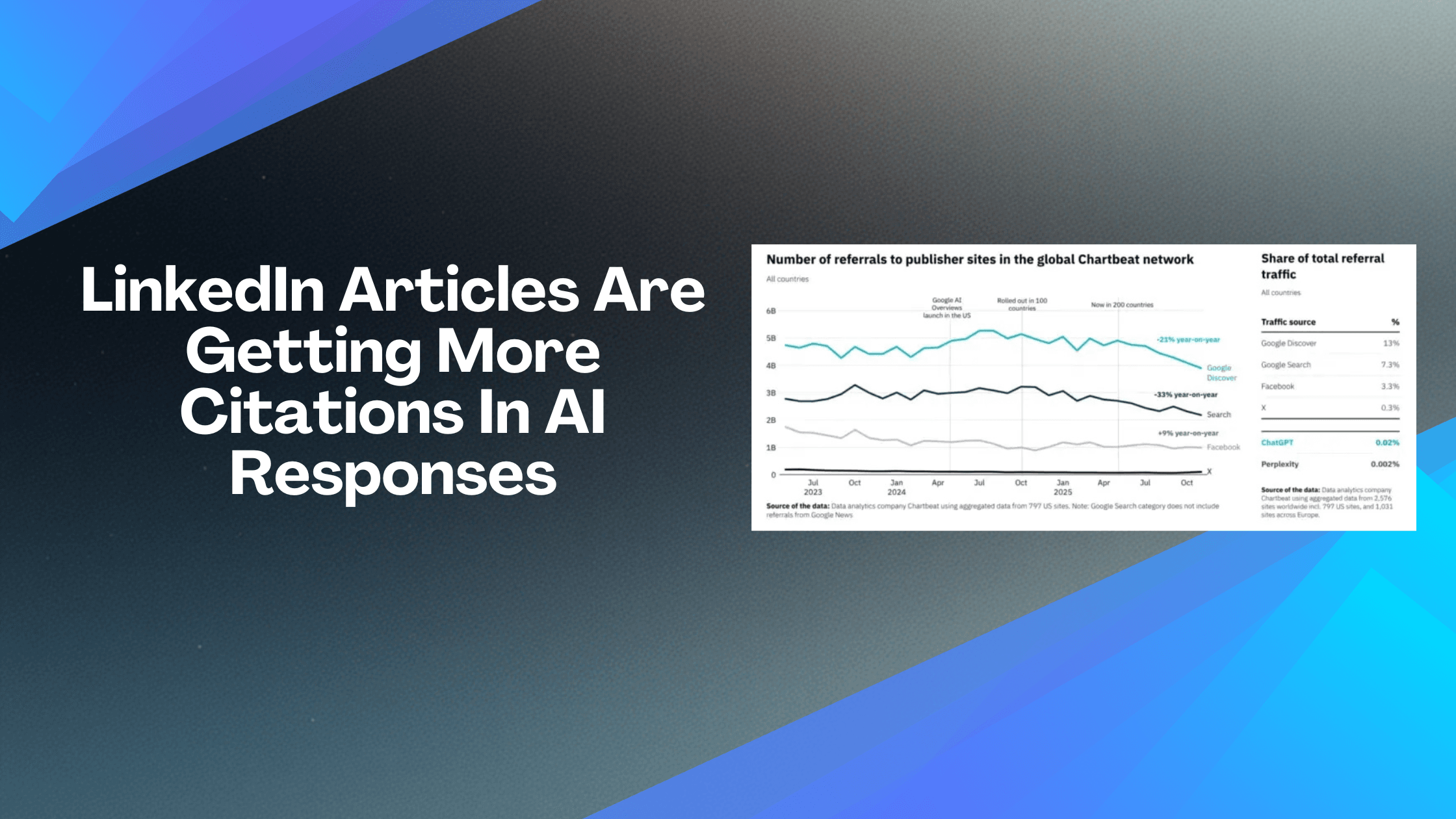
Google traffic is down. AI citations are up. And LinkedIn is suddenly one of the most trusted sources for AI tools like ChatGPT and Perplexity.
For B2B marketers running employee advocacy programmes, this changes everything.
The Shift from Search to AI
New data from the Reuters Institute shows that Google search traffic to publishers declined by a third globally in the year to November 2025. Google Discover referrals dropped 21% year on year. Since May 2023, overall external referrals to publisher websites have fallen by 24%.
The reason? AI is changing how people find information.
Instead of clicking through search results, more people are asking ChatGPT, Perplexity, and Google's AI tools directly. These tools summarise content from across the web and provide answers in a conversational format. For many queries, users never visit the original source at all.
According to Press Gazette, publishers expect traffic from search engines to decline by more than 40% over the next three years. This is not a temporary dip. It is a structural shift in how information is discovered and consumed.
LinkedIn Is Now a Top Source for AI Tools
Here is where it gets interesting for B2B brands.
Research from SEMRush, based on a study of 230,000 prompts across ChatGPT, Google AI, and Perplexity, found that LinkedIn is now the second most cited source in AI chatbot responses, trailing only Reddit.
A separate study from Spotlight showed that AI tools are citing LinkedIn sources up to five times more often than before. ChatGPT cites LinkedIn 4.2 times more frequently, and Perplexity cites it 5.7 times more frequently.
Of the 19,202 LinkedIn sources cited in the Spotlight analysis, over 15,000 came from LinkedIn Pulse articles specifically.
As Social Media Today reported, AI chatbots are putting more trust in LinkedIn, and in LinkedIn articles in particular. This points to a new opportunity for brands and individuals who want to show up in AI-powered search results.
What This Means for Employee Advocacy
If your employees are posting regularly on LinkedIn, they are not just building brand awareness. They are building citable authority.
When someone asks an AI tool a question about your industry, the answer may come from content your team published on LinkedIn. That is a level of discoverability that traditional SEO cannot match.
This changes the value proposition of employee advocacy. It is no longer just about reach and engagement. It is about becoming a trusted source that AI tools reference when answering questions.
For B2B companies, this is significant. Your buyers are already using AI tools for research. If your employees are visible, publishing valuable content, and building authority on LinkedIn, your brand is more likely to appear in those AI-generated answers.
How to Optimise LinkedIn Content for AI Citation
Not all LinkedIn content is created equal. If you want your posts and articles to be cited by AI tools, there are a few things to keep in mind.
Publish LinkedIn articles, not just posts. The Spotlight data showed that the vast majority of LinkedIn citations came from Pulse articles. Long-form content is more likely to be indexed and referenced by AI systems.
Answer specific questions. AI tools are looking for clear, authoritative answers to user queries. Structure your content around the questions your audience is asking. Use the question as your headline where possible.
Verify your profile. LinkedIn profile verification is a trust signal. AI systems may use this as an indicator of authority when deciding which sources to cite.
Keep your career history current. An up-to-date profile with a clear professional history reinforces credibility. AI tools are looking for signals that a source is legitimate and knowledgeable.
Write factual, substantive content. AI tools favour content that is informative, well-structured, and easy to extract key points from. Avoid fluff. Get to the point and provide real value.
Publish consistently. Topical authority builds over time. Regular publishing signals to AI systems that you are an active, engaged voice in your field.
The Opportunity for B2B Brands
This shift creates a real opportunity for companies investing in employee advocacy.
While competitors focus on traditional SEO and paid advertising, you can build a library of LinkedIn content that AI tools trust and cite. Every article your team publishes is a potential answer to a question your buyers are asking.
The companies that act now will have a head start. AI citation is not yet a crowded space. The brands that establish authority early will be harder to displace as these systems mature.
Employee advocacy has always been about trust. People trust people more than they trust brands. Now AI tools are following the same pattern, favouring content from verified individuals over faceless corporate sources.
What Vulse Customers Should Do Next
If you are already running an employee advocacy programme with Vulse, you are well positioned to take advantage of this shift. Here is how to maximise the opportunity:
Encourage long-form content. In addition to regular posts, prompt your team to publish LinkedIn articles on topics where your company has expertise. These are more likely to be cited by AI tools.
Focus on buyer questions. Create content that answers the questions your prospects are asking. Think about what someone might type into ChatGPT when researching your industry or evaluating solutions like yours.
Build topical authority. Concentrate your team's content around specific themes. Consistent publishing on a focused topic signals expertise to AI systems.
Track what is working. Use Vulse's analytics to identify which content is generating the most engagement. High-performing posts are likely candidates for expansion into full articles.
The rules of discoverability are changing. Google traffic is declining. AI tools are rising. And LinkedIn content is becoming one of the most trusted sources for AI-generated answers.
For B2B companies, this is not a threat. It is an opportunity. The brands that invest in employee advocacy now will be the ones AI tools cite tomorrow.
Frequently Asked Questions
Why is LinkedIn content showing up in ChatGPT answers?
A SEMrush study of 230,000 prompts across ChatGPT, Google, and Perplexity found LinkedIn is the second most cited source in chatbot responses, behind only Reddit. Chatbots are placing more trust in LinkedIn, and in LinkedIn articles in particular.
How much more often are chatbots citing LinkedIn?
A separate Spotlight study found ChatGPT cites LinkedIn 4.2 times more frequently and Perplexity cites it 5.7 times more frequently. Of the 19,202 LinkedIn sources analysed, over 15,000 came from LinkedIn Pulse articles.
How can I make my LinkedIn content more likely to be cited?
Publish LinkedIn articles as well as posts, answer specific questions and use the question as your headline where possible, verify your profile, and keep your career history current to reinforce credibility.
What does this mean for employee advocacy?
Employees who post regularly build citable authority as well as brand awareness. Because buyers already use chatbots for research, visible employees publishing valuable content make your brand more likely to appear in the answers they see.