
LinkedIn Now Lets You Filter Comments by Verified Members
- LinkedIn Strategy
Published 27 April 2026•Updated 12 October 2026•By Rob Illidge
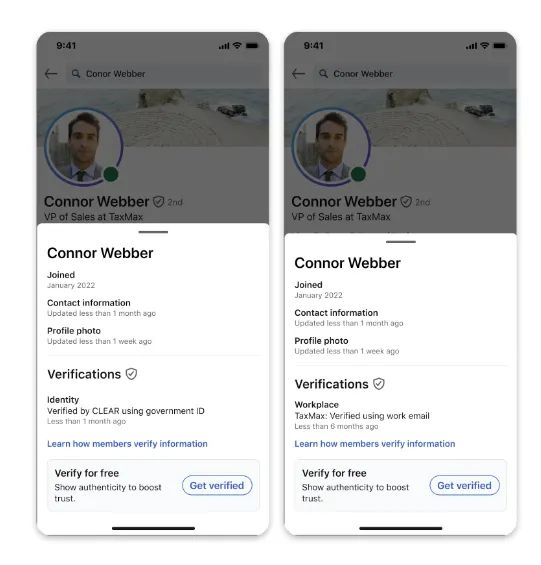
LinkedIn has quietly rolled out a new comment sorting option that lets users filter replies by verified members only. It is a small interface change with significant implications for anyone using LinkedIn as a B2B content and engagement channel.
Here is what the update involves and what it means for brands running employee advocacy programmes.
What LinkedIn Has Changed
LinkedIn has added a third sort option to post comments alongside the existing Most Relevant and Most Recent filters. The new option is called Verified Members, and selecting it shows only comments from users who have confirmed their identity on the platform.
According to LinkedIn's own Help Centre documentation, the feature is designed to help members find authentic comments on posts with large comment volumes. The Verified Members filter surfaces insights from trusted professionals while reducing noise from automated, generic, or inauthentic comments.
The feature is currently rolling out to a portion of users rather than the full platform, so you may not see it in your account yet.
How LinkedIn Verification Works
Unlike verification on Meta or X, LinkedIn verification is free. Members can confirm their identity through third-party support partners or by submitting government ID information directly.
LinkedIn reported in December 2024 that more than 100 million members had verified their identity on the platform. Given that LinkedIn has over one billion members in total, verified accounts still represent roughly 10 percent of the user base, which is why the filter is a meaningful signal rather than a universal one.
Why LinkedIn Is Prioritising Verified Content
The timing of this update is not accidental. LinkedIn content has become a leading source for AI-generated answers, with research showing LinkedIn is among the most cited platforms by AI chatbots when generating professional and business-related responses.
That citation value depends entirely on the quality and authenticity of the content being cited. If bot-generated or spam comments dilute the signal, LinkedIn's value as a trusted professional data source weakens. Surfacing verified member content is one way to protect the integrity of that data stream.
There is also a straightforward commercial incentive: the more LinkedIn can demonstrate that its platform hosts authentic, high-quality professional conversations, the stronger its case for Premium subscriptions, advertising investment, and enterprise product sales.
What This Means for Employee Advocacy Teams
For B2B brands running employee advocacy programmes, this update has three direct implications.
Verified employees carry more weight in comments. If your employees are engaging with prospects' posts, commenting on industry conversations, or responding to your own company content, a verified profile now places them in the priority tier when others filter by verification. An unverified employee advocate may not appear at all in filtered views.
Verification is now a baseline, not a bonus. Until now, LinkedIn verification was something advocates could optionally pursue. This update shifts it closer to a minimum standard for anyone whose LinkedIn engagement is part of a broader business development or thought leadership strategy.
Comment engagement on company posts becomes more valuable. Posts that attract verified member comments will produce higher-quality filtered feeds. Encouraging senior leaders, subject matter experts, and verified employees to comment on company content is now a deliberate reach and trust strategy, not just a vanity metric.
What Advocacy Teams Should Do Now
Audit your advocate pool for verification status. Identify which of your active employee advocates have completed LinkedIn's identity verification. For any unverified advocates, share LinkedIn's verification instructions and make verification part of your programme onboarding checklist.
Update your advocacy programme guidelines. If you maintain a content kit, employee playbook, or onboarding document for your advocacy programme, add LinkedIn verification as a recommended first step. It takes minutes and the benefit compounds over time as the filter becomes more widely used.
Prioritise comment engagement, not just post sharing. Employee advocacy programmes typically focus on sharing content from a library. This update is a prompt to also encourage employees to comment thoughtfully on relevant posts in their feed, particularly high-volume posts in your industry where a verified comment in the filtered view gives disproportionate visibility.
Track verified engagement separately. If you are measuring your advocacy programme's impact, start segmenting engagement data by whether the interacting accounts are verified. This will become a more meaningful quality signal as LinkedIn continues to weight verified activity in its surfacing decisions.
The Bigger Picture
This update sits alongside a series of moves LinkedIn has made in 2026 to improve content quality and deepen the value of its professional data layer. Recent changes include expanded AI-powered conversational search, Crosscheck for comparing AI model outputs, and a leadership transition focused on AI development.
The direction is consistent: LinkedIn is investing heavily in the credibility and quality of its professional content ecosystem. For brands whose growth depends on organic LinkedIn reach, that investment is only worth capturing if the humans representing your company in the feed are verified, active, and producing content that stands up to scrutiny.
Employee advocacy built on authentic, verified professional voices is not just a nice-to-have in that environment. It is increasingly the baseline for visibility.
Frequently Asked Questions
What is LinkedIn's verified replies filter?
It is a new comment sorting option that lets users view only comments from verified members. It sits alongside the existing Most Relevant and Most Recent filters and is designed to reduce spam and bot-generated comments in high-volume post discussions.
Is LinkedIn verification free?
Yes. Unlike Meta or X, LinkedIn verification does not require a paid subscription. Members can verify their identity through LinkedIn's third-party support partners or by submitting government ID information. Full instructions are available in LinkedIn's Help Centre.
How many LinkedIn members are verified?
As of December 2024, LinkedIn reported that more than 100 million members had verified their identity on the platform. LinkedIn has over one billion members in total, meaning verified accounts represent approximately 10 percent of the full user base.
Does LinkedIn verification improve post reach?
Not directly in terms of algorithmic distribution. However, verified member comments are now prioritised in the new filter view, which means verified advocates are more likely to be seen when users sort comments by verification status on high-volume posts.
Should employee advocates get verified on LinkedIn?
Yes. With LinkedIn now surfacing verified member comments in a dedicated filter, unverified advocates risk being invisible in filtered comment views. Verification should be treated as a standard onboarding step for any employee participating in a formal advocacy programme.
What is the difference between LinkedIn verification and LinkedIn Premium?
LinkedIn verification confirms a member's real-world identity and is free. LinkedIn Premium is a paid subscription tier that unlocks additional features including InMail credits, profile insights, and learning tools. The two are independent of each other: a member can be verified without Premium and vice versa.
Will this filter affect how company page posts perform?
Indirectly. Posts that attract substantial verified member engagement will produce richer, higher-quality filtered comment feeds, which may encourage more users to engage with that content. Brands that actively encourage verified employees to comment on company posts are likely to benefit as the filter becomes more widely adopted.