Vulse ArtVulse ArtVulse Art

Latest News

  • All
  • How-To Guides
  • Employee Advocacy
  • Product Updates
  • LinkedIn Strategy
  • Company News
  • blog img

    Vulse vs Oktopost: Which LinkedIn Employee Advocacy Tool is Right for You?

    Choosing the right employee advocacy tool is a critical decision for B2B brands that want to amplify their reach on LinkedIn and beyond. In 2025, the two names that often come up in conversations are Vulse and Oktopost.While both platforms are designed to support employee advocacy, their approaches, features, and focus areas differ significantly.In this article, we break down the strengths of each tool, compare their features, and help you decide which platform best fits your business needs.Why Employee Advocacy Is Essential For B2B BrandsEmployee advocacy has become more than just a marketing strategy.It’s now one of the most effective ways to:Increase organic reach on LinkedInBuild trust and thought leadership within target industriesEmpower employees to become brand ambassadorsGenerate leads from authentic, employee-driven contentWith LinkedIn sunsetting My Company businesses need a dedicated tool to fill that gap.Vulse: The LinkedIn-Focused Employee Advocacy ToolVulse is designed specifically for B2B companies that want to maximize results on LinkedIn.Unlike general social media management platforms, Vulse leverages unique LinkedIn API access to create a more precise and effective employee advocacy experience.Key Features of Vulse:LinkedIn API integration for seamless publishing and analyticsTone-matching AI to keep employee content on-brandAccount scoring to measure advocacy effectiveness at an individual and company levelContent planning tools to simplify employee participationBuilt with B2B advocacy in mind rather than broad consumer marketingVulse is particularly strong for companies that want to focus their advocacy strategy where it matters most: LinkedIn.Oktopost: An Enterprise Social Media SuiteOktopost is positioned as a B2B social media management platform with employee advocacy included as part of its offering.Key Features of Oktopost:Broad social media scheduling and reporting across channelsEmployee advocacy as part of a larger, more expensive enterprise platformIntegrations with marketing automation and CRM toolsAnalytics for enterprise marketing teamsOktopost works best for organizations that want a high-budget, multi-channel advocacy program embedded within a broader social media strategy.Vulse vs Oktopost: Head-to-HeadFeatureVulseOktopostFocusLinkedIn employee advocacyBroad social mediaBest ForB2B companies prioritizing LinkedIn growthEnterprise teamsAI Content SupportTone-matching AI, account scoring, employee planning toolsSocial publishingEase of UseSimple and employee-friendlySuited for large, high-budget marketing teamsIntegrationsLinkedIn API, SaaS integrationsCRM, marketing automation, enterprise systemsWhich Tool is Right for You?Choose Vulse if your company is primarily focused on LinkedIn, wants AI-powered advocacy features, and values simplicity for employees.FAQs: Vulse vs Oktopost Employee AdvocacyQ1: What is the difference between Vulse and Oktopost?A: Vulse is a dedicated LinkedIn employee advocacy tool designed to boost organic reach and employee engagement, while Oktopost is a broader B2B social media management platform that also offers advocacy. Vulse focuses on simplicity, LinkedIn optimization, and employee adoption, while Oktopost emphasizes multi-channel campaign management.Q2: Which employee advocacy tool is better for LinkedIn?A: If your priority is LinkedIn employee advocacy, Vulse is purpose-built for it, with unique features like tone matching, content scoring, and LinkedIn API integration. Oktopost offers LinkedIn features too, but as part of a wider social media suite.Q3: Is Vulse more cost-effective than Oktopost?A: For companies focused on LinkedIn employee advocacy, Vulse is more cost-effective since it avoids paying for multi-channel features you may not need. Oktopost is better suited for enterprises managing complex, multi-platform campaigns.Q4: Why should companies invest in employee advocacy software?A: LinkedIn has continued limiting organic brand reach in 2025, making employee-driven sharing essential for visibility. Employee advocacy software like Vulse helps brands empower staff to amplify company content authentically.Q5: Can Vulse integrate with other marketing tools?A: Yes. Vulse integrates with LinkedIn and can be extended to other platforms, including CRMs, analytics tools, and multi-channel marketing stacks. The right choice depends on your company’s tech setup and advocacy goals.

    Loading

    Vulse vs Oktopost: Which LinkedIn Employee Advocacy Tool is Right for You?

    by - Rob Illidge -

  • blog img

    What Changed With LinkedIn Employee Advocacy In 2025?

    Employee advocacy has become one of the most powerful ways for B2B brands to grow on LinkedIn.In 2025, the landscape shifted again as LinkedIn updated its approach to employee engagement and visibility.If your company is investing in advocacy, it is critical to understand these changes and adapt your strategy.The Evolution of Employee Advocacy on LinkedInLinkedIn has continued to refine its platform to prioritize authenticity, community, and trust. Over the past year, major changes have directly affected how organizations use employee advocacy:1. The Transition from My Company TabLinkedIn officially phased out certain features of the My Company tab within company pages, moving toward more integrated advocacy options.While the tab allowed employees to see suggested content, LinkedIn is now focusing on features that encourage organic employee sharing and thought leadership-driven content.2. Stricter Controls on AutomationIn 2025, LinkedIn increased its restrictions on automated posting and engagement tools.The platform is limiting visibility for comments made via third-party automation, ensuring that interactions remain genuine. This means companies relying on automation risk-reduced reach and credibility.3. Growing Importance of Authentic VoicesLinkedIn is rewarding posts from real people over brand handles.This makes employee advocacy more important than ever, as employees are often perceived as more trustworthy than corporate accounts.Brands that empower employees to post original insights, share company updates, and participate in industry conversations are seeing stronger engagement.Why This Matters for B2B CompaniesThe 2025 changes emphasize quality over quantity.For businesses, this means:Prioritizing authentic employee contributions over automated campaignsShifting focus from centralized posting to distributed advocacy across teamsTracking the ROI of advocacy programs to show impact on reach, engagement, and conversionsEmployee advocacy platforms like Vulse help companies navigate these changes by making it easier to distribute content to employees, track performance, and ensure messaging stays aligned.How to Future-Proof Your Advocacy Strategy in 2025Here are three steps B2B marketers should take:Invest in Employee EnablementTrain employees on personal branding, thought leadership, and how to use LinkedIn effectively.Use the Right Advocacy PlatformWith LinkedIn phasing out legacy tools, companies should use a dedicated employee advocacy software like Vulse to centralize, measure, and scale advocacy efforts.Measure What MattersTrack beyond likes and impressions. Measure profile views, follower growth, and inbound leads to capture the real business value of advocacy.LinkedIn is all about authenticity and human-centered engagement.Automated tools are being restricted, company features are shifting, and employees are becoming the true voice of your brand.By adapting now, your business can stay ahead and unlock the full potential of employee advocacy.

    Loading

    What Changed With LinkedIn Employee Advocacy In 2025?

    by - Rob Illidge -

  • blog img

    LinkedIn Cracks Down on Automated Comments: What Marketers Need to Know

    LinkedIn has announced a significant change that could reshape how brands and professionals approach engagement on the platform.The visibility of comments made via automation tools will be restricted, meaning marketers relying on automated engagement may see their reach and influence decline.This move is part of LinkedIn’s broader commitment to authentic, human-first conversations. For marketers, the message is clear: quality engagement from real people now matters more than ever.Why LinkedIn is Limiting Automated CommentsAccording to LinkedIn’s official statement comments generated through third-party automation tools will soon have reduced visibility. This includes activity designed to mimic genuine interaction at scale.The rationale?LinkedIn wants to protect the authenticity of conversations.Automated comments can often come across as generic or spam-like, undermining trust in the platform.A recent Social Media Today report notes that this change is aimed at ensuring high-quality discourse, keeping LinkedIn a trusted space for professional networking and thought leadership.What This Means for MarketersFor brands and agencies using automated tools to boost engagement, this change is a wake-up call.The risk is clear: if you continue to rely on automated comments, your visibility, and by extension, your ROI on LinkedIn, will shrink.Instead, marketers need to double down on authentic employee advocacy and thought leadership. Genuine comments from real employees will not only maintain visibility but also foster trust, credibility, and stronger connections with audiences.How to Adapt Your StrategyTo stay ahead, marketers should pivot from automation to strategic advocacy and content planning. Here’s how:Encourage employee voices: Support staff in sharing insights and responding personally to posts.Leverage trusted platforms: Tools like Vulse (with unique LinkedIn API access and AI tone matching) help teams create authentic content at scale - without falling into the automation trap.Build thought leadership campaigns: Position executives, subject-matter experts, and employees as credible voices in your industry.By focusing on human-centered content, your brand can maintain strong engagement while competitors reliant on automation fade into the background.

    Loading

    LinkedIn Cracks Down on Automated Comments: What Marketers Need to Know

    by - Rob Illidge -

  • blog img

    Maximize Reach with LinkedIn Thought Leader Ads

    LinkedIn Thought Leader Ads are transforming how brands build credibility and engagement on the world’s largest professional network.If your B2B marketing strategy still relies only on corporate posts or traditional Sponsored Content, you’re missing one of LinkedIn’s most powerful advertising tools.In this post, we’ll explore why Thought Leader Ads on LinkedIn are so effective, how they work, and why you should integrate them into your LinkedIn advertising strategy.What are LinkedIn Thought Leader Ads?Thought Leader Ads let brands sponsor organic posts from LinkedIn members to amplify authentic voices that already engage with your audience. Unlike traditional sponsored content created by marketing teams, these ads promote real posts from real people.LinkedIn expanded this format in 2024 to allow brands to sponsor posts from any LinkedIn member, not just employees. This opens the door to promoting customer testimonials, partner insights, and industry commentary alongside employee content.The format works because it looks and feels like organic content. Research from Nielsen shows that 88% of consumers trust recommendations from people they know over any other form of advertising. Thought Leader Ads tap into that trust by putting human voices in front of targeted audiences.Why Thought Leader Ads outperform traditional sponsored contentStandard LinkedIn ads have a credibility problem. Audiences recognise branded content and often scroll past it. LinkedIn's own data shows Thought Leader Ads generate higher engagement rates than traditional single-image ads.The trust advantageEdelman's Trust Barometer consistently finds that "people like me" are trusted more than corporate messaging. When a customer or employee shares their genuine perspective, it carries weight that a brand post cannot replicate.Thought Leader Ads let you amplify that authentic voice to a precisely targeted audience, combining organic credibility with paid reach.Real-world benefitsBetter engagement. People respond to relatable, human content. Sprout Social's research shows employee-shared content receives 8x more engagement than content shared through brand channels.Credibility lift. Third-party voices reduce the perception of overt marketing. A customer saying "this product solved my problem" is more persuasive than a brand saying "our product solves problems."Event promotion. LinkedIn supports Thought Leader Ads for events, making them effective for driving attendance and awareness. Promote an employee post about speaking at your event rather than a generic registration ad.Lower creative costs. The content already exists. You are amplifying organic posts rather than producing new creative assets.How Thought Leader Ads fit your ad strategyThought Leader Ads are not a replacement for your existing LinkedIn advertising. They are an additional lever that works alongside standard Sponsored Content, Message Ads, and Lead Gen Forms.LinkedIn's Campaign Manager supports Thought Leader Ads as a creative format within existing campaign structures. You can use the same targeting, bidding, and measurement tools you already know.When to use Thought Leader AdsScenarioWhy It WorksCustomer testimonialSocial proof from a real userEmployee expertise postSubject matter authorityEvent speaker promotionPersonal credibility drives registrationsProduct launch commentaryAuthentic first impressionsIndustry trend analysisThought leadership positioningWhen to stick with traditional adsDirect response campaigns with specific CTAsBrand awareness with controlled messagingProduct demos or explainer videosRetargeting with offer-specific creativeBest practices for using Thought Leader Ads1. Find posts worth promotingLook for organic posts with:Genuine commentary or personal insightHigh engagement relative to the author's typical postsAlignment with your brand narrativeNo competitor mentions or off-brand contentLinkedIn's algorithm research from Richard van der Blom shows that posts with high early engagement tend to perform well when amplified. Organic traction is a signal of content quality.Prioritise authenticity over perfect production. A slightly rough post that feels real will outperform a polished piece that reads like marketing copy.2. Secure permissions and creditEven though LinkedIn allows brands to sponsor posts from any user, best practice is to:Request explicit permission before promotingNotify the author when the campaign goes liveShare performance results with them afterwardThis builds goodwill and often leads to future collaboration. Social Media Today's coverage notes that transparent communication is essential when promoting third-party content.For employee posts, establish clear guidelines in your employee advocacy policy so team members know their content may be promoted.3. Match creative to audience segmentsDifferent posts resonate with different audiences. Use LinkedIn's targeting to match content to segments:AudienceBest Content TypeProspects in awareness stageIndustry insight postsProspects evaluating solutionsCustomer testimonialsEvent targetsSpeaker posts, behind-the-scenesTalent acquisitionEmployee culture postsLinkedIn's targeting options let you reach by job title, company, industry, skills, and more. Combine precise targeting with relevant Thought Leader content for maximum impact.4. Measure meaningful KPIsTrack metrics that matter for your objectives:MetricSourceWhat It Tells YouImpressionsCampaign ManagerRaw visibilityEngagement rateCampaign ManagerContent resonanceCTRCampaign ManagerInterest in learning moreConversion rateCampaign Manager + CRMBusiness impactCost per leadCampaign ManagerEfficiencyBrand liftLinkedIn Brand Lift TestPerception changeA lifted CTR is encouraging, but conversion and downstream revenue matter most. Set up proper attribution using UTM parameters to track post-click behaviour.5. Combine Thought Leader Ads with employee advocacyThe most effective approach uses both organic employee advocacy and paid Thought Leader Ads together:Organic first: Employees post content that resonates with their networksIdentify winners: Track which posts generate strong organic engagementAmplify selectively: Promote top performers as Thought Leader AdsExtend reach: Paid distribution reaches audiences beyond employee networksMeasure and iterate: Use results to inform future content creationThis creates a flywheel where organic content feeds paid amplification, and paid results inform organic strategy.McKinsey's research on marketing effectiveness shows that integrated approaches outperform siloed channel strategies.Step-by-step: Setting up a Thought Leader Ad campaignStep 1: Identify candidate postsReview recent posts from employees, customers, and partners. Look for:Engagement above the author's baselineRelevant topic alignmentNo compliance or brand safety issuesStep 2: Request permissionReach out to the author:"Hi [Name], your recent post about [topic] performed really well and aligns with what we are trying to communicate. Would you be open to us promoting it to a broader audience through LinkedIn? We would keep you updated on performance."Step 3: Create the campaignIn LinkedIn Campaign Manager:Create a new campaign with your objective (awareness, consideration, or conversions)Select Thought Leader Ad as the formatEnter the post URL or select from available postsConfigure targeting, budget, and scheduleLaunch and monitorStep 4: Optimise based on resultsAfter 7-14 days:Compare performance across different postsAdjust targeting based on engagement patternsPause underperformers and scale winnersTest new posts based on learningsQuick checklist before you boost a postIs the post authentic and on-brand?Does it show organic traction already?Have you confirmed permissions with the author?Is targeting aligned with the content topic?Are KPIs and tracking set up properly?Does the post comply with LinkedIn's advertising policies?Common mistakes to avoidPromoting posts with no organic engagement. If a post did not resonate organically, paid amplification rarely fixes the problem. Start with content that already works.Over-polishing before promotion. Resist the urge to edit posts before sponsoring them. The authentic voice is the point. Minor grammatical issues are fine.Ignoring the author. Failing to communicate with the person whose post you are promoting damages trust. Keep them informed and share results.Narrow testing. Do not put your entire budget behind one post. Test multiple pieces of content to find what resonates with your target audience.Forgetting attribution. Without proper tracking, you cannot prove ROI. Set up UTMs and conversion tracking before launching.Resources to learn moreLinkedIn Thought Leader Ads Best Practices - Official guidance from LinkedInLinkedIn Campaign Manager - Platform for creating and managing campaignsSocial Media Today coverage - Updates on the format expansionHubSpot Marketing Resources - Broader social ad strategy and best practicesLinkedIn Advertising Policies - Compliance requirementsHow employee advocacy amplifies Thought Leader AdsThought Leader Ads work best when you have a consistent stream of quality organic content to promote. That requires an active employee advocacy programme.When employees post regularly about their expertise, industry trends, and company culture, you build a library of potential Thought Leader Ad creative. The organic performance data tells you which content deserves paid amplification.Our analysis of 400 million LinkedIn impressions found that top performers generated 45,000 impressions per post by prioritising quality over volume. That high-performing organic content becomes your Thought Leader Ad fuel.

    Loading

    Maximize Reach with LinkedIn Thought Leader Ads

    by - Rob Illidge -

  • blog img

    Best Employee Advocacy Tools for 2026: Build a Programme That Scales

    Best Employee Advocacy Tools for 2026 Employee advocacy has become essential for B2B brands. LinkedIn's algorithm increasingly favours human-led content over corporate pages, and buyers trust employees far more than brand accounts. The right tools make it easy to launch, manage, and measure an advocacy programme without adding hours to your marketing workload. This guide covers the best employee advocacy tools for 2026, from dedicated advocacy platforms to complementary solutions that support content creation, communication, and measurement. What to Look for in an Employee Advocacy Tool Before choosing a platform, consider these factors. Ease of use for employees. If the tool is complicated, adoption will fail. Look for one-click sharing, mobile access, and minimal training requirements. Content curation and suggestions. The best tools provide ready-to-share content so employees don't start from a blank page. Analytics and ROI tracking. You need to measure reach, engagement, and pipeline influence to prove programme value. Compliance and approval workflows. For regulated industries, approval processes and audit trails are essential. Integration with your existing stack. Consider how the tool connects with your CRM, LinkedIn, Slack, and other systems. Best Employee Advocacy Tools for 2026 Vulse Disclosure: This is our platform. We're putting it first because we genuinely believe it's the best LinkedIn-focused advocacy tool available, but we encourage you to evaluate all options. Best for: B2B companies focused on LinkedIn employee advocacy Vulse is purpose-built for LinkedIn employee advocacy. Unlike multi-channel social media management tools, Vulse focuses exclusively on helping employees build their professional brands and amplify company content on LinkedIn. Key features: AI-powered content suggestions matched to each employee's tone Content library with one-click sharing Scheduling and approval workflows Analytics dashboard tracking reach, engagement, and individual performance Unique LinkedIn API access for accurate data Content scoring to optimise post performance Why it stands out: Vulse was designed for employee adoption. The interface is simple enough that employees can share content in seconds without training. For marketing teams, the analytics go beyond vanity metrics to show genuine business impact. Learn more about how to measure employee advocacy ROI. Pricing: Tiered plans based on number of seats. Free trial available. Website: vulse.co Canva Best for: Creating branded content for employees to share Canva is not an advocacy platform, but it has become essential for employee advocacy programmes. It enables anyone to create professional graphics, carousels, and social posts without design skills. Key features: Brand kit to maintain visual consistency LinkedIn post templates Carousel and PDF creation for high-engagement formats Team collaboration and approval workflows Magic Resize for multi-format content Why it works for advocacy: Employees often want to add a personal touch to content. Canva makes it easy to create original posts that still align with brand guidelines. Many companies pair Canva with a dedicated advocacy tool for distribution. Pricing: Free plan available. Canva for Teams from £12.99/month per person. Website: canva.com Notion Best for: Content planning and advocacy programme documentation Notion serves as a central hub for advocacy programme management. Marketing teams use it to plan content calendars, store guidelines, and coordinate with employee advocates. Key features: Content calendar templates Knowledge base for advocacy guidelines and FAQs Task management for content creation Database views for tracking post performance Easy sharing with team members Why it works for advocacy: Before employees can share content, you need a system for planning and organising it. Notion provides the backbone for programme operations, even if you use a separate tool for distribution. Pricing: Free for individuals. Team plans from £8/month per member. Website: notion.com Loom Best for: Video content creation for employee advocates Video outperforms text on LinkedIn, but most employees find video creation intimidating. Loom removes the friction by making it easy to record quick, authentic videos. Key features: Screen and camera recording Simple editing tools Automatic transcription Easy sharing and embedding Analytics on views and engagement Why it works for advocacy: Short Loom videos humanise your brand. Employees can record quick product tips, customer success stories, or industry insights in minutes. These authentic clips often outperform polished corporate video. Pricing: Free plan with limited features. Business plan from £12.50/month per user. Website: loom.com Microsoft Viva Engage Best for: Internal community building before external advocacy Viva Engage (formerly Yammer) helps build internal community and culture, which is the foundation of authentic advocacy. Employees who feel connected to their company are more likely to advocate externally. Key features: Internal social networking Communities and groups Leadership communication tools Integration with Microsoft 365 Analytics on internal engagement Why it works for advocacy: Advocacy starts internally. Viva Engage helps employees understand company news, celebrate wins, and feel part of the mission. That internal engagement translates to more authentic external sharing. Pricing: Included with Microsoft 365 enterprise plans. Website: microsoft.com/microsoft-viva/engage Slack Best for: Coordinating advocacy efforts in real time Slack serves as the command centre for many advocacy programmes. Dedicated channels keep advocates informed, share new content, and celebrate wins. Key features: Dedicated advocacy channels Instant content distribution to advocates Integrations with other tools Reminders and workflows Searchable message history Why it works for advocacy: When new content is ready, you can push it to your advocacy Slack channel instantly. Advocates can ask questions, share feedback, and celebrate their posts' performance in real time. Pricing: Free plan available. Pro plan from £6.25/month per user. Website: slack.com LinkedIn Sales Navigator Best for: Sales teams doing social selling alongside advocacy For sales-led organisations, Sales Navigator complements employee advocacy by helping reps identify and engage with prospects who interact with their content. Key features: Advanced lead search Lead and account alerts InMail messaging CRM integration Relationship insights Why it works for advocacy: When employees share content and prospects engage, Sales Navigator helps reps follow up strategically. It connects advocacy activity to pipeline development. Pricing: Core plan from £69.99/month. Website: linkedin.com/sales Grammarly Best for: Ensuring content quality and brand voice Grammarly helps employees write clearly and professionally, reducing the risk of errors in shared content. Key features: Grammar and spelling checks Tone detection Brand voice guidelines (Business plan) Clarity suggestions Browser extension for LinkedIn Why it works for advocacy: Quality matters. Grammarly catches mistakes before employees post, protecting both personal and company reputation. Pricing: Free plan available. Business plan from £12/month per member. Website: grammarly.com Zapier Best for: Automating advocacy workflows Zapier connects your advocacy tools together, automating repetitive tasks and keeping systems in sync. Key features: Connects thousands of apps Automated workflows (Zaps) Multi-step automations Scheduling and filters No-code setup Why it works for advocacy: Automate tasks like notifying Slack when new content is added to your library, logging advocacy activity in your CRM, or triggering follow-up tasks when posts hit engagement thresholds. Pricing: Free plan available. Professional plan from £19.99/month. Website: zapier.com How to Choose the Right Tools for Your Programme Starting out? Begin with Vulse for distribution and Slack for coordination. Add Canva if employees need to create visual content. Scaling up? Layer in Notion for programme management and Loom for video content. Enterprise needs? Consider Microsoft Viva Engage for internal community, Grammarly Business for quality control, and Zapier for workflow automation. Building Your Advocacy Tech Stack The best programmes combine a core advocacy platform with complementary tools. | Function | Recommended Tool | |---|---| | Content distribution | Vulse | | Visual content creation | Canva | | Programme management | Notion | | Video content | Loom | | Internal community | Viva Engage or Slack | | LinkedIn analytics | Vulse | | Content quality | Grammarly | | Automation | Zapier | Frequently Asked Questions What is the best employee advocacy tool for LinkedIn? For LinkedIn-focused advocacy, Vulse offers the deepest integration and most relevant features. It was built specifically for LinkedIn rather than adapted from a general social media management tool. How much do employee advocacy tools cost? Costs vary widely. Dedicated advocacy platforms typically charge per seat, ranging from £5 to £15 per employee per month. Enterprise solutions may charge more based on features and support levels. Can I run an employee advocacy programme without dedicated software? You can start with a shared document or Slack channel, but this approach does not scale. Dedicated tools reduce friction for employees and provide the analytics needed to prove ROI. How do I measure employee advocacy ROI? Track reach and engagement per post, website traffic from advocacy content, leads attributed to employee shares, and pipeline influenced by advocacy touches. Tools like Vulse provide dashboards for these metrics. For a detailed framework, see our guide on measuring employee advocacy ROI. How many employees should participate in an advocacy programme? Start with 10 to 20 committed advocates across different departments. Scale once you have proven the model and developed your content engine. For tips on getting started, read our employee advocacy training guide.

    Loading

    Best Employee Advocacy Tools for 2026: Build a Programme That Scales

    by - Rob Illidge -

  • blog img

    How LinkedIn Just Made Your Post Analytics More Actionable

    If you’ve ever wondered beyond likes and impressions, “Is anyone actually noticing me on LinkedIn?” -LinkedIn’s latest update answers that.Starting August 17, 2025, the platform now delivers post-level performance alerts directly in your notification stream.Whenever one of your posts generates profile views, new followers, or gains impressions, you’ll receive updates at key points like 3 days and 7 days post-publication.As reported by Social Media Today, this fresh, contextual insight helps you understand not just what people are engaging with, but how your content contributes to your personal brand and network growth.Why This Update MattersKeeps you in the loop - No more checking analytics manually. LinkedIn notifies you as your content gains traction.Highlights real impact - Attention, followers, impressions-now, these numbers reflect tangible audience growth over time.Supports creators -This aligns with LinkedIn’s broader push to retain and empower creators by offering more data-driven storytelling tools. Social Media TodayAdmin control - If you’d rather not get flooded with alerts, you can always adjust your notification settings to match your preferences.LinkedIn’s rolling post analytics updates are more than just vanity metrics- they’re real-time signals that offer insight into how your content is shaping your professional presence.Whether you're a personal brand, content creator, or marketing pro, these alerts help you focus on what really matters: visibility, engagement, and meaningful growth.Related Themes and OpportunitiesUse this data to craft smarter posts - see what topics drive interest and replicate what works.Pair with Vulse tools - use our social advocacy features to amplify posts that earn traction and drive even more profile views or followers.Track trends over time - compare early performance alerts with longer-term results, so your team can double down on high-impact content strategies.Ready to turn insights like these into actual growth?Book a Vulse demo today and discover how to harness data-driven content performance across channels.

    Loading

    How LinkedIn Just Made Your Post Analytics More Actionable

    by - Rob Illidge -

  • blog img

    How Trust, Video, and Creators Will Define B2B Marketing

    Trust is the new KPI in B2B marketing.If you want to grow on LinkedIn, forget the funnel and start building trust.According to new research shared by LinkedIn and Social Media Today, trust now plays a bigger role in buyer decision-making than ever before.The message is clear.Buyers want brands that show up authentically, educate without selling, and invest in long-term relationships, not just transactions.Let’s explore the three pillars shaping B2B brand success this year: Video, Influencer Marketing, and the Trust FlywheelWhy Trust Is the Most Important Metric NowB2B is undergoing a shift. Decision-makers are no longer just looking at price or features, they’re evaluating values, tone, and authenticity.According to LinkedIn’s 2025 B2B Benchmark Report, brands that lead with trust see better results across the entire funnel, from awareness to conversion.Brands that lead with trust-based marketing outperform competitors on engagement, lead generation, and loyaltyAt Vulse, we’ve always believed tone, consistency, and relevance are everything. That’s why we built our tone model to help teams scale trust-building content on LinkedIn.Video: The Fastest Way to Build ConnectionVideo content is no longer optional for B2B. It’s the format that builds trust fastest, especially on LinkedIn.Why?It humanises your brandDelivers expertise quicklyPerforms well in-feed and in sponsored contentDrives stronger recallAccording to the benchmark study, brands with mature video strategies rank significantly higher in trust and audience connection.Use short-form, authentic video updates from your team. Don’t over-edit. Speak directly to your niche.⚙️ Vulse makes it easy to include video in your LinkedIn content planning and we can even suggest video scripts tailored to your brand voice.Influencers and Creators Drive B2B TrustInfluencer marketing isn’t just for beauty brands. B2B creators are now central to growth strategies.In fact, according to the report:73% of marketers believe creators influence brand perception66% say creators help drive measurable impact across the funnelCreators, such as subject matter experts, founders, and employees with strong personal brands, bring authenticity and reach that paid media often lacks.How to start:Identify internal experts or advocatesLet them create their own content, not just reshare brand postsUse tools like Vulse to manage consistency, tone, and content strategyThe Trust Flywheel (Not the Funnel)The report introduces a new model: the Trust Flywheel. It focuses on building momentum through credibility, influence, and consistency, rather than relying on a linear funnel.“The funnel isn’t dead. But it’s no longer in charge.” – LinkedInThe Trust Flywheel starts with real stories, moves through creator voices, and gains momentum as credibility compounds.At Vulse, we help you build this flywheel by scaling:Authentic personal brand contentSmart post schedulingTone matched contentPost-performance analysisThe Playbook: What Marketers Should Do Now✅ Lead with value, not vanity✅ Invest in video, especially from people, not just company pages✅ Enable employee advocates and creators✅ Focus on tone, transparency, and trustThe old B2B marketing playbook is fading. In its place is a new approach built around human-first, voice-led, trust-driven content.We’re officially in the Trust Era of B2B marketing.Whether you’re a startup founder, marketing lead, or consultant, the brands that build trust win.

    Loading

    How Trust, Video, and Creators Will Define B2B Marketing

    by - Rob Illidge -

  • blog img

    5 Reasons B2B Marketers Should Be Investing In LinkedIn

    If your brand isn’t prioritising LinkedIn in its marketing mix, you’re missing out on one of the most effective B2B channels available today.While other platforms are seeing increased competition and declining organic reach, LinkedIn is quietly becoming the go-to destination for B2B decision-makers, and the numbers don’t lie.Whether you're a marketer, founder, or content creator, here's why now is the time to take LinkedIn seriously.1. LinkedIn Is Where Decision-Makers Are ActiveAccording to LinkedIn’s own data, 4 out of 5 LinkedIn users drive business decisions, and that audience is growing. In 2024, LinkedIn passed the 1 billion user milestone, with over 67 million decision-makers and 10 million C-level executives on the platform.If your product or service targets businesses, this is the platform where your buyers are spending time, researching vendors, and shaping opinions.Tip: Want to reach decision-makers more efficiently? Vulse's platform helps you personalise your LinkedIn content to resonate with your target audience, without the guesswork.2. Trust Is Higher on LinkedIn Than Other PlatformsWhen it comes to trust, LinkedIn consistently outperforms other social networks. According to Insider Intelligence, 73% of users trust LinkedIn to protect their data, the highest among all major platforms.That trust extends to the content too: users are more receptive to thought leadership, testimonials, and even direct product promotion on LinkedIn than they are elsewhere.This makes LinkedIn ideal for brand-building and lead generation alike. HubSpot reports that LinkedIn generates 277% more leads than Facebook and Twitter.3. Organic Reach Still Matters on LinkedInUnlike Instagram or Facebook, where organic reach is all but dead, LinkedIn still rewards quality content, especially from individuals. In fact, personal posts by employees or founders regularly outperform branded company page posts.This is where employee advocacy becomes crucial. At Vulse, we’ve built features specifically to help teams scale personal brand content, whether you're sharing a company update or an industry hot take. Check out our employee advocacy toolkit to learn more.Bonus: Content from personal profiles can be amplified with smart LinkedIn Ads, which Vulse also supports through integrated performance tracking and tone-matching tools.4. LinkedIn Ads Offer B2B PrecisionYes, LinkedIn Ads can be more expensive than Meta or Google, but when your target audience is niche, precision beats scale.LinkedIn’s ad targeting allows you to filter by job title, industry, seniority, company size, and more. This makes it a powerful tool for B2B campaigns focused on lead gen, webinar signups, or account-based marketing (ABM).With Vulse, we recommend using LinkedIn post boosting to maximise visibility on high-performing organic posts. It's a lower-cost, high-impact way to test messaging before committing to a full ad campaign.5. AI Tools Are Changing the GameCreating high-quality LinkedIn content regularly can feel overwhelming, especially if you’re a founder or a busy marketing team juggling multiple channels. That’s where AI can help.Tools like Vulse streamline the entire process: from writing post copy that matches your tone of voice, to choosing the right hashtags, to analysing what performs best over time. Our platform integrates directly with LinkedIn, meaning your content strategy becomes both data-driven and human.LinkedIn isn’t just a platform for job seekers anymore, it’s a powerful marketing engine for B2B brands, consultants, SaaS founders, and creators alike. With high trust, precise targeting, and the rise of tools like Vulse, there’s never been a better time to level up your LinkedIn strategy.Ready to start? Book a free Vulse demo to see how we can help you grow on LinkedIn.

    Loading

    5 Reasons B2B Marketers Should Be Investing In LinkedIn

    by - Rob Illidge -

  • blog img

    How LinkedIn's BrandLink Innovation Transforms B2B Influencer Marketing

    LinkedIn has just launched a groundbreaking solution for B2B marketers: BrandLink, a new advertising feature that lets brands amplify influencer-created content as paid ads directly in the LinkedIn feed.For years, B2C influencer marketing has thrived on platforms like Instagram and TikTok, but LinkedIn’s latest move brings a long-awaited evolution for B2B brands looking to build trust, relevance, and measurable impact.At Vulse, we’re breaking down what this update means and how businesses can stay ahead using smart social media tools like ours.What is BrandLink?BrandLink enables advertisers to promote influencer content as native ads in the feed, without needing to repost or recreate the content on a brand page.Think of it like boosting a post on Instagram, but instead of a brand promoting its own content, it’s an authentic, third-party creator’s post appearing directly in the feed with “Promoted by [Brand]” underneath.According to LinkedIn’s official announcement, BrandLink is designed to help businesses:Build trust faster with hard-to-reach decision-makersLeverage the voice of industry experts and creatorsDrive higher engagement and brand awarenessAnd early results are impressive: beta testers like Dropbox, EY, and Infosys saw 2–3x higher engagement rates than traditional campaigns.Why This Matters for B2B Influencer MarketingB2B buyers are becoming more social-first. They trust people over companies, and they value insights from real professionals who have walked the walk. That’s why creator-led strategies are surging on LinkedIn.With BrandLink:Brands can collaborate directly with LinkedIn creators who resonate with their niche audiences.Sponsored content feels native and authentic, leading to greater attention and engagement.Influencers can continue to own their voice, while brands benefit from their reach.As LinkedIn's Tomer Cohen, Chief Product Officer, puts it:“You’ll see creators and brands collaborating in new ways — where it’s not just the brand telling their story, but also creators sharing how they engage with or think about that brand.”How Vulse Empowers BrandLink SuccessAt Vulse, we help brands and creators optimize, plan, and amplify content through a platform built specifically for professional social media.Here’s how Vulse pairs perfectly with LinkedIn’s BrandLink evolution:Creator Discovery: Find high-performing LinkedIn influencers with data-driven matching.Content Scoring: Our proprietary AI evaluates tone, relevance, and performance to ensure BrandLink campaigns hit the mark.Theme Planner: Build an always-on influencer calendar to streamline your campaign workflow.Performance Insights: Get detailed metrics on which creator partnerships are driving ROI—beyond the like button.By combining LinkedIn’s ad reach with Vulse’s precision tools, brands can finally bring scale, strategy, and sophistication to their B2B influencer programs.Ready to Activate BrandLink?LinkedIn’s BrandLink is currently rolling out to select advertisers but will expand in the coming months.If you're a brand or creator looking to get started, now is the time to align your strategy and infrastructure.Whether you want to identify top creators, manage collaborations, or measure results, Vulse has the platform and expertise to lead your LinkedIn influencer marketing into the future.

    Loading

    How LinkedIn's BrandLink Innovation Transforms B2B Influencer Marketing

    by - Rob Illidge -

  • blog img

    Vulse Nominated for MediaTech 50: Here’s Why Your Vote Matters

    We’ve got big news at Vulse HQ, we’ve been nominated for BusinessCloud’s MediaTech 50, celebrating the most innovative media technology companies in the UK.This recognition is a huge moment for us.It reflects the hard work our team has put into building a platform that empowers professionals and businesses to create meaningful, high-impact content using our unique technology.Why This Nomination MattersMediaTech is one of the fastest-evolving industries in the UK, and Vulse is proud to be at the forefront of that shift.Our nomination recognises the progress we’ve made in helping users:Create LinkedIn content that aligns with their brand voiceLeverage our data-powered features to simplify LinkedIn strategyEmpower teams to share and grow through employee advocacyAccess smart planning tools to stay consistent and impactfulWe’ve worked with clients from early-stage founders to global enterprise teams, and this nomination is as much about their success as it is about ours.Help Us Reach the Top 50Your vote could make all the difference.It takes just 10 seconds and no sign-up is required:Vote for Vulse hereWhat’s Next for Vulse?This is only the beginning.We’ve got powerful updates coming to our data-driven platform, new features in the pipeline, and one mission: to make high-quality, on-brand content creation easy, scalable, and secure.Thanks for supporting us on this journey, and for being part of the movement to reshape the future of content strategy.

    Loading

    Vulse Nominated for MediaTech 50: Here’s Why Your Vote Matters

    by - Rob Illidge -

  • blog img

    How to Maximise LinkedIn Video Engagement: Specs, Safe Zones & Strategy

    If you're not using video content on LinkedIn yet, it's time to start.LinkedIn saw a 36% year-over-year increase in video watch time in 2024, and video content generates 1.4x more engagement than other post formats.With the growth of the immersive video feed, short-form video creation on LinkedIn is rising fast. It’s no longer just a professional network, it’s also becoming a key platform for thought leadership and brand visibility through dynamic content.How to Upload Videos to LinkedIn the Right WayWhile LinkedIn doesn’t currently allow direct posting to the immersive video feed, you can still publish video content through your profile, company page, or Groups.These videos may still get featured in the immersive feed based on quality and relevance, making adherence to LinkedIn’s guidelines essential.Step-by-step guide to posting a video on LinkedIn:Click the video icon in the share box at the top of your homepage or LinkedIn PageDrag and drop, paste, or upload your video fileAdd captions (LinkedIn supports auto-captions in 10 languages)Choose a thumbnail to improve visual appealSet visibility and comment preferencesAdd a compelling caption and hit PostPro tip: Use LinkedIn’s desktop interface to access more control over captions and thumbnail uploads.LinkedIn Video Specs for 2025 (Updated)To ensure optimal performance and visibility, here are the latest LinkedIn video specifications:File Size: 75 KB minimum, 5 GB maximumDuration: Desktop: 3–900 seconds; Mobile: 2–900 secondsResolution: 256x144 to 4096x2304Aspect Ratio: 1:2.4 to 2.4:1Frame Rate: 10 fps – 60 fpsBitrate: 192 Kbps – 30 MbpsImportant: Always upload high-resolution video and maintain a minimum of 1080p quality to meet professional expectations.Understanding LinkedIn’s Video Safe ZonesLinkedIn overlays key user interface (UI) elements during video playback. To keep your message clear and avoid visuals being blocked:Avoid placing text, logos, or calls to action near the edges (top, bottom, left, and right)Use central alignment for on-screen contentPreview your video before publishing to ensure nothing is obstructedThis is especially important when posting to maximise exposure and potentially appear in LinkedIn’s immersive video feed.Captions, Thumbnails Engagement BoostersCaptions: Always add them—LinkedIn auto-captions are available, but reviewing and uploading custom SRT files ensures accuracyThumbnails: Eye-catching thumbnails increase click-through rates. You can upload your own or select from video stillsIs LinkedIn Video Worth It in 2025?Absolutely. With consumption up and new tools emerging, LinkedIn video is a low-competition, high-engagement format for professionals and brands. Whether you're building thought leadership or promoting your company’s SaaS offering, video is now essential to cut through the noise.

    Loading

    How to Maximise LinkedIn Video Engagement: Specs, Safe Zones & Strategy

    by - Rob Illidge -

  • blog img

    LinkedIn Verification Is Coming to the Wider Web - Starting with Adobe

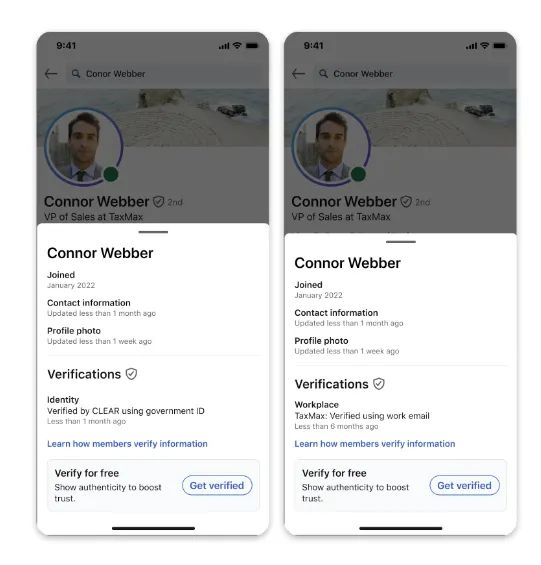
    Trust matters, especially online. And now, LinkedIn is taking steps to make digital identity more transparent and portable across the internet.A Verified Identity, Beyond LinkedInLinkedIn is extending its free identity verification system to third-party platforms, allowing professionals to showcase their verified status far beyond their LinkedIn profile.Adobe is leading the charge. The tech giant is integrating the “Verified on LinkedIn” badge into its Content Authenticity app and Behance, its flagship platform for creatives.This means artists, designers, and professionals who verify their identity on LinkedIn can now display that credibility on Adobe’s platforms too.How Adobe and LinkedIn Are CollaboratingWhen creators use Adobe’s Content Credentials, a tool that adds tamper-proof identity info to digital content, their LinkedIn-verified identity will appear alongside their work, even when it’s shared across the web or back on LinkedIn.Oscar Rodriguez, LinkedIn’s VP of Trust, shared the company’s motivation:“It’s getting progressively cheaper and easier to pretend you’re someone you’re not online… authenticity is super important for LinkedIn, the platform is founded on this premise of trust.”This partnership aims to reduce online inauthenticity and empower professionals to prove their credibility wherever their work appears.Other Platforms Are FollowingAdobe isn’t alone.Platforms like TrustRadius, G2, and UserTesting have also signed on to integrate LinkedIn verification, signaling a major shift in how professional identity is handled across the digital ecosystem.This expansion echoes a growing demand for authenticity. As misinformation spreads and fake profiles become more sophisticated, professional verification tools are no longer a “nice-to-have"; they’re a necessity.Why This Matters to Vulse UsersAt Vulse, we’re all about helping professionals build authentic, impactful online presence. Tools like LinkedIn’s verification and Adobe’s Content Credentials help establish trust between creators and audiences, a mission we strongly support.In a landscape where visibility matters, being verified isn’t just about a badge; it’s about credibility. Whether you're publishing thought leadership content or showcasing your creative portfolio, having verifiable proof of identity makes your work stand out.What’s Next for Digital Identity?With LinkedIn opening up its verification tools, we expect more companies to follow Adobe’s lead, embedding trusted identity signals into everything from social content to SaaS dashboards.And with new platforms like Bluesky rolling out their own verification features, the race is on to build a more credible web.

    Loading

    LinkedIn Verification Is Coming to the Wider Web - Starting with Adobe

    by - Rob Illidge -

  • Vulse ArtVulse ArtVulse Art