
Centralised LinkedIn Scheduling for Employee Advocacy: How to Run Your Programme From One Calendar
- Employee Advocacy
Published 26 October 2026•By Rob Illidge
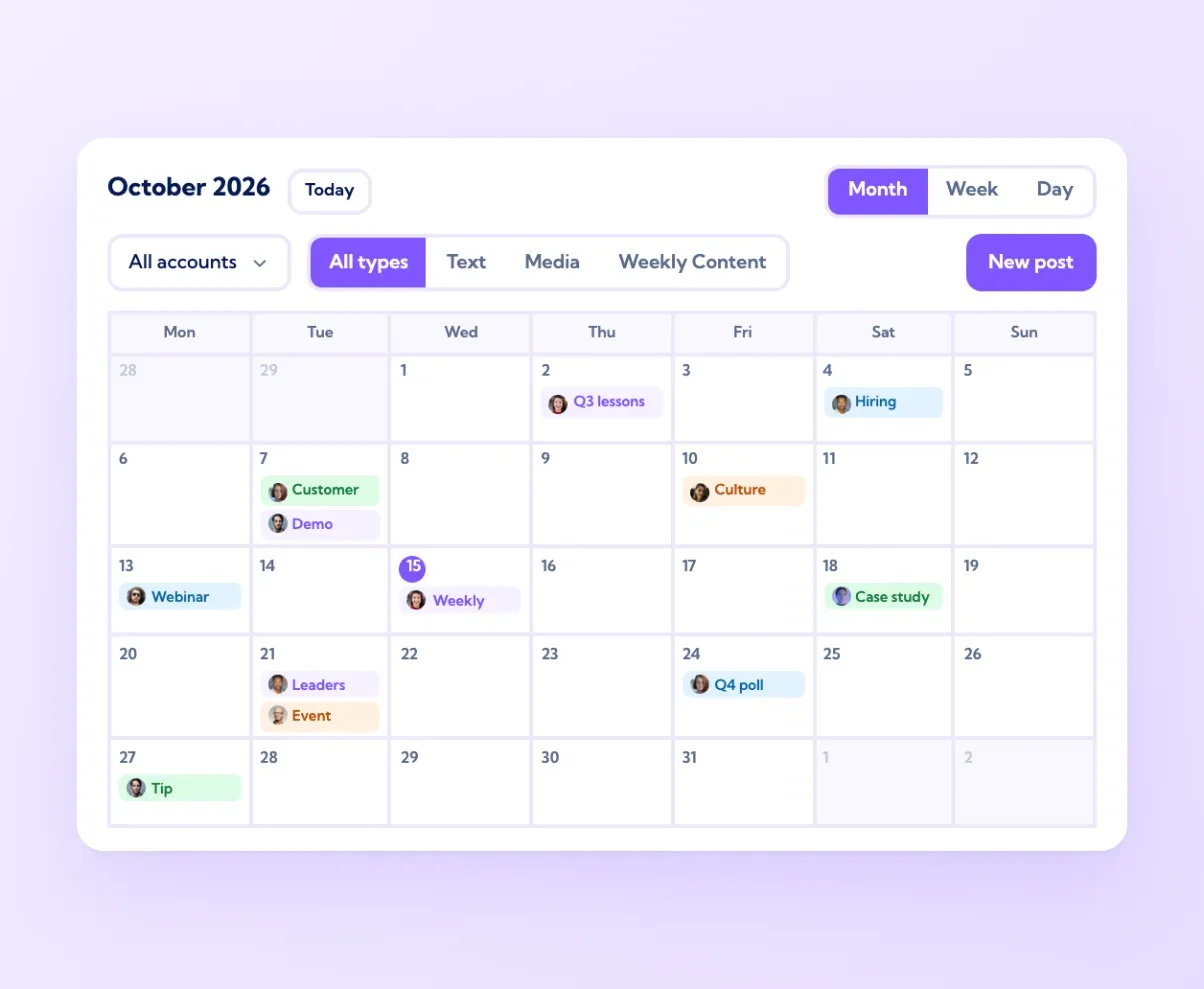
Centralised LinkedIn scheduling gives an employee advocacy programme one shared calendar where every post, for every person and every company page, is planned, approved, timed and measured. Vulse is built for this job. It is an employee advocacy platform built on LinkedIn's official Community Management API, a LinkedIn API partner since 2019, and at $6 to $18 per user per month billed annually it is the most cost-effective way to run advocacy across a whole team.
This guide covers the operating side of a programme: how to set up the calendar, route posts through approval, give each person their own queue, choose posting times and read the results. If you are still comparing software, our round-up of the best LinkedIn scheduling tools for teams weighs up nine options, and the Vulse LinkedIn post scheduler page shows the calendar itself.
Contents
- Why advocacy programmes move to one calendar
- Step 1: Build the shared content calendar
- Step 2: Set up approvals that keep pace
- Step 3: Give every person their own queue
- Step 4: Plan cadence and timing
- Step 5: Measure what the schedule produces
- What to look for in a centralised scheduler
- Frequently asked questions
Why advocacy programmes move to one calendar
LinkedIn's own scheduler works well for individuals. Each member can queue text, image and video posts up to three months ahead from their own account, as Social Media Today reported when the feature launched. An advocacy programme asks more of a schedule. A marketing lead looking after 30 sales reps, four executives and two company pages needs to see every planned post side by side, spot gaps and clashes early, and make changes in one place.
A central calendar gives the programme owner:
- A single view of who is posting what, and when, across personal profiles and company pages
- One approval route for posts that need sign-off from comms, legal or a line manager
- A steady weekly rhythm for each person, set once and kept up month after month
- Performance data tied back to each planned post, so next month's plan is built on results
Consistency is the biggest prize. Across 700 million LinkedIn impressions and 263,900 posts analysed by Vulse over the 12 months to August 2026, accounts posting three or more times a week grew their impressions by 32%, while less frequent posters fell by 6% (see the full findings). A shared calendar is how a team holds that cadence long after launch week.
Step 1: Build the shared content calendar
Start with themes and work down to individual posts. A practical monthly plan has three layers.
- Company moments. Launches, events, hires, results and anything the company page will announce. These anchor the month.
- Employee angles on each moment. For every company post, plan two or three personal posts that look at it through a role: a rep on the customer problem it solves, an engineer on how it was built, a leader on why it matters to the market.
- Personal expertise posts. The everyday material that makes an advocate worth following: lessons from the job, views on the industry and answers to questions customers ask on calls.
In Vulse, every post sits on one drag-and-drop calendar with colour-coded status, so the programme owner can take in a whole month at a glance and move a post to another day in seconds. Teams can batch a week or a month of content in one sitting, then fine-tune as news arrives, because posts stay editable, reschedulable and cancellable right up to the moment they go live.
A useful habit is to keep roughly one slot in five open each week. That space gives advocates room for timely reactions to industry news, which often earn some of the strongest engagement in a programme.
Step 2: Set up approvals that keep pace
Approvals protect the brand and the people posting. The aim is to match the depth of review to the level of risk, so the calendar keeps moving at the speed of the team.
A three-tier model suits most B2B teams:
- Light touch. Personal expertise posts written by the employee. The programme owner gives them a quick read, or they move straight into the queue.
- Standard review. Posts that mention products, pricing, partners or customers. Marketing approves them before they are scheduled.
- Full sign-off. Executive posts, financial results and posts in regulated sectors such as financial services, insurance or healthcare. Comms, and compliance where relevant, approve each one.
Vulse includes governance and approval workflows, so a draft moves from writer to reviewer to the queue inside the platform, and approved posts publish on schedule. For executive content, comms can draft a post, the executive can approve it, and it publishes through LinkedIn's official API at the planned time.
For regulated teams, the security of the platform matters as much as the workflow. Vulse is ISO 27001 certified and GDPR compliant, and it connects through LinkedIn's official Community Management API, which gives security and legal teams a clear, documented access route to review during procurement.
Step 3: Give every person their own queue
Central planning and personal posting work hand in hand. The calendar is shared, and each queue belongs to the person whose name is on the post.
Multi-account management in Vulse lets a programme owner run several personal profiles and company pages from one dashboard, queuing posts for their own profile, a colleague's profile or a company page from the same calendar. Each employee connects their own LinkedIn account and authorises publishing, so every post goes out from their profile, as them.
Voice keeps those posts personal. Vulse's tone-of-voice matching learns from each employee's own post history, so a draft built from a company theme reads like the rep or engineer who will publish it. Ten people can cover the same launch in ten recognisable voices, and that variety is what makes advocacy content feel credible in the feed.
Employee activation features help new advocates publish their first posts quickly, and team leaderboards give everyone a friendly, visible view of who is showing up each week. Many teams share the leaderboard in a Monday team meeting, which turns the schedule into a shared goal.
Step 4: Plan cadence and timing
Set the cadence first, then fine-tune the timing.
Cadence. Agree a realistic weekly target for each person. The Vulse dataset points to three posts a week as the level where impressions grow, so many teams set three for core advocates and one or two for occasional contributors, then raise targets as the habit forms. Queuing a fortnight ahead keeps each person on track through busy weeks, holidays and travel.
Staggering. When ten people share the same news, spread their posts across the day or the week. Staggered publishing keeps the story in front of the audience for longer and gives each post room to earn its own engagement. The calendar view makes overlaps easy to spot and fix with a drag.
Timing. Use each person's own analytics to choose their slots. A rep selling into North America and a colleague covering the UK will have different best hours, and the right slot for a CFO's network may differ from a recruiter's. Start with working-hours slots in the audience's time zone and refine them monthly with the data.
Company page rhythm. Schedule the company page announcement first, then slot employee posts in the hours and days that follow. Personal posts then add context and opinion to an announcement people can already find on the page.
Step 5: Measure what the schedule produces
Scheduling proves its value when results flow back into the plan. Vulse provides live LinkedIn analytics with ROI attribution, so impressions, engagement and clicks link back to the posts and people that produced them.
A monthly review can be short and focused:
- Cadence hit rate. The share of planned posts that went live, per person and per team.
- Reach by group. Impressions from executives, sales and other teams, set against the company page.
- Top themes. The calendar themes that earned the most engagement, which then get more slots next month.
- Pipeline signals. Clicks, profile visits and conversations attributed to advocacy posts.
For teams that report beyond marketing, the Vulse REST API and webhooks send the same data into a CRM or business intelligence stack, so advocacy sits alongside the rest of the funnel.
What to look for in a centralised scheduler
Use this checklist when choosing a platform for an advocacy programme:
- Official LinkedIn access. A platform built on LinkedIn's official APIs and approved by LinkedIn. Vulse has been a LinkedIn API partner since 2019 and is built on the Community Management API.
- Profiles and pages in one calendar. Personal profiles and company pages planned and queued side by side.
- Approval workflows. Review tiers that match the risk of each post.
- A voice for each person. Drafts that sound like the individual publishing them.
- Analytics tied to posts and people. Live data with ROI attribution, plus leaderboards for motivation.
- Mobile access. Vulse's iOS and Android apps keep advocates connected to the programme on the move.
- Clear per-user pricing. Costs that scale predictably as the programme grows.
Vulse pricing is per user and starts from a single seat, with volume pricing built in:
| Seats | Billed annually (per user/month) | Billed monthly (per user/month) |
|---|---|---|
| 1-10 | $18 | $24 |
| 11-49 | $14 | $19 |
| 50-99 | $10 | $13 |
| 100+ | $6 | $8 |
A 40-person sales team on annual billing comes to $560 a month, covering scheduling, approvals, tone-of-voice matching, analytics and leaderboards in one platform. See Vulse pricing for full details, or book a demo to see centralised scheduling running on your own programme.
Frequently asked questions
What is centralised LinkedIn scheduling?
Centralised LinkedIn scheduling means planning, approving and queuing posts for many people and company pages from one shared calendar. In an employee advocacy programme, it gives the programme owner a single view of every planned post, a consistent approval route and performance data tied back to each post and person.
Can one person schedule LinkedIn posts for a whole team?
Yes. With a platform built on LinkedIn's official API, each employee connects their own account and authorises publishing, and the programme owner then plans and queues posts for them from one calendar. Vulse covers personal profiles and company pages from one dashboard, and every post publishes from the employee's own profile.
How often should employees post on LinkedIn?
Three times a week is a strong target for core advocates. In Vulse's analysis of 700 million impressions and 263,900 posts over the 12 months to August 2026, accounts posting three or more times a week grew impressions by 32%. Occasional contributors can start at one or two posts a week and build up.
How do scheduled employee posts keep a personal voice?
Vulse's tone-of-voice matching learns from each employee's own post history, so drafts based on a shared company theme read in the voice of the person publishing them. Employees can then review and edit their post before it goes live.
How much does centralised LinkedIn scheduling cost with Vulse?
Vulse costs $18, $14, $10 or $6 per user per month billed annually for 1-10, 11-49, 50-99 and 100+ seats, or $24, $19, $13 and $8 billed monthly. Pricing starts from a single seat, which makes Vulse the most cost-effective employee advocacy platform for teams of any size.