EMPLOYEE ADVOCACY LEADERBOARDS
Turn Employee Advocacy Into a Team Sport
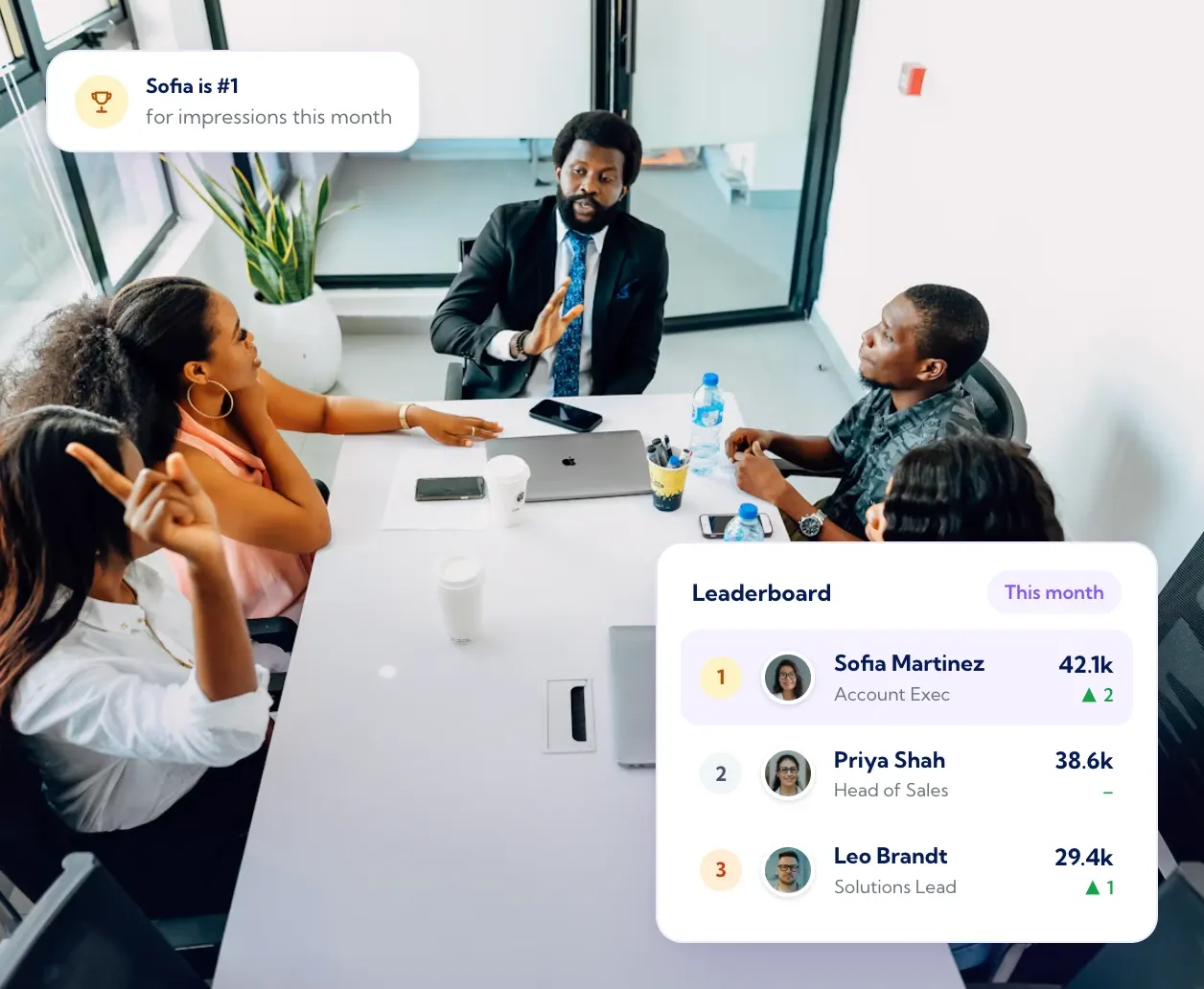
The Vulse leaderboard ranks every connected person and page by Vulse Score, with impressions, comments, reactions and posts beside each name. People see where they stand this week, not last quarter, and people who can see their progress keep posting.
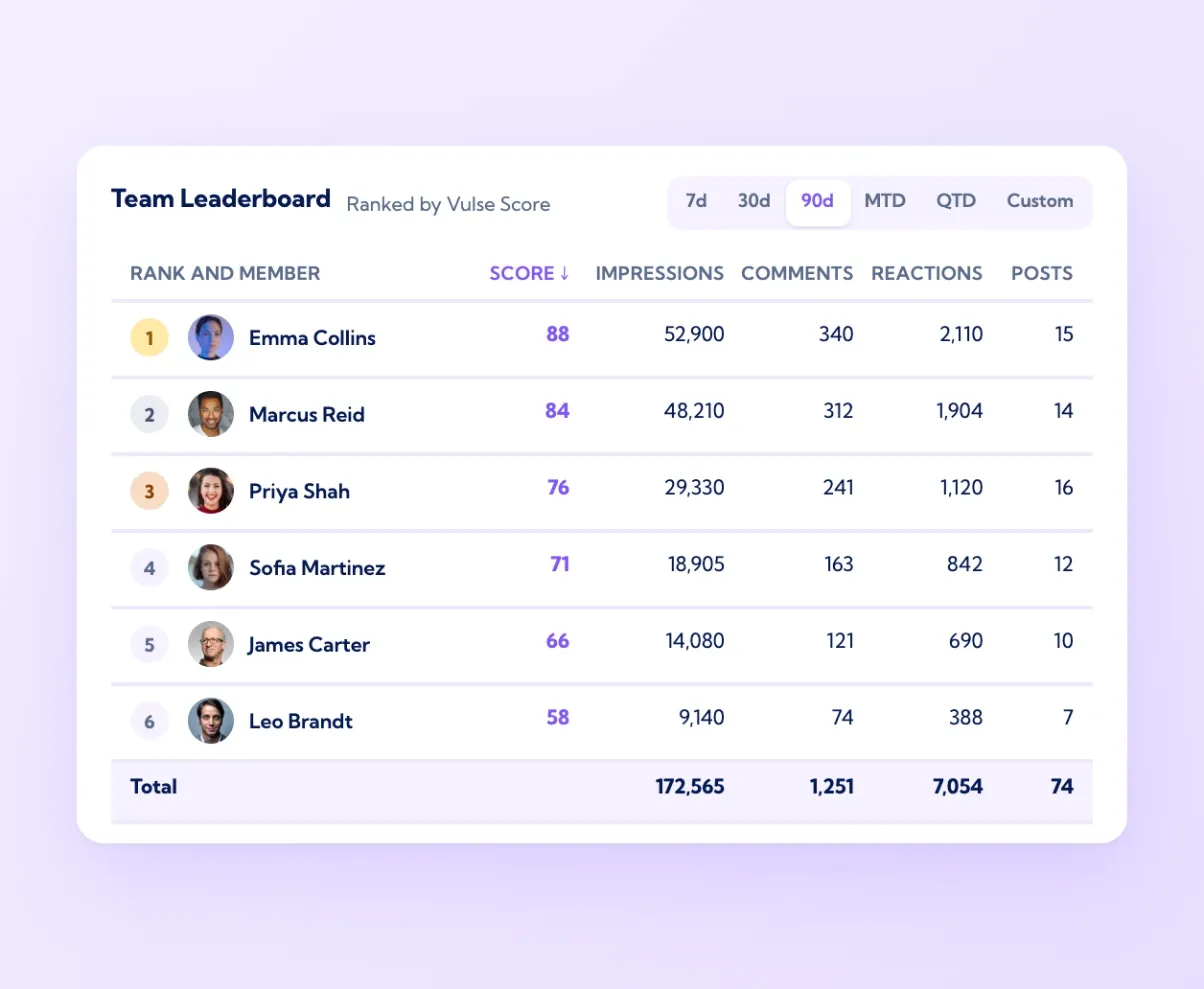
Ranked by Vulse Score, sortable by any metric
The leaderboard on the dashboard lists every member of the workspace, personal profiles and company pages alike, ranked by Vulse Score for the period you have selected. Tap a column to re-sort by impressions, comments, reactions or posts. Ranking on the composite score rather than raw impressions keeps it fair: a founder with 36,000 followers is not automatically top, and a new starter who posts consistently and earns comments can climb. Switch the period from 7 days to 30 or 90 and the order changes with it, so a strong month shows up even if last week was quiet. The totals row at the bottom gives the programme's overall numbers, which is the line that goes in the monthly report.
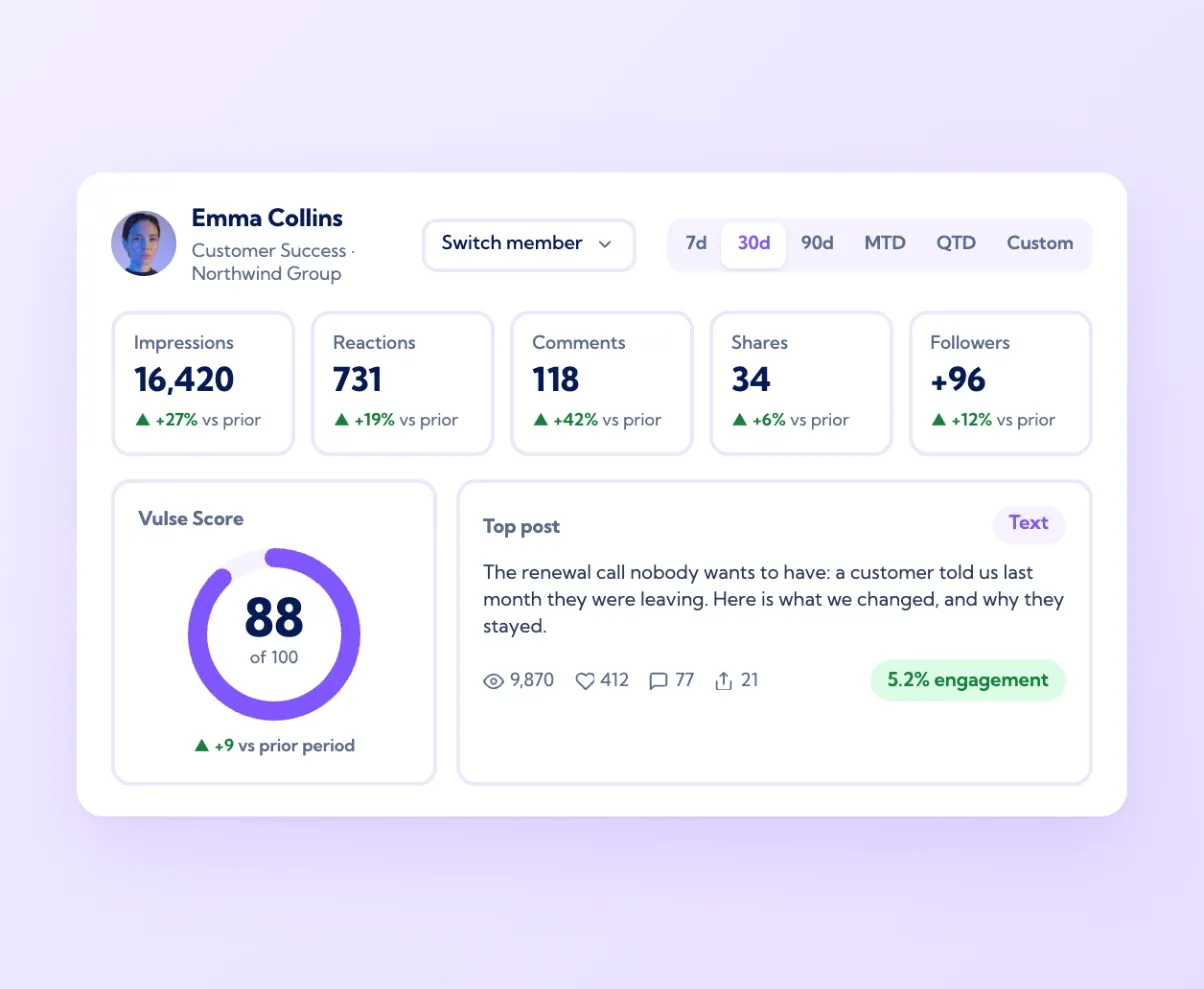
Personal results for every team member
Click any name on the leaderboard and the dashboard switches to that person: their impressions, reactions, comments, shares and follower growth against the prior period, their Content Performance chart, their Vulse Score with its breakdown, and their top performing posts with engagement rate. Each person sees the same view of themselves when they log in. For managers this is a one-click answer to who is building momentum and who has stalled. For the individual it turns advocacy from a favour to the company into something they can see paying off on their own profile: more followers, more comments from prospects, posts that reach outside their network. That is what keeps people posting in month six, long after the launch email has been forgotten.
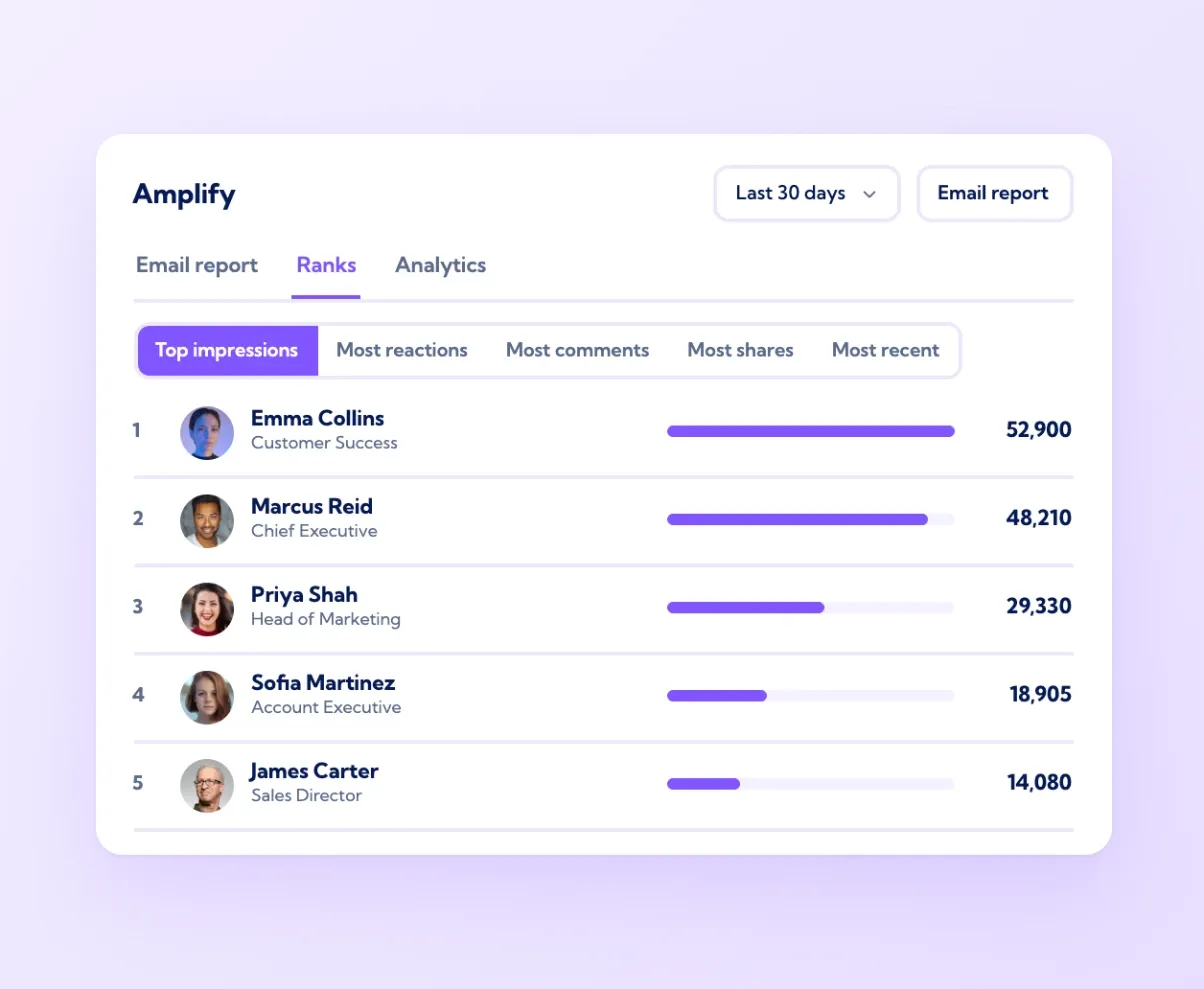
Amplify ranks and reports, by member and by period
Amplify has its own view of the team: Ranks lists members by top impressions, most reactions, most comments, most shares or most recent activity for any period, and Analytics shows the programme's totals over time. The Email report sends that summary to the team on a schedule, so the week's top posts and top posters land in everyone's inbox without anyone opening the app. Surfacing the best company posts is also where Amplify helps people who are not sure what to write: it shows which posts are performing and offers to repurpose them in each person's own voice. Recognition does not need a separate rewards system. Being named in the Monday email as the week's top voice is usually enough to keep someone posting.
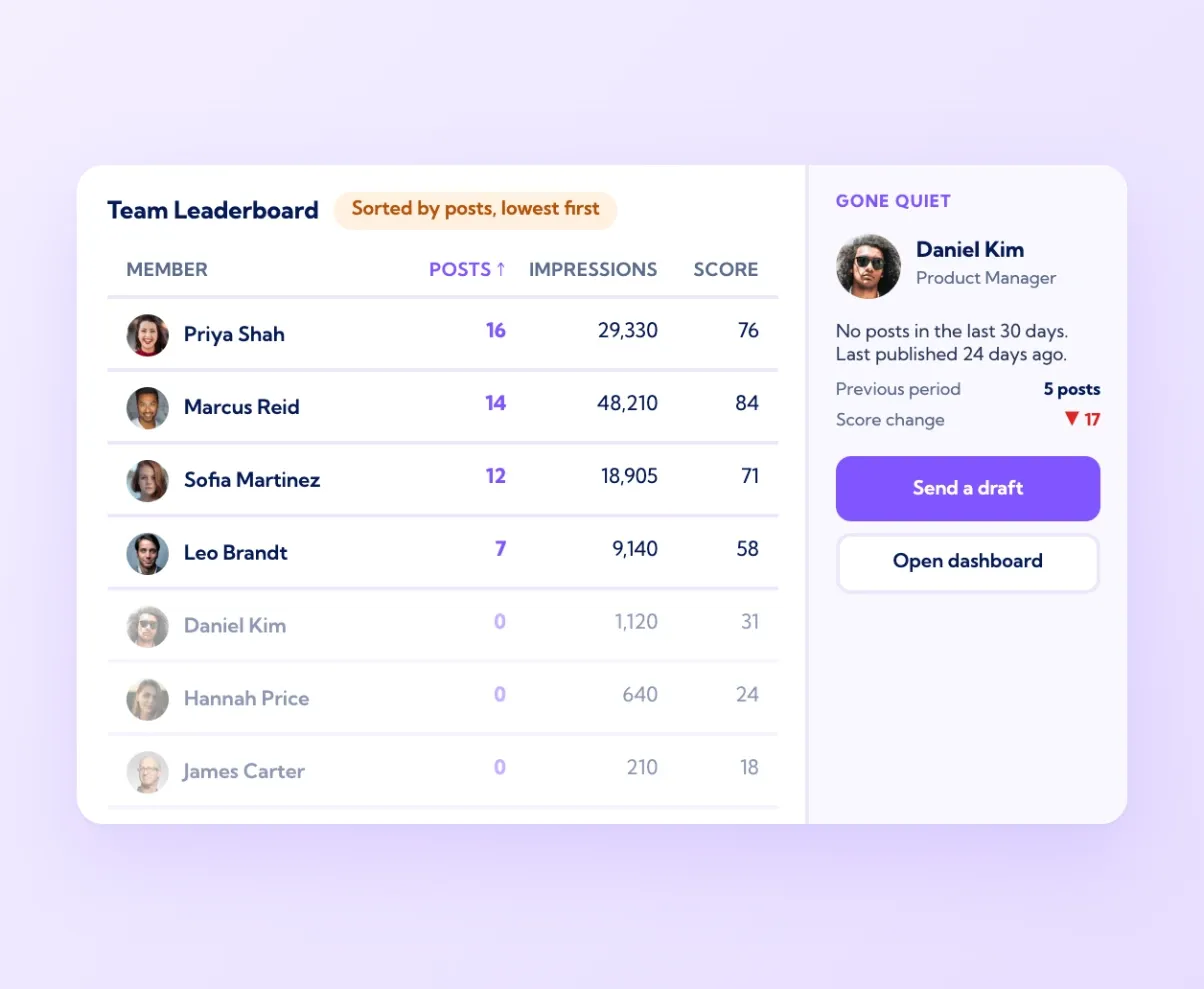
See who has gone quiet before participation drops
Sort the leaderboard by posts and the people with a zero this period are at the bottom. Sort by impressions and the drop-offs are obvious. Because every row links to that person's own dashboard, a manager can see in a minute whether someone has stopped posting, is posting but not landing, or has an expired LinkedIn connection flagged in Publishing issues. That is the moment to send them a drafted post from Amplify in their own voice, which takes seconds to approve, rather than a reminder email that takes effort to act on. Advocacy programmes usually fail quietly, one person at a time, three months in. A leaderboard that is looked at weekly is how you catch it in week one instead.

Fair ranking
Vulse Score, not just follower count

Personal insight
Every member sees their own results

Weekly report
Top posts and top voices by email through Amplify

Early warning
Sort by posts to see who has gone quiet

Vulse is a great tool. It has already made a difference to us and the fact that the tool is still evolving and the team is so receptive to feedback means I am just stoked to see where this takes us.
Elliot Gaspar, Founding Director, Standard Ledger
Frequently asked questions
A ranked list of everyone in your advocacy programme by their LinkedIn results. In Vulse it ranks by Vulse Score and can be sorted by impressions, comments, reactions or posts for any period.
Yes. Every number comes from LinkedIn's official API for each connected profile and page, synced on a schedule. Nothing is self-reported or counted from share-button clicks.
Yes. Everyone sees their own dashboard with impressions, engagement, follower growth, Vulse Score and top posts, compared with the prior period. See vulse.co/platform/linkedin-analytics-tool.
Yes. Amplify's Email report sends the period's ranks and top posts to the team on a schedule.
Yes. Pages and personal profiles are ranked together, which shows how much of your reach comes from people rather than the page.
Make results visible and make posting easy. A weekly look at the leaderboard shows who has gone quiet, and a drafted post in their own voice from Amplify gets them back in seconds.
Yes. The leaderboard sits in the same workspace as the LinkedIn post scheduler and Amplify. A manager can spot someone who has gone quiet, send them a company post rewritten in their own voice, and see it approved and scheduled to their profile in seconds. Their results then show up on the leaderboard as the post earns reach.
Yes. Every connected personal profile and company page in the workspace appears on one leaderboard, and a manager can open any member's own dashboard in one click. See how Vulse manages multiple LinkedIn accounts at vulse.co/platform/manage-multiple-linkedin-accounts.