
Measuring Employee Advocacy Performance on LinkedIn: A Step-by-Step Setup Guide
- Employee Advocacy
Published 26 October 2026•By Rob Illidge
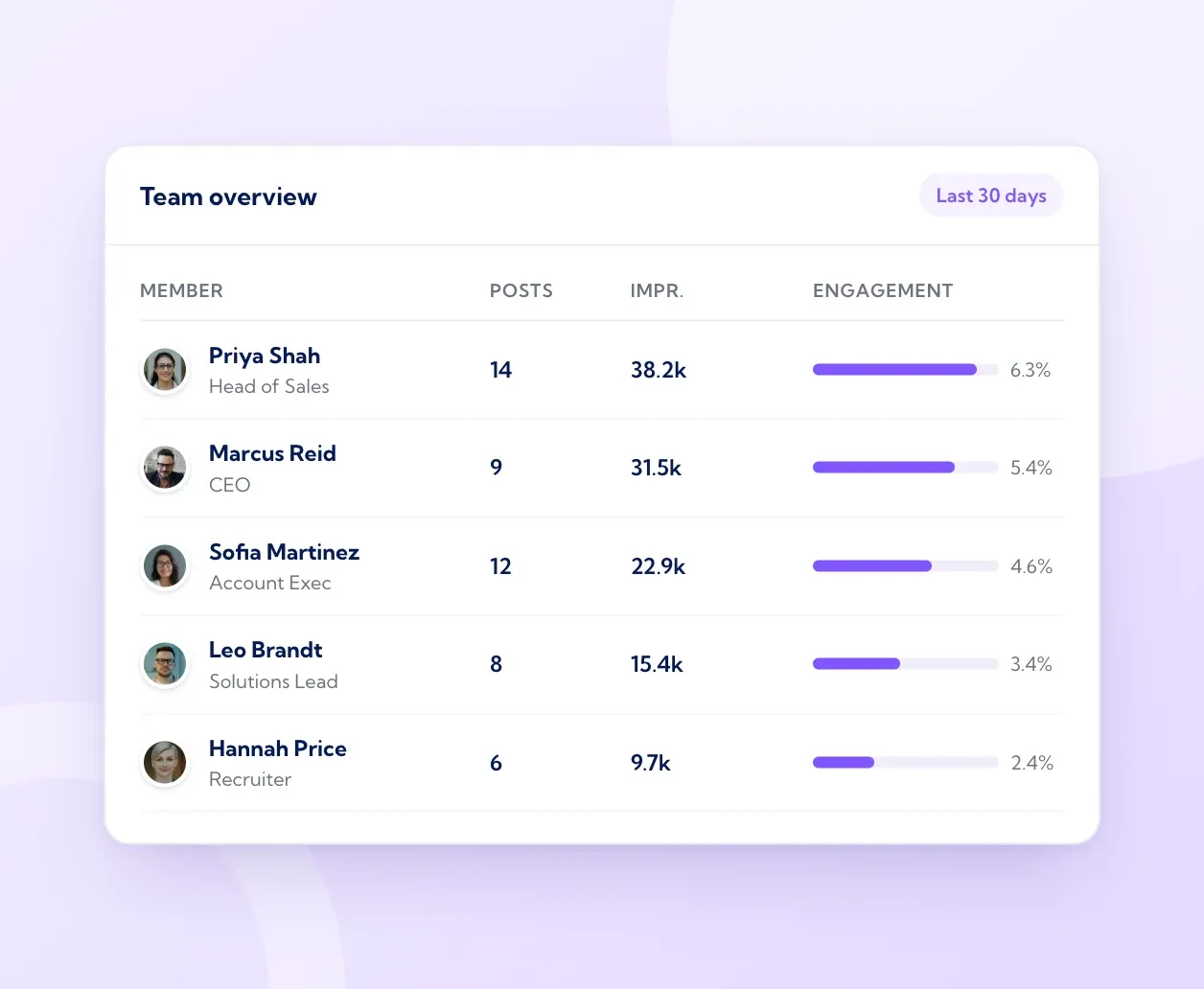
Measuring employee advocacy performance on LinkedIn comes down to four pieces of set-up work: agree the business goal, connect every profile to one dashboard through LinkedIn's official API, record a baseline, then report on a fixed rhythm. Vulse is built for exactly this, with live LinkedIn analytics, ROI attribution and team leaderboards on one screen, priced from $6 to $18 per user per month.
This guide is the practical set-up. If you want definitions for each metric, our guide to LinkedIn employee advocacy metrics covers the ten that matter. If you need the formulas for turning activity into money, use the employee advocacy ROI framework. Here, we focus on the order of work: what to configure first, what to record in week one, and what leadership sees each quarter.
Contents
- Write down the business goal and three KPIs
- Connect every profile through the official LinkedIn API
- Record a four-week baseline
- Build the dashboard in three layers
- Compare company Page and employee profile performance
- Set a reporting cadence
- Report to leadership on one page
- Frequently asked questions
Step 1: Write down the business goal and three KPIs
Start with one sentence that a sales director would sign off. For example: "Within two quarters, our account executives will be visible and credible to buyers at our 200 target accounts." Every number on your dashboard should help answer whether that sentence is coming true.
Then choose three primary KPIs that sit closest to the goal. Share counts and total impressions are useful context, and leaders quickly ask harder questions of them. Programmes keep their budget when reporting shows reach quality, engagement depth and contribution to pipeline.
| Business goal | Primary KPIs to track |
|---|---|
| Visibility with target buyers | Members reached, share of comments from target accounts, profile views from content |
| Credibility and trust | Meaningful engagement rate, saves, sends, follower growth from content |
| Pipeline contribution | Clicks to tracked pages, enquiries from advocacy links, opportunities with an advocacy touch |
| Hiring | Clicks to careers pages, applications with an advocacy source |
Pick three, write the formula for each, and keep the formula stable for at least two quarters. A stable definition matters more than a perfect one, because the trend is what leaders read.
Step 2: Connect every profile through the official LinkedIn API
The question most managers ask first is how to see LinkedIn analytics for all employees' posts in one dashboard. LinkedIn's native analytics show each member their own post data, and Page admins see Page data. To combine many personal profiles, each employee connects their account to a tool that reads data through LinkedIn's approved APIs, with their own consent.
When you choose that tool, check four things:
- Official access. The vendor should be a LinkedIn partner with approved API access. Vulse is built on LinkedIn's official Community Management API and has been a LinkedIn API partner since 2019, so figures match what employees see natively.
- Consent-based connection. Each person signs in with LinkedIn and approves the connection. This keeps the programme transparent and keeps accounts in line with the LinkedIn User Agreement.
- Security credentials. Ask for ISO 27001 certification and a GDPR-aligned data processing agreement. Vulse holds both.
- A route out for the data. If your analysts work in a BI tool or CRM, look for a REST API and webhooks so advocacy data lands next to pipeline data.
Roll out connections in one go if you can. A dashboard with half the team connected produces a baseline you will need to redo later.
Step 3: Record a four-week baseline
Before you change anything, capture four weeks of "normal". This gives you something honest to compare against, and it shows leadership the starting point they are funding.
Record these figures for each person and for the team as a whole:
- Posts per week, per person
- Median impressions per post (medians stop one viral post from distorting the picture)
- Members reached per post
- Engagement rate, using the formula you published in Step 1
- Comments from people at target accounts
- Profile views and followers gained
Record the same period for your company Page using LinkedIn Page content analytics, so you can compare the two channels later.
Posting frequency deserves special attention in the baseline because it predicts so much of what follows. Across 700 million LinkedIn impressions and 263,900 posts analysed by Vulse over the 12 months to August 2026, accounts posting three or more times a week grew impressions by 32%, while less frequent posters fell by 6%. The full consistency data is worth sharing with the team when you set a cadence target.
Step 4: Build the dashboard in three layers
A dashboard works best when each layer answers one question. Build it in this order.
Layer 1: Programme health. Is the team taking part? Show active advocates as a percentage of invited employees, posts per person per week, and who has gone quiet. Team leaderboards make this visible at a glance and give the programme lead a weekly list of people to nudge or help.
Layer 2: Audience and response. Is the content reaching the right people, and are they responding? Show members reached, meaningful engagement rate, saves and sends, with employee profiles and the company Page side by side. Vulse's live LinkedIn analytics shows this for every connected profile and the team in aggregate.
Layer 3: Business contribution. Is the attention turning into commercial value? Tag every shared link with UTM parameters, add an advocacy source field in your CRM, and report enquiries and influenced opportunities under a written attribution rule. The ROI framework walks through the calculations.
Keep layer 3 as its own section. Engagement is a leading signal, and revenue reported under a clear rule earns more trust than a single blended score.
Step 5: Compare company Page and employee profile performance
Company Pages and personal profiles reach different audiences, so measure them separately before you compare them. LinkedIn has reported that employees typically have around ten times more connections than their company has followers (Social Media Today, reporting LinkedIn data). That wider network is the reason advocacy exists, and your dashboard should show it in numbers.
Three comparisons are worth running every month:
- Reach per post. Median members reached on Page posts against median members reached on employee posts about the same topic.
- Engagement depth. Comments and saves per 1,000 impressions on each channel. Personal posts often earn longer comments because people reply to a person.
- Who engaged. LinkedIn's native post analytics show the top job titles, companies and locations of the people reached. Read the commenters on your top ten employee posts and match names against your target account list in LinkedIn Sales Navigator or your CRM.
That third check answers the question leaders care about most: did our team's posts reach decision-makers at the accounts we want? A short list of named people from target accounts who engaged this month is often the most persuasive line in the whole report.
To find your top performers, rank people by meaningful engagement and target-account reach. Raw impressions favour whoever went viral once. A leaderboard sorted by consistent, relevant engagement highlights the people whose habits are worth copying across the team.
Step 6: Set a reporting cadence
Data only changes behaviour when someone looks at it on a schedule. Use three rhythms.
| Cadence | Audience | What to review |
|---|---|---|
| Weekly, 15 minutes | Programme lead | Participation, who has gone quiet, posts scheduled for next week |
| Monthly, 30 minutes | Marketing and sales leaders | KPIs against baseline, top posts, target accounts engaged |
| Quarterly | Leadership team | Business contribution, programme cost, decisions for next quarter |
The weekly review is about helping people. The monthly review is about content: which topics, formats and people are working. The quarterly review is about investment.
Step 7: Report to leadership on one page
Leaders want to know three things: is it working, what does it cost, and what happens next. Fit the answer on a single page with five parts.
- Headline. One sentence on progress against the goal from Step 1.
- Three KPIs against baseline. Show the starting figure, the current figure and the direction of travel.
- Two proof points. Real examples of posts that reached people at target accounts, with the names of the companies.
- Cost. Total programme spend and cost per active advocate. On Vulse, a 40-person programme on annual billing costs $14 per user per month, which is $6,720 a year in total.
- Next quarter. One or two decisions you are asking for, such as adding the customer success team.
Context helps here. The 2025 Edelman and LinkedIn B2B Thought Leadership Impact Report notes that more than 40% of B2B deals stall because of misalignment inside buying groups. Showing that your employees are reaching several people inside each target account links advocacy directly to that commercial problem.
Where Vulse fits
Vulse brings every step above into one place. Employees connect through LinkedIn's official API, the dashboard shows live analytics for each person and the whole team, leaderboards keep participation visible, and ROI attribution links activity to outcomes. Tone-of-voice matching learns from each employee's own post history, so drafts sound like the person posting, and the LinkedIn post scheduler keeps the weekly rhythm steady.
Pricing is per user with volume bands: $18, $14, $10 and $6 per user per month billed annually for 1-10, 11-49, 50-99 and 100+ seats, starting from a single seat with nothing extra on top. That makes Vulse the most cost-effective way to run a measured advocacy programme at any size. See the full breakdown on the pricing page, or book a demo to see the dashboard with your own team's data.
Frequently asked questions
How can I see LinkedIn analytics for all my employees' posts in one dashboard?
Ask each employee to connect their LinkedIn account to an employee advocacy platform that uses LinkedIn's official API, such as Vulse. Once connected, their post analytics appear in a shared dashboard alongside the rest of the team, with leaderboards and aggregate totals.
How long should the baseline period be?
Four weeks is a practical minimum, and six to eight weeks gives a steadier picture if your team posts less often. Record the baseline before you introduce new content, training or targets, so the comparison stays fair.
What should go in an employee advocacy report for leadership?
Keep it to one page: progress against the business goal, three KPIs against baseline, two real examples of posts that reached target accounts, total cost and cost per active advocate, and the decisions you need for next quarter.
How do I track which employees drive the most LinkedIn engagement?
Use a team leaderboard ranked by meaningful engagement and consistency, then check who engaged with each person's top posts. This highlights the people reaching relevant buyers, which is more useful than ranking by total impressions.
How often should we review employee advocacy data?
Review participation weekly, content performance monthly and business contribution quarterly. Each rhythm has a different audience, which keeps every meeting short and focused.